
🎙️ What Is Altered?
Altered is an AI-powered voice and audio production platform focused on voice transformation, voice cloning, text-to-speech, transcription, translation, and audio editing. Unlike general-purpose AI tools such as ChatGPT, Altered is built specifically for people who work with spoken audio.
The company behind the product is Altered Ltd, a London-based company founded by Ioannis Agiomyrgiannakis. The product emerged during the early growth of AI voice technology and has developed into a broader voice-synthetic media platform.
Altered is mainly aimed at creators, game developers, voice actors, filmmakers, podcasters, advertisers, localization teams, and businesses that need to create or modify spoken content.
The product is centered around two main workflows: Altered Studio for voice production and audio editing, and Altered Real-Time Pro for changing voices during live calls, gaming, streaming, and other real-time applications.
The key idea behind Altered is different from standard text-to-speech. Instead of simply typing text and asking an AI to read it, you can record yourself performing the dialogue and then transform the vocal identity while retaining important aspects of the original performance.
🧰 Core Features
1. AI Voice Morphing
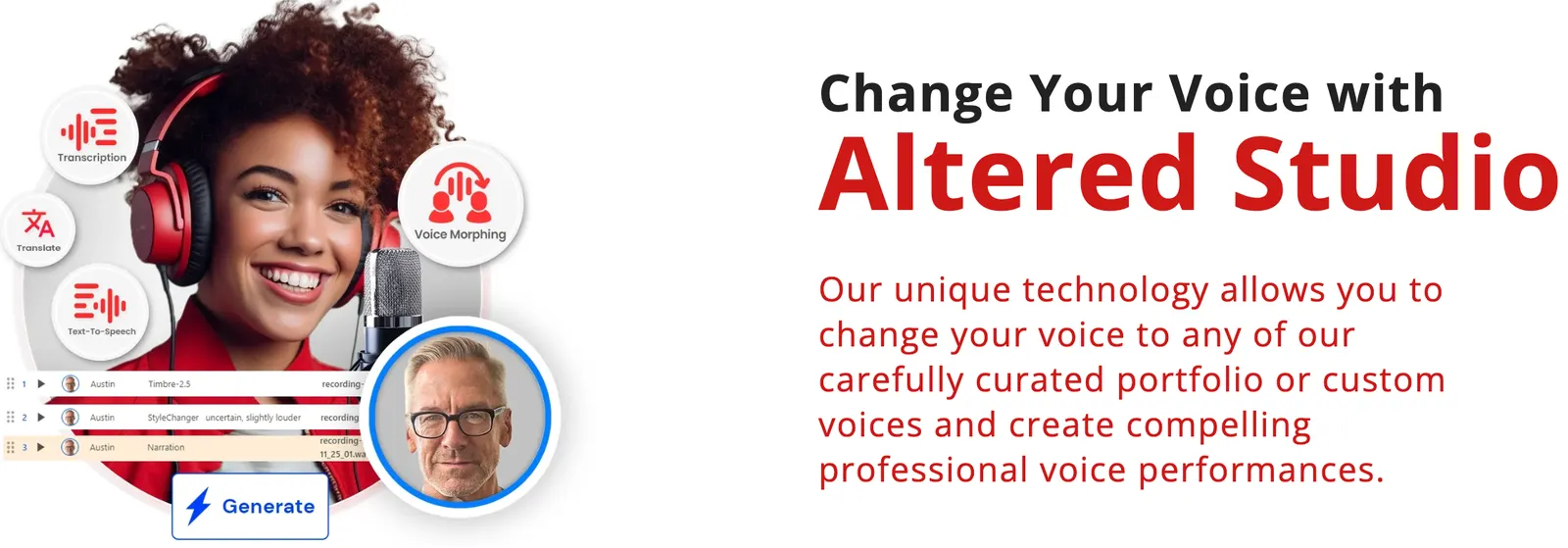
Voice Morphing is one of Altered's main features. Users can upload or record speech and transform it into another voice while preserving much of the original timing and delivery. This makes it useful for character dialogue, game development, dubbing, and creative audio projects.
2. AI Voice Cloning
Altered supports voice cloning, allowing users to create a digital version of a voice from recorded samples. The platform provides rapid voice cloning as well as more advanced custom voice options for professional projects.
3. Text-to-Speech
Altered can convert written scripts into spoken audio. This can be used for narration, advertisements, tutorials, e-learning courses, videos, podcasts, and other voice-over projects.
4. AI Voice Editing
Altered Studio includes audio editing capabilities alongside its AI features. Users can cut, crop, copy, insert, adjust audio levels, apply effects, and combine conventional editing with AI voice processing.
5. Transcription
The platform can convert spoken audio into text. This is useful for podcasts, interviews, meetings, videos, research recordings, and content repurposing.
6. Translation and Voice-Over
Altered can combine transcription, translation, and AI voice generation to help creators produce multilingual versions of existing content. This can be particularly useful for international video, e-learning, and localization projects.
7. Audio Cleaning
AI-based audio cleaning can reduce unwanted background noise and improve dialogue recordings. It is useful when the original recording is understandable but contains environmental noise or other distractions.
8. Real-Time Voice Transformation
Altered Real-Time Pro provides live voice transformation through a virtual microphone. It can be used with compatible games, communication applications, streaming software, and online meetings.
✨ What Makes Altered Different?
The biggest difference is that Altered is not simply a text-to-speech generator or a collection of funny voice effects. Its workflow puts considerable emphasis on speech-to-speech voice transformation.
With conventional text-to-speech, the AI determines how the sentence should sound. With Altered's speech-to-speech workflow, you can perform the dialogue yourself first and then change the vocal identity. Your pauses, timing, emphasis, and acting can therefore remain part of the result.
This is particularly useful for character work. A game developer can perform a line naturally and then test several different character voices without recording every version from scratch.
Altered also combines several related audio functions in one platform. Voice transformation, voice cloning, TTS, transcription, translation, audio cleanup, and editing can all be part of the same workflow.
Another distinction is the availability of local processing for some workflows. This can be useful for creators and organizations that prefer to keep certain voice-processing tasks on their own computers rather than sending every piece of audio to a cloud service.
🎬 Practical Use Cases
Game Development
Game developers can create temporary character voices during prototyping, test dialogue before hiring final voice actors, and experiment with different character identities.
Podcasts
Fiction podcasts can use Altered to create multiple character voices from a smaller number of recordings. It can also help with transcription, cleanup, and voice-over production.
YouTube and Video Production
Creators can use Altered for narration, voice-over, character voices, transcription, translation, and audio cleanup.
Film and Animation
Production teams can use AI voice transformation for early-stage dialogue, character experiments, dubbing tests, and production prototypes.
Localization
Teams producing content for several countries can combine transcription, translation, and AI-generated voice-over to create localized versions of existing material.
Marketing
Marketing teams can quickly test different voice styles for advertisements, product videos, social media content, and campaign concepts before committing to a full recording session.
E-Learning
Course creators can generate narration, clean recorded lessons, transcribe educational material, and produce versions of content in different languages.
Gaming and Streaming
For people who want to change their voice while playing games or streaming, Real-Time Pro is more relevant than the production-oriented Altered Studio.
🚀 How to Use Altered
Step 1: Create an Account
Create an Altered account and access Altered Studio. The platform provides a free option, allowing new users to test some of its capabilities before purchasing a subscription.
Step 2: Choose the Right Function
Choose the workflow based on what you want to produce:
- Change an existing voice → Voice Morphing
- Create narration from a script → Text-to-Speech
- Create a personalized voice → Voice Cloning
- Remove background noise → Audio Cleaning
- Convert speech to text → Transcription
- Create multilingual audio → Translation and Voice-Over
- Change your voice during a call or game → Real-Time Pro
Step 3: Upload or Record Audio
Import an existing recording or record directly through the application. A clean source recording will generally produce better results than heavily compressed or noisy audio.
Step 4: Select a Voice
Choose a voice from the available library or use a custom voice where your plan supports it. The available voices and processing options depend on the subscription and selected workflow.
Step 5: Process the Audio
Apply the selected voice transformation or AI processing. For longer projects, it is sensible to test a short section before processing the entire recording.
Step 6: Edit the Result
Review the generated audio and make corrections where necessary. Cut unwanted sections, adjust volume, clean up noise, and make sure the final voice fits the intended scene.
Step 7: Export
Export the finished audio and move it into your video editor, game engine, podcast software, or other production environment.
🧠 Tips for Better Results
Start With Good Recording Quality
Voice transformation cannot completely compensate for a poor recording. Use a quiet room, keep the microphone position consistent, and avoid excessive background noise and room echo.
Perform the Dialogue Naturally
If you are using speech-to-speech transformation, do not intentionally speak in a robotic or unnatural way. Give the system a strong performance to work with. Natural pauses, emphasis, and emotional delivery can make a noticeable difference.
Test Before Processing Large Projects
For a long podcast, game dialogue collection, or video project, process a short sample first. Check pronunciation, voice quality, emotional delivery, and unwanted artifacts before processing the complete project.
Create Consistent Character Profiles
When producing a fictional character, keep the same voice model and general settings across scenes. Consistency is more important than finding a slightly better voice for every individual sentence.
Use Different Tools for Different Jobs
Altered Studio is designed for production and editing, while Real-Time Pro is designed for live voice modification. Choosing the correct product makes the workflow much simpler.
Check Commercial Licensing
If the audio will be used in a commercial game, advertisement, monetized YouTube channel, client project, or business product, check the licensing terms of your subscription before publishing the content.
💻 Installation and Supported Platforms
- Web: Altered Studio can be accessed through a web browser.
- Windows: A desktop version is available for Windows users.
- Mac: Altered provides desktop support for macOS.
- iPhone and iPad: Altered Studio is not primarily offered as a dedicated iOS application.
- Android: There is no main Android version of Altered Studio.
- Browser Extension: Altered is primarily a web application rather than a conventional browser extension.
- API: Enterprise customers can access API-based integrations.
- On-Premise: Enterprise deployments can include on-premise options depending on the agreement.
The desktop version is more demanding than the browser experience. Altered lists dedicated GPU requirements for some local Windows workflows, so users with older computers should check the current hardware requirements before installing the desktop application.
Real-Time Pro works through a virtual microphone, allowing compatible applications to receive the processed voice as an audio input.
💰 Altered Pricing
Altered does not use a simple one-price-fits-all subscription model. The cost depends on whether you are using Altered Studio, Real-Time Pro, AI processing credits, and commercial licensing.
Free — $0
The free Altered Studio plan provides limited access to voice processing and AI tokens. It is useful for testing the platform before committing to a paid subscription.
Creator — Around $30/month
The Creator plan is listed at approximately $30 per month when billed annually. It provides substantially more Voice Morphing time and AI tokens and is aimed at individual creators and smaller teams.
Professional — Around $90/month
The Professional plan is listed at approximately $90 per month when billed annually. It provides higher processing limits, more AI tokens, local processing capabilities, and additional professional voice features.
Enterprise — Custom Pricing
Enterprise customers can receive features such as custom voice models, API access, multiple seats, commercial data protection, dedicated support, and on-premise deployment. Pricing is negotiated based on the organization's requirements.
Real-Time Pro
Real-Time Pro has separate pricing from Altered Studio. Depending on the selected feature and subscription, users can access live voice skins, voice transformation, call-center functions, and other real-time capabilities.
Important: AI services can consume tokens or processing credits. Therefore, the subscription price should not be viewed as unlimited access to every AI function. Users with heavy transcription, translation, TTS, or voice-generation requirements should check the current usage limits before choosing a plan.
👥 Who Is Altered For?
- Game developers: Character dialogue, prototypes, voice experiments, and localization.
- Voice actors: Character experimentation and alternative vocal performances.
- Podcasters: Fictional characters, narration, transcription, and audio cleanup.
- YouTubers: Narration, voice-over, character content, and audio enhancement.
- Video producers: Voice production, dubbing, and multilingual content.
- Marketing professionals: Advertising voice prototypes and campaign variations.
- E-learning creators: Course narration and localization.
- Streamers and gamers: Real-time voice modification.
- Businesses: Professional voice production, API integration, and customized enterprise workflows.
It is less suitable for students or ordinary users who only need occasional text-to-speech narration. In that situation, a simpler TTS service may be easier to learn and cheaper to maintain.
🌍 Global Usage and Market Presence
Altered has an international use case because its technology is applicable to gaming, film, animation, advertising, podcasting, e-learning, voice-over production, and localization.
The platform supports a broad range of languages for transcription and voice production, making it suitable for projects intended for audiences in North America, Europe, Asia, and other international markets.
However, there is an important limitation when discussing its global popularity: Altered does not publicly provide a consistently updated, independently audited figure for total active users, total downloads, or users by country.
For that reason, precise claims such as “millions of active users” or a specific ranking of its largest user countries should be treated cautiously unless they are backed by a clearly identified current third-party measurement source.
Website traffic estimates can provide some indication of online interest, but they should not be confused with the number of people actually using the Altered application or paying for its services.
What can be established more clearly is Altered's target market: professional and independent users working with voice production, gaming, podcasts, video, advertising, localization, and other audio-heavy workflows.
⚖️ Pros and Cons
Pros
- Strong speech-to-speech workflow: Users can transform an actual performance instead of relying entirely on generated speech.
- Wide range of audio features: Voice transformation, cloning, TTS, transcription, translation, cleaning, and editing are available within the same ecosystem.
- Useful for creative production: It goes beyond basic consumer voice-changing effects and supports more serious production workflows.
- Desktop and browser options: Users can choose between online and local workflows.
- Enterprise capabilities: API, custom voice models, multiple seats, commercial data protection, and on-premise deployment can support larger organizations.
Cons
- Can become expensive: Professional plans and AI processing usage can add up for heavy users.
- Not a general-purpose AI platform: Its value is concentrated in voice and audio rather than writing, programming, research, or office productivity.
- Limited mobile support: Users looking for a mobile-first voice production application may find the platform inconvenient.
- Desktop hardware requirements: Some local processing workflows require a relatively capable computer.
🔍 Altered vs. Similar AI Voice Tools
| Tool | Main Focus | Voice Transformation | Text-to-Speech | Audio Editing | Typical Use |
|---|---|---|---|---|---|
| Altered | Voice production and transformation | Strong | Yes | Yes | Games, podcasts, dubbing, creative production |
| ElevenLabs | AI voice generation | Available | Strong | More limited | Voice-over, narration, AI characters |
| Murf | AI voice-over | Less central | Strong | Basic production workflow | Business content, presentations, e-learning |
| Descript | Audio and video editing | Not its primary focus | Yes | Strong | Podcasts, video, content teams |
| Voicemod | Real-time voice changing | Strong for live use | Limited | Limited | Gaming, streaming, casual voice effects |
If your main requirement is generating a voice-over from written text, tools such as ElevenLabs or Murf may provide a more direct workflow.
If your main requirement is editing podcasts and videos, Descript is more focused on the broader editing process.
If you mainly want real-time voice effects for gaming and streaming, Voicemod is a more straightforward consumer-oriented choice.
Altered makes the most sense when you specifically need speech-to-speech transformation, voice identity changes, and creative control over an existing performance.
📝 Final Verdict: Is Altered Worth Using?
Altered is a serious AI voice-production tool rather than a simple voice changer. Its strongest use case is people who already have a reason to work with recorded speech and want more control over how that speech sounds.
Game developers, fiction podcasters, voice actors, video producers, localization teams, and professional creators are likely to get the most value from it. The combination of speech-to-speech transformation, voice cloning, TTS, transcription, translation, audio cleaning, and editing gives Altered a broader production workflow than many basic AI voice applications.
For someone who simply wants to type a paragraph and generate a natural voice, however, Altered may be more complicated than necessary. A dedicated text-to-speech platform can provide a simpler experience.
The same applies to users looking for an all-purpose AI assistant. Altered is not designed to compete with ChatGPT, Claude, Gemini, or other general AI systems for writing, coding, research, or office work.
The easiest way to judge Altered is to test it with your own voice. Record a clean 15–30 second piece of dialogue, try several voice models, compare the transformed result with the original recording, and then calculate how much time and money it could save in your actual workflow.
If your work involves character voices, voice-over, dubbing, localization, or repeated audio production, that test can give you a much clearer answer than simply comparing feature lists.
Comments