

🧠 What Is AnythingLLM?
AnythingLLM is an open-source, local-first AI application designed to give individuals and organizations their own private AI workspace. Instead of relying on a chatbot that only works with the current conversation, AnythingLLM lets users connect documents, knowledge bases, local AI models, cloud models, AI agents, and external tools in one environment.
AnythingLLM is developed by Mintplex Labs and is released as an open-source project under the MIT license. The project originally focused on chatting with private documents and has since expanded into a broader AI platform covering RAG, AI agents, local models, multi-user environments, APIs, and self-hosting.
The original problem AnythingLLM set out to solve is simple: people have large amounts of private information in PDFs, Word documents, reports, notes, websites, and internal documentation, but general-purpose chatbots do not automatically have access to that information.
AnythingLLM allows those materials to become part of an AI knowledge base. Users can then ask questions, summarize information, compare documents, extract details, or build AI workflows around their own data.
The most important characteristic of AnythingLLM is its local-first architecture. Users can run the desktop application locally, connect local language models, and keep their documents and conversations on their own machine when using an appropriate local configuration.
🛠️ Core Features
1. Chat With Your Own Documents
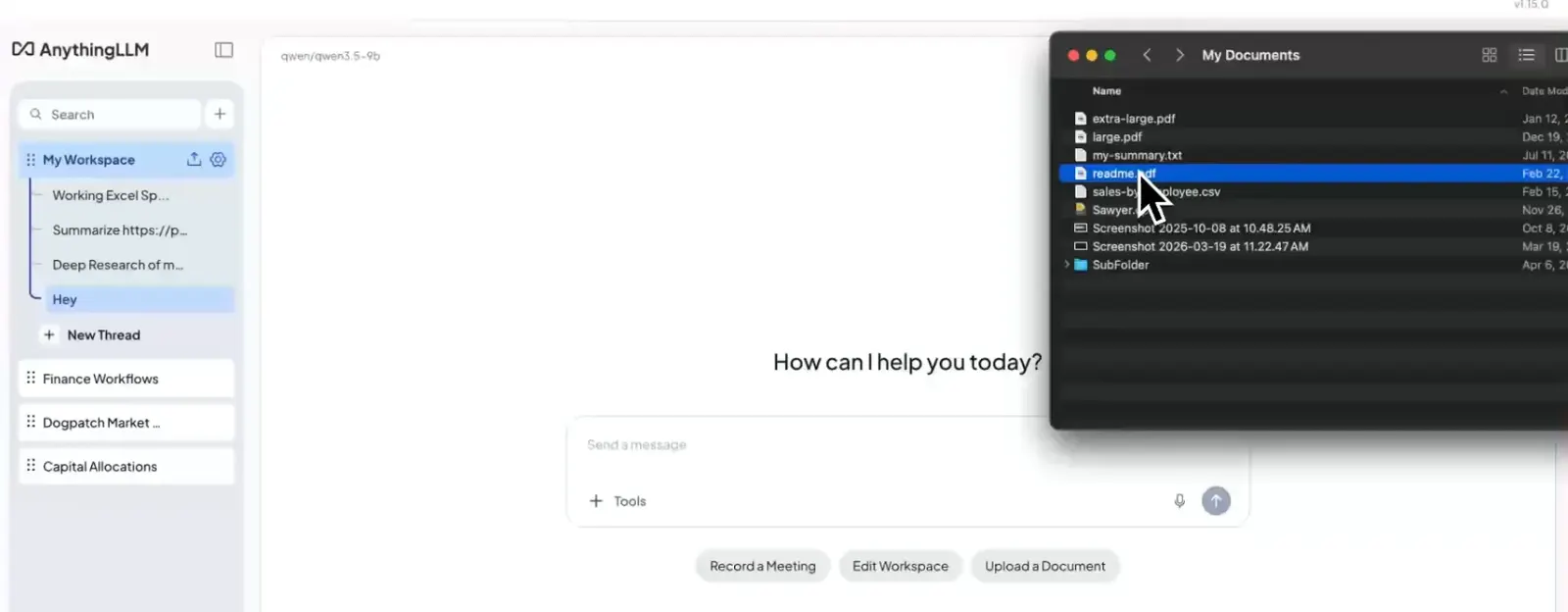
AnythingLLM can ingest supported files such as PDFs, DOCX documents, TXT files, and other sources and make their contents available to an AI model. Users can then ask questions about those materials instead of manually searching through every page.
This is based on a Retrieval-Augmented Generation, or RAG, workflow. Relevant sections of the knowledge base are retrieved and provided to the language model as context when answering a question.
2. RAG Knowledge Bases and Workspaces
Information can be organized into separate workspaces. This is useful when working on unrelated projects because each workspace can have its own documents, conversations, and instructions.
For example, a company could create separate workspaces for product documentation, employee policies, sales materials, customer support, and marketing research.
3. AI Agents
AnythingLLM supports AI agents that can use tools and perform tasks rather than simply answer questions. Users can create custom agents and configure their behavior for specific workflows.
This makes AnythingLLM more flexible than a basic “chat with PDF” application. An agent can be designed around research, document analysis, information retrieval, or other repeatable tasks.
4. Local and Cloud LLM Support
AnythingLLM is not tied to a single AI model provider. Users can connect supported cloud models or run compatible local models.
This flexibility is important because different tasks have different requirements. A small local model may be enough for basic document searches, while a more powerful cloud model may be preferable for complex reasoning or writing.
5. Multi-User and Permission Management
Self-hosted and enterprise deployments can support multiple users and access controls. This allows organizations to build a shared AI environment rather than installing a separate application on every employee's computer.
6. AI Meeting Assistant
AnythingLLM also includes a Meeting Assistant designed to record, transcribe, summarize, and index meetings. Its local-processing approach is useful for users who want more control over meeting recordings and transcripts.
7. API and Developer Integrations
Developers can use AnythingLLM's API and deployment options to integrate its AI capabilities into other applications and internal workflows. This makes the project useful as a foundation for custom AI systems rather than only as a standalone chatbot.
8. Self-Hosted Deployment
AnythingLLM can be deployed on private infrastructure, including through Docker. This is particularly relevant for companies that want to control their own data storage, authentication, models, and network environment.
⭐ What Makes AnythingLLM Different?
The easiest way to understand AnythingLLM is to think of it as an AI workspace rather than another chatbot.
ChatGPT, Claude, and Gemini are primarily hosted AI services. AnythingLLM can work with those types of models, but it can also run with local models and private infrastructure. Users therefore have much more control over the underlying AI environment.
The combination of RAG + local AI + agents + self-hosting is one of its strongest characteristics. Instead of buying separate products for document chat, local AI, knowledge bases, and AI agents, users can build many of these workflows inside one platform.
The open-source nature of the project is another important difference. Developers can inspect the code, customize the deployment, connect different models, and run the software on infrastructure they control.
This is particularly useful for organizations that have sensitive internal documentation. Rather than automatically uploading company files to a third-party AI SaaS platform, an organization can deploy AnythingLLM on its own infrastructure and select how its models and data are handled.
There is one important caveat: self-hosting does not automatically guarantee security or privacy. Administrators still need to configure authentication, permissions, networking, storage, backups, model providers, and server security correctly.
💼 Practical Use Cases
Business Documents
Companies can upload policies, product manuals, reports, operating procedures, training materials, and internal documentation to create a searchable AI knowledge base.
Research
Researchers can organize academic papers, reports, notes, and reference documents into separate workspaces and use AI to find information, summarize material, and compare sources.
Writing and Content Creation
Writers can provide previous articles, style guidelines, product information, research notes, and source material. The AI can then generate or revise content using that information as context.
Programming
Developers can use AnythingLLM with software documentation, API references, project specifications, coding guidelines, and internal technical documentation.
Customer Support
A company can create a support knowledge base containing FAQs, troubleshooting guides, product documentation, and internal support procedures.
Marketing
Marketing teams can organize campaign documents, brand guidelines, customer research, product information, and previous marketing materials into an AI workspace.
Education
Students can upload textbooks, lecture notes, study guides, and research papers and use the AI to explain concepts, summarize chapters, and generate study questions.
Meeting Management
Teams can use the Meeting Assistant to turn recorded meetings into transcripts, summaries, and searchable information.
Private Company AI
Businesses can use AnythingLLM as the foundation for an internal AI assistant that works with company knowledge while allowing the organization to control the deployment and model configuration.
🚀 How to Use AnythingLLM
Step 1: Choose a Deployment Method
First decide how you want to run AnythingLLM.
- Desktop: Best for individuals and local AI experimentation.
- Cloud: Best for teams that do not want to manage servers.
- Self-hosted: Best for organizations that want control over infrastructure and data.
Step 2: Install or Open AnythingLLM
Desktop users can install the appropriate application for their operating system. Self-hosted users can deploy AnythingLLM through Docker or another supported deployment method.
Step 3: Select an AI Model
Connect a supported cloud model or select a compatible local model. Local models are useful when privacy and predictable infrastructure costs are important. Cloud models can be easier to use and may offer stronger performance for demanding tasks.
Step 4: Create a Workspace
Create a dedicated workspace for your project. Give it a specific name so that the purpose of the knowledge base remains clear.
Step 5: Add Documents
Upload the documents that contain the information you want the AI to use. The system processes and indexes the content so that relevant passages can be retrieved during conversations.
Step 6: Ask Questions
Ask questions that are directly related to the information in the workspace. Instead of asking “What is this document about?”, ask for specific information, comparisons, risks, figures, or conclusions.
Step 7: Create an AI Agent
When a task needs more than document-based question answering, create an agent with a specific role, instructions, and tools.
Step 8: Refine the Workflow
Once the workspace produces useful results, refine the instructions, documents, retrieval configuration, and model choice. The goal is to create a repeatable workflow rather than repeatedly starting from scratch.
🧠 Tips for Better Results
Give the AI a Specific Role
A specific role usually produces more useful results than a generic request.
Example: “Act as a financial analyst. Review the uploaded annual report and identify revenue changes, major cost increases, unusual risks, and three questions management should answer.”
Tell It How to Handle Missing Information
For business documents, add an instruction such as: “Only use information contained in the uploaded documents. If the answer cannot be found, say that the information is not available.”
This reduces the temptation for the model to fill gaps with unsupported information.
Keep Workspaces Focused
Do not put every document you own into one huge workspace. Separate unrelated subjects into different knowledge bases. A clean information structure generally makes the system easier to manage and troubleshoot.
Use Structured Prompts
For complicated document analysis, specify the output format.
“Review these three reports. Create a table with company name, revenue, year-over-year growth, major risks, and key management comments. After the table, provide five differences between the companies.”
Test Retrieval Before Changing Models
If AnythingLLM gives you an incorrect answer, the language model may not be the problem. The relevant information may simply not have been retrieved from the knowledge base.
Check document quality, indexing, retrieval settings, and workspace organization before assuming that you need a more powerful model.
Use Local Models for Simple Tasks
Tasks such as document lookup, simple summaries, and basic classification may work well with smaller local models. Save more expensive cloud models for tasks that genuinely require additional reasoning capability.
💻 Installation and Supported Platforms
Windows
AnythingLLM provides a native Windows desktop application. Users can also deploy the platform on Windows through supported self-hosting methods.
macOS
The desktop application supports macOS, including Apple Silicon and Intel-based Macs.
Linux
Linux users can run the desktop application or deploy AnythingLLM through Docker and other self-hosted configurations.
iOS
AnythingLLM also provides a mobile application for iOS, allowing users to interact with their AI environment from mobile devices.
Android
An Android application is also available, providing mobile access to AnythingLLM workflows.
Web
Browser-based access is available for cloud and self-hosted installations. This is particularly useful for teams that want employees to access a centralized AnythingLLM instance without installing the desktop application.
Docker
Docker is one of the most important deployment options for organizations. It allows administrators to host AnythingLLM on their own server and provide access to multiple users.
Browser Extension
AnythingLLM also provides browser-based integration capabilities that can be used to bring web information into AI workflows.
💰 AnythingLLM Pricing
One of the unusual aspects of AnythingLLM is that the core desktop application and open-source software can be used without paying a traditional monthly software subscription.
Desktop — Free
The AnythingLLM desktop application is free to download and use. When users run local models, there is no separate API subscription required for the model itself.
However, if you connect a commercial cloud model, that model provider can charge separately for API usage.
Self-Hosted — Free Software
The open-source version can be self-hosted without paying a conventional AnythingLLM software license. The actual cost comes from infrastructure, storage, bandwidth, administration, and any paid AI models or APIs you decide to use.
Cloud Basic — $50/month
AnythingLLM Cloud currently lists a Basic plan at $50 per month. It provides a managed private AI environment with features such as RAG and AI agents.
Cloud Pro — $99/month
The Pro plan is currently listed at $99 per month and is intended for teams that require additional resources and support.
Enterprise — Custom Pricing
Enterprise pricing is customized according to the organization's requirements. Enterprise capabilities can include on-premise deployment, SSO, role-based access control, custom integrations, service-level agreements, and enterprise support.
Important: “Free AnythingLLM” does not mean that every AI operation is free. If you use an external API, the provider's usage charges still apply. Likewise, running large local models can require expensive GPU hardware.
👥 Who Should Use AnythingLLM?
- Developers: Useful for local models, RAG, APIs, agents, documentation, and AI application development.
- Students: Useful for textbooks, lecture notes, study materials, and research papers.
- Researchers: Useful for organizing and querying large collections of private documents.
- Writers: Useful for maintaining project-specific reference material and content guidelines.
- Marketing teams: Useful for product knowledge, brand documentation, campaign research, and content planning.
- Small businesses: Useful for creating an internal AI assistant without building an entire RAG system from scratch.
- Enterprises: Useful when self-hosting, access control, privacy, and infrastructure control matter.
- Privacy-conscious users: Useful for running local AI and keeping documents on local infrastructure.
- AI developers and enthusiasts: Useful for experimenting with different models, embeddings, RAG configurations, and agents.
It is less useful for people who only want a general chatbot for casual questions. If you do not need private documents, local models, RAG, or self-hosting, a standard hosted AI assistant may be considerably easier to use.
🌍 Global Usage and Adoption
AnythingLLM has developed a substantial presence in the open-source AI community. The project has accumulated tens of thousands of GitHub stars and millions of container pulls, providing useful evidence of developer interest and deployment activity.
These numbers should not be interpreted as unique users. GitHub stars measure community interest, while Docker pulls measure image downloads and can include repeated downloads by the same users or automated systems.
AnythingLLM does not publish a reliable current country-by-country breakdown of active users, nor does it provide an independently audited global user count that can be used to accurately rank its largest markets.
For that reason, precise claims such as “X million active users” or “the United States represents X% of users” should be treated cautiously unless supported by a current third-party measurement source.
The available adoption signals show that AnythingLLM has particular relevance among developers, AI engineers, researchers, privacy-focused users, and businesses experimenting with local or self-hosted AI.
Its open-source distribution, Docker ecosystem, desktop applications, mobile support, multilingual capabilities, and cloud offering also make the platform suitable for users across North America, Europe, Asia, and other international markets.
⚖️ Pros and Cons
Pros
- Open source: The project provides a high degree of transparency and customization compared with closed AI SaaS products.
- Local-first: Users can run local models and keep data on their own infrastructure when configured appropriately.
- Model flexibility: Users are not locked into a single LLM provider.
- Strong RAG workflow: Documents, workspaces, retrieval, and AI conversations are integrated into one environment.
- Broad feature set: Agents, APIs, meeting assistance, multi-user support, and self-hosting extend the product beyond simple document chat.
Cons
- More technical than ChatGPT: Users who want a completely managed experience may find AnythingLLM harder to configure.
- Local hardware matters: Running powerful AI models locally can require significant RAM, GPU memory, and processing power.
- Cloud AI can add costs: External model APIs are billed separately from the AnythingLLM software.
- Self-hosting requires maintenance: Organizations must manage updates, security, authentication, backups, and infrastructure themselves.
🔍 AnythingLLM vs. Similar AI Tools
| Tool | Main Focus | Local AI | Private RAG | AI Agents | Self-Hosting | Best Fit |
|---|---|---|---|---|---|---|
| AnythingLLM | Private AI workspace | Strong | Strong | Yes | Yes | Developers, businesses, privacy-focused users |
| ChatGPT | General AI assistant | Not the main focus | Yes | Yes | No conventional self-hosting | General users and businesses |
| Claude | General AI assistant | No local deployment | Yes | Yes | No | Writing, research, programming |
| Open WebUI | Local and self-hosted AI interface | Strong | Yes | Yes | Yes | Technical users and local AI enthusiasts |
| AnythingLLM Cloud | Managed private AI workspace | Not the main focus | Strong | Yes | Provider-managed | Teams that do not want to manage servers |
Compared with ChatGPT: ChatGPT is easier for general-purpose AI work, while AnythingLLM provides more control over local models, private documents, deployment, and infrastructure.
Compared with Claude: Claude is primarily a hosted AI assistant. AnythingLLM is more appropriate when the user wants to control the AI environment and connect it to private infrastructure.
Compared with Open WebUI: both are popular choices for local and self-hosted AI. AnythingLLM places a particularly strong emphasis on document RAG, workspaces, AI agents, and a packaged business AI environment.
Compared with commercial enterprise AI platforms: AnythingLLM gives organizations more control over deployment and infrastructure, but that control also means more responsibility for administration and security.
🔐 Privacy and Data Considerations
Privacy is one of AnythingLLM's strongest selling points, but users should understand how the complete AI workflow works.
When using a local model and local processing, documents and conversations can remain on the user's computer. This is particularly useful for private research, internal documentation, and other information that users do not want to upload to a third-party AI service.
However, if a cloud LLM provider is connected, prompts and relevant retrieved information may be sent to that provider. The privacy characteristics therefore depend on the model and infrastructure configuration, not simply on the fact that AnythingLLM is installed.
For business deployments, administrators should map the entire data path: document storage, embeddings, retrieval, LLM processing, logs, authentication, backups, and external API connections.
📝 Final Verdict: Is AnythingLLM Worth Using?
AnythingLLM is worth serious consideration if you want to build an AI workspace around your own data.
Its strongest combination is local AI, RAG, private documents, model flexibility, AI agents, and self-hosting. That combination makes it substantially different from simply downloading another chatbot application.
For developers, researchers, privacy-conscious users, small businesses, and organizations with large amounts of internal documentation, AnythingLLM can be genuinely useful. It can start as a simple local document assistant and grow into a more complete private AI environment.
The main reason not to choose AnythingLLM is that it introduces more complexity. If all you want is a chatbot that works immediately with no model configuration, server management, or infrastructure decisions, a hosted service such as ChatGPT or Claude is easier.
It is also important not to confuse “open source” with “zero cost.” The software itself can be free, but powerful local hardware, cloud model APIs, storage, servers, and maintenance can all create real costs.
For individual users, the most sensible way to evaluate AnythingLLM is to start with the desktop version, connect a small local model, and test it against several real documents. For businesses, the evaluation should go further and include security, access control, model costs, infrastructure, backups, and maintenance.
Bottom line: AnythingLLM is a strong choice for people who want more control over their AI stack. It is particularly compelling when privacy, private knowledge bases, RAG, local models, agents, and self-hosting are important. If you simply need an easy everyday AI assistant, its additional flexibility may not justify the extra setup.
Comments