

🎨 What Is Artguru?
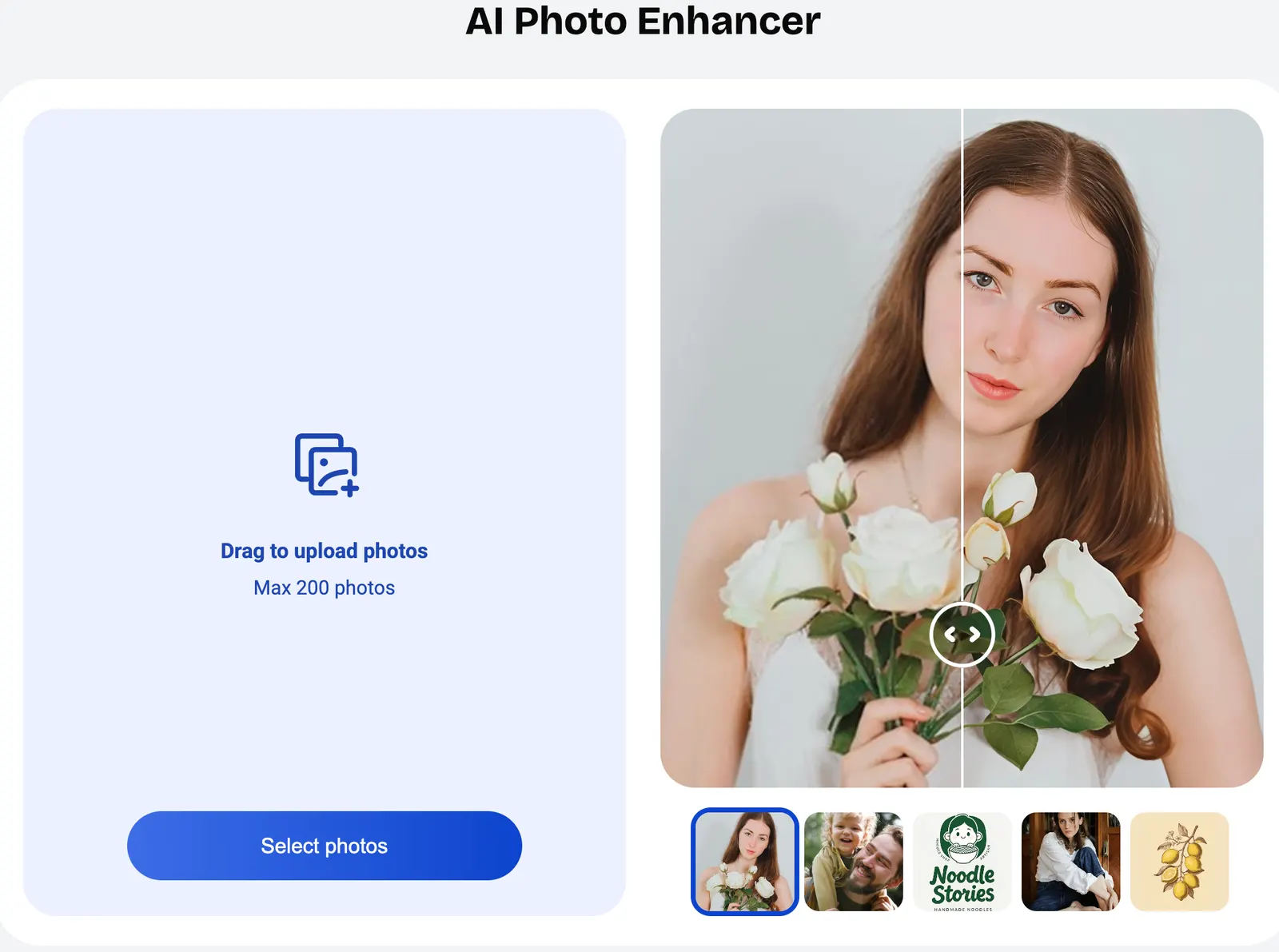
Artguru is an AI-powered photo enhancement and image editing platform designed to improve existing images rather than simply generate new ones. It can sharpen blurry photos, increase image resolution, restore old photographs, remove backgrounds, colorize black-and-white pictures, enhance videos, and improve scanned documents.
The platform is developed by Cygnus Space (Hong Kong) Company Limited. Artguru is available as a web service as well as mobile applications, giving users a relatively simple way to perform common AI image-processing tasks without learning professional software such as Photoshop.
Artguru is best understood as an AI image enhancement toolkit. Its main purpose is to solve everyday image-quality problems: a product photo is too small, an old family photograph has lost detail, a portrait looks blurry, a screenshot is difficult to read, or an image needs its background removed before being used in a design.
The exact original launch date of the Artguru brand is not clearly documented in its current official materials. The company's mobile products have continued to receive feature updates, particularly during 2025 and 2026, as the platform expanded from photo enhancement into video and document processing.
Unlike text-to-image platforms that start with a blank canvas, Artguru generally works best when you already have an image that needs improvement. That makes it particularly practical for e-commerce, marketing, photography, social media, document processing, and personal photo restoration.
🧩 Core Features of Artguru
1. AI Photo Enhancement
Artguru can automatically improve image clarity, sharpness, detail, and overall quality. The process is designed to be simple: upload an image, let the AI process it, and download the enhanced version.
This is useful for ordinary smartphone photographs, compressed online images, screenshots, portraits, and other files that look acceptable at a small size but lose quality when enlarged.
2. AI Image Upscaling
Artguru can enlarge images while using AI to reconstruct or preserve visual details. This is particularly useful when the original image is too small for its intended purpose.
Typical examples include product images for online stores, photos for presentations, social media graphics, posters, printing materials, and website assets.
3. Old Photo Restoration
The old-photo restoration feature is designed for damaged, faded, noisy, or low-resolution photographs. AI processing can improve clarity and reconstruct details that have become difficult to see in the original.
This makes Artguru useful for digitized family albums, historical photographs, scanned pictures, and other older visual materials.
4. AI Image Unblur
Artguru provides tools for improving images affected by blur or insufficient sharpness. The system attempts to reconstruct clearer visual details from the available information.
It can be useful for casual smartphone photos, old pictures, compressed images, and other photographs that are recognizable but lack sufficient detail.
5. Background Removal
Artguru can automatically separate the main subject from its background. This is especially useful for product photography, profile pictures, portraits, marketplace listings, advertising materials, and social media graphics.
For simple subjects, automatic background removal can eliminate a task that would otherwise require manual masking in Photoshop or another image editor.
6. AI Photo Colorization
Artguru can add color to suitable black-and-white photographs. This is useful for old family photographs, historical images, creative projects, and social content.
However, AI colorization should be treated as an estimated interpretation. The system cannot always know the original colors of clothing, buildings, objects, or environments.
7. Video Enhancement
Artguru has expanded beyond still-image processing and now offers AI-powered video enhancement. Users can process video footage and improve its visual quality at supported resolutions.
This can be useful for older video clips, compressed smartphone footage, archived content, and videos that need a quality improvement before being published.
8. PDF Enhancement
Artguru also supports PDF enhancement for documents and scanned material. This can be useful when pages are photographed with a phone, scanned at low quality, or contain visual elements that are difficult to read.
✨ What Makes Artguru Different?
It Solves an Existing Image Problem
Artguru's biggest strength is that it focuses on images users already have. Instead of asking an AI model to create an entirely new picture, you can give Artguru a real image and ask it to improve the quality.
That distinction is important. If a product photograph is too small, generating a new product image may change the product itself. An image enhancement tool is generally more appropriate when preserving the original subject matters.
A Broad Collection of Image Tools
Artguru combines several common image-processing functions in one platform. Users can handle enhancement, upscaling, restoration, background removal, colorization, video enhancement, and document processing without switching between multiple specialized websites.
Simple Workflow for Non-Designers
Professional image editors offer much more control, but that control also creates a learning curve. Artguru removes much of the technical work from common enhancement tasks.
For someone who simply wants to make a blurry photo clearer, the difference is significant: there is no need to learn layers, masks, sharpening filters, noise reduction settings, or complex retouching techniques.
Useful for Both Personal and Business Work
Artguru is not limited to artistic experiments. Its tools can be used for product photography, online listings, marketing materials, documents, presentations, social media assets, and archived photographs.
Credit-Based Processing
Artguru uses credits to measure usage. Basic operations consume relatively few credits, while more intensive processing such as old-photo restoration, 8K upscaling, and video enhancement uses considerably more.
This makes the pricing model relatively easy to understand, but heavy users should monitor credit consumption carefully.
🛠️ Practical Use Cases for Artguru
1. E-Commerce Product Images
Online sellers often have product photos that are technically usable but not suitable for a professional store. Artguru can help increase resolution, improve sharpness, and remove backgrounds.
A practical workflow is to clean the original image, remove the background, upscale the result when necessary, and then place it into the final product listing.
2. Marketing and Advertising
Marketing teams frequently need to reuse older campaign assets. An image that looked fine on an old website may be too small for a new landing page, social media campaign, or printed advertisement.
Artguru can help extend the useful life of those existing assets without recreating every image from scratch.
3. Social Media Content
Content creators can use Artguru to improve photos before publishing them on social networks, blogs, newsletters, and video platforms.
It is particularly useful when the source image has been downloaded from another platform and has already lost some quality through compression.
4. Old Family Photographs
Old family photos are one of the most natural use cases for Artguru. A scanned photograph can be sharpened, enlarged, restored, or colorized before being printed or shared with family members.
5. Real Estate Photography
Real estate agents can use image enhancement to improve listing photographs, especially when source images are slightly soft or have been compressed during transfer.
6. Graphic Design
Designers can use Artguru before moving an image into Photoshop, Illustrator, Canva, Figma, or another design application.
For example, a designer might receive a small product image from a client, remove the background with Artguru, upscale it, and then use the improved asset in a marketing layout.
7. Document and Screenshot Processing
Students and office workers can use Artguru to improve photographed documents, screenshots, scanned pages, and other visual files that need to be easier to read.
8. Video Archives
Creators and businesses with older video footage can use video enhancement to improve the appearance of archived clips before reusing them in modern content.
🚀 How to Use Artguru
Step 1: Open Artguru
Open the Artguru web application in a modern browser, or use the official mobile application on a supported device.
Step 2: Register or Sign In
Create an Artguru account or sign in when the selected feature requires an account. A registered account allows you to manage your usage and paid credits.
Step 3: Select the Appropriate Tool
Choose the tool according to the problem you want to solve:
- Blurry photo: AI Enhance or Unblur
- Small image: Image Upscale
- Damaged old photograph: Old Photo Restoration
- Black-and-white photograph: Colorize
- Product or portrait with unwanted background: Background Removal
- Low-quality video: Video Enhance
- Scanned document: PDF Enhance
Step 4: Upload Your Source File
Upload the highest-quality original file you have. Avoid uploading a screenshot of an already compressed image whenever possible.
The more useful information contained in the original file, the more likely an AI enhancement system is to produce a natural result.
Step 5: Choose the Processing Option
If the selected Artguru tool offers different modes, choose the one that matches the type of image. Portraits, graphics, text, products, and ordinary photographs can require different enhancement approaches.
Step 6: Start Processing
Start the AI processing and wait for the result. Processing time depends on the file, selected function, and current server workload.
Step 7: Compare the Result
Compare the enhanced version with the original before downloading it. Pay particular attention to faces, text, fine lines, product edges, and repetitive patterns.
AI enhancement can sometimes make an image appear sharper while introducing artificial details. A result that looks impressive when zoomed out may not hold up at 100% magnification.
Step 8: Download and Finish the Edit
Download the processed file when it meets your requirements. If the image still needs cropping, color correction, typography, compositing, or manual retouching, continue working in your preferred design application.
💡 Tips for Getting Better Results
Use the Original Image
Always start with the highest-quality source available. A camera original is preferable to a screenshot, messaging-app download, or image that has already been compressed several times.
Choose the Tool Based on the Problem
Do not automatically use the most powerful enhancement option. If a product photo only needs background removal, background removal may be all you need. If an old photograph has significant damage, restoration makes more sense.
Use the Highest Resolution Only When Necessary
8K processing is not automatically better for every project. If the image will only appear in a website thumbnail or social media post, an extremely large file may provide little practical benefit.
Inspect Faces Carefully
When enhancing portraits, check the eyes, teeth, skin, hair, and facial contours at full size. AI models can sometimes create details that were not clearly present in the original.
Do Not Expect Miracles From Severe Blur
If an image is extremely blurry or heavily damaged, AI can estimate missing details but cannot guarantee an accurate recovery of the original scene.
This is especially important for historical photographs. A visually pleasing restored face is not necessarily an exact representation of the person's original appearance.
Test Before Processing a Large Collection
If you need to enhance hundreds of photos, test several representative files first. Compare portraits, products, documents, and other image types before spending a large number of credits.
Keep Your Original Files
Never replace the original photograph with the AI-generated version. Keep the original files separately so you can return to them if the enhancement result is not satisfactory.
Watch Credit Consumption
Different Artguru features consume different numbers of credits. Basic enhancement and background removal are relatively inexpensive, while old-photo restoration, 8K upscaling, and video enhancement can consume substantially more.
💻 Installation and Access
Web
The Artguru web version is the simplest option for desktop users. It works through a modern browser and does not require traditional desktop installation.
Windows
Windows users can access Artguru through a web browser. A dedicated Windows desktop application is not required for the main Artguru workflow.
Mac
Mac users can use the Artguru web application through Safari, Chrome, Firefox, or another modern browser.
iOS
Artguru has an iOS application developed by Cygnus Space (Hong Kong) Company Limited. The current app supports iPhone and iPad and provides access to a range of AI photo and video enhancement functions.
Android
Artguru is also available on Android through Google Play. The current Google Play listing identifies Cygnus Space (Hong Kong) Company Limited as the developer.
Browser Extension
Artguru's main workflow does not depend on a browser extension. Users generally access the service directly through the web application.
When installing any third-party application using the Artguru name, check the developer information carefully rather than assuming that every similarly named app is officially connected to the service.
💰 Artguru Pricing
Artguru follows a freemium model with free access and paid usage based on credits. The exact subscription price can vary by platform, billing period, region, and promotional offer, so the live pricing page or in-app subscription screen should be treated as the final reference.
Free Version
Artguru offers free usage so users can test its AI image-processing capabilities before paying. Free access is suitable for occasional image enhancement and trying out different tools.
Free usage is not designed for unlimited high-volume processing. Credit limits and commercial-use restrictions can apply.
Pro Subscription
Artguru's paid plans provide additional credits and expanded usage. Public pricing information has listed Pro access at around $9.99 per month, although the exact price and included credits may change over time or differ between web and mobile purchases.
Artguru's published credit costs currently include approximately:
- General photo enhancement: 1 credit per image
- Text, portrait, or graphic enhancement: 5 credits per image
- Old photo restoration: 20 credits per image
- 4K image upscaling: 2 credits per image
- 8K image upscaling: 20 credits per image
- 1080p video enhancement: 10 credits per second
- 4K video enhancement: 40 credits per second
- PDF enhancement: 5 credits per page
- Background removal: 1 credit per image
- Colorization: 1 credit per image
These credit requirements make an important difference to the actual cost. A user processing a few photos a month may spend very little, while someone restoring hundreds of old photos or enhancing long videos can consume credits quickly.
Enterprise
Artguru does not prominently advertise a standardized enterprise plan with a public fixed price comparable to large business software platforms. Businesses with large processing volumes, commercial licensing requirements, or custom integration needs should contact the company to discuss available options.
Commercial Use
Users planning to use Artguru outputs commercially should check the current licensing conditions for their specific plan. Free usage may be restricted to personal, non-commercial purposes, while paid plans or qualifying purchases can provide commercial-use rights under the applicable terms.
For advertising, e-commerce, client work, or other commercial projects, licensing should be checked before publication rather than assumed.
🌍 Global Usage and Market Presence
Artguru is available internationally through its web platform and mobile applications. The service targets a broad audience that includes consumers, creators, small businesses, marketers, photographers, and online sellers.
The Android application currently shows more than 50,000 downloads on Google Play, providing a visible lower-bound indicator of its Android distribution. The iOS version is also listed in Apple's App Store and has accumulated user ratings.
Artguru's own published materials have described a global audience and millions of users for its AI image-related services. These figures are company-reported rather than independently audited monthly active-user statistics.
There is no reliable public source providing a current country-by-country breakdown of Artguru's active users or a verified global monthly traffic figure. Because of that, precise claims such as “X% of users are from the United States” should be avoided unless supported by current independent analytics.
Its international positioning is nevertheless clear: Artguru supports users who need AI-powered image enhancement for photography, e-commerce, social media, personal archives, documents, and other everyday visual workflows.
⚖️ Artguru Pros and Cons
Advantages
- Easy to use: Most tasks follow a straightforward upload, process, compare, and download workflow.
- Broad range of tools: Enhancement, upscaling, restoration, background removal, colorization, video enhancement, and PDF processing are available in one platform.
- Useful for non-designers: Users can perform common image improvements without learning Photoshop or other professional editing software.
- Good for practical business tasks: E-commerce sellers, marketers, small businesses, and creators can use it for everyday visual assets.
- Web and mobile access: Users can work through a browser or supported mobile applications.
Disadvantages
- AI enhancement can introduce artificial details: Results may look unnatural on severely damaged or extremely blurry images.
- Advanced processing can consume credits quickly: 8K upscaling, old-photo restoration, and video enhancement cost significantly more than basic operations.
- Less manual control than professional software: Users who need precise layers, masks, curves, retouching, or compositing will still need a professional editor.
- Commercial licensing needs attention: Users should check the current plan-specific terms before using outputs in paid commercial projects.
🔍 Artguru vs. Similar AI Tools
| Tool | Main Strength | Best Use Case | Pricing Approach | Editing Control |
|---|---|---|---|---|
| Artguru | AI enhancement, restoration, upscaling, background removal | Improving existing images | Free access + credit/subscription model | Simple |
| Remini | AI portrait and photo enhancement | Faces, selfies, old photos, mobile photography | Free access + subscription | Simple |
| Topaz Photo AI | Professional sharpening, denoising, and enhancement | Professional photography | Paid software | Advanced |
| Adobe Photoshop | Complete image editing and generative AI | Professional design and image production | Subscription | Very high |
| Let's Enhance | Image enlargement and enhancement | E-commerce, printing, and image scaling | Credits/subscription | Moderate |
Artguru vs. Remini
Remini has a strong focus on portrait and face enhancement, particularly on mobile devices. Artguru covers a broader collection of image-processing tasks, including background removal, colorization, PDF enhancement, and multiple upscaling options.
If your main requirement is improving selfies and faces, Remini is a direct alternative. If you need several different types of image processing, Artguru provides a broader workflow.
Artguru vs. Topaz Photo AI
Topaz Photo AI is aimed at photographers and users who want more professional control over sharpening, noise reduction, and image enhancement.
Artguru is much simpler. It is better suited to users who do not want to spend time learning advanced image-processing settings.
Artguru vs. Photoshop
Photoshop offers a much deeper editing environment with layers, masks, retouching, color correction, compositing, typography, and generative features.
Artguru is faster for specific AI enhancement tasks, while Photoshop is better when the final image requires extensive manual editing.
Artguru vs. Let's Enhance
Both tools are relevant to image upscaling and enhancement. Artguru has a wider collection of consumer-oriented image tools, while Let's Enhance has a strong emphasis on image enlargement and quality improvement.
If you only need an image upscaler, a specialized service may be enough. Artguru becomes more useful when upscaling is only one part of the project.
👥 Who Should Use Artguru?
Students
Students can use Artguru to clean up screenshots, improve scanned documents, restore old images, and prepare visuals for presentations and research projects.
Designers
Designers can use Artguru as a preprocessing tool before importing images into Photoshop, Figma, Canva, Illustrator, or another design application.
Photographers
Photographers can use Artguru for quick enhancement, image enlargement, background removal, and restoration. Professionals who require detailed manual control may still prefer specialized desktop software.
E-Commerce Sellers
E-commerce sellers are a particularly practical audience because product images often need background removal, sharpening, and enlargement before publication.
Marketing Teams
Marketing teams can use Artguru to prepare images for advertisements, landing pages, social media, newsletters, presentations, and product campaigns.
Small Businesses
Small businesses without a dedicated designer can use Artguru for everyday image tasks that would otherwise require outsourcing or learning professional editing software.
Content Creators
Bloggers, YouTubers, social media creators, and newsletter publishers can use the platform to improve images before publishing them.
Everyday Users
For ordinary consumers, old-photo restoration, image enhancement, unblurring, colorization, and background removal are likely to be the most immediately useful features.
📌 Is Artguru Worth Using?
Artguru is worth trying when you already have an image and the main problem is quality. It is especially useful for blurry photos, small product images, old family photographs, black-and-white pictures, screenshots, scanned documents, and images that need a clean background.
The platform's main advantage is convenience. Instead of opening a professional editor and manually adjusting several settings, you can upload an image and let AI handle most of the technical work.
For e-commerce sellers, marketers, content creators, small businesses, and everyday users, that simplicity can be more valuable than having hundreds of advanced editing controls.
Artguru is less suitable when you need precise professional retouching, complex compositing, detailed layer-based editing, or complete control over every part of an image. In those situations, Photoshop or a professional photo-enhancement application remains more appropriate.
It is also important to keep expectations realistic. AI enhancement does not literally recover every detail that disappeared from a damaged image. It can reconstruct plausible details, but those details may not always be faithful to the original photograph.
For occasional users, the free option provides a practical way to test the service. For regular users, the paid credit model can make sense, but it is worth estimating your monthly workload first, especially if you plan to use 8K upscaling, old-photo restoration, or video enhancement.
Overall, Artguru is a practical choice for users who want fast AI-powered image improvement without learning professional photo-editing software. It is particularly well suited to e-commerce, marketing, social media, photography, personal photo restoration, and everyday image cleanup.
If your requirement is simply “make this image sharper, larger, cleaner, or easier to use,” Artguru is worth testing. If you need complete creative control over the final image, use Artguru as an enhancement step rather than as a replacement for professional editing software.
Comments