

🎵 What Is BandLab SongStarter?
BandLab SongStarter is an AI-powered music idea generator built into BandLab, the online music creation and collaboration platform. It is designed to solve a very specific problem: getting a song started when you have an idea in your head but do not know what the first beat, chord progression, or melodic direction should sound like.
SongStarter was introduced by BandLab in 2022 as an AI tool for overcoming musical writer's block. It was developed with Google's TensorFlow technology and was designed around a simple concept: instead of asking AI to make an entire finished song, give musicians a musical starting point that they can develop themselves.
That makes SongStarter closer to an AI songwriting sketchpad than a traditional text-to-song generator. It can provide beats, melodies, and chord progressions, after which users can open the result inside BandLab Studio and continue producing the track.
The product is particularly useful for musicians who have hit a creative wall, beginners who are still learning music theory, producers looking for unexpected ideas, and creators who want to experiment with a new genre without building the first section of a composition entirely from scratch.
Because SongStarter is part of the BandLab ecosystem, the generated idea does not have to remain an isolated AI experiment. It can become an editable project where the user can change the arrangement, add vocals, record instruments, replace sounds, and continue developing the composition.
⚙️ Core Features of BandLab SongStarter
1. AI Music Idea Generation
The main purpose of SongStarter is to generate an original musical starting point when you do not have one yet.
The tool can generate combinations of beats, melodies, and chord progressions. You can start with a genre or simply allow the system to surprise you. This makes it useful when the biggest problem is not production ability but the inability to decide what the first few bars should sound like.
2. Genre-Based Generation
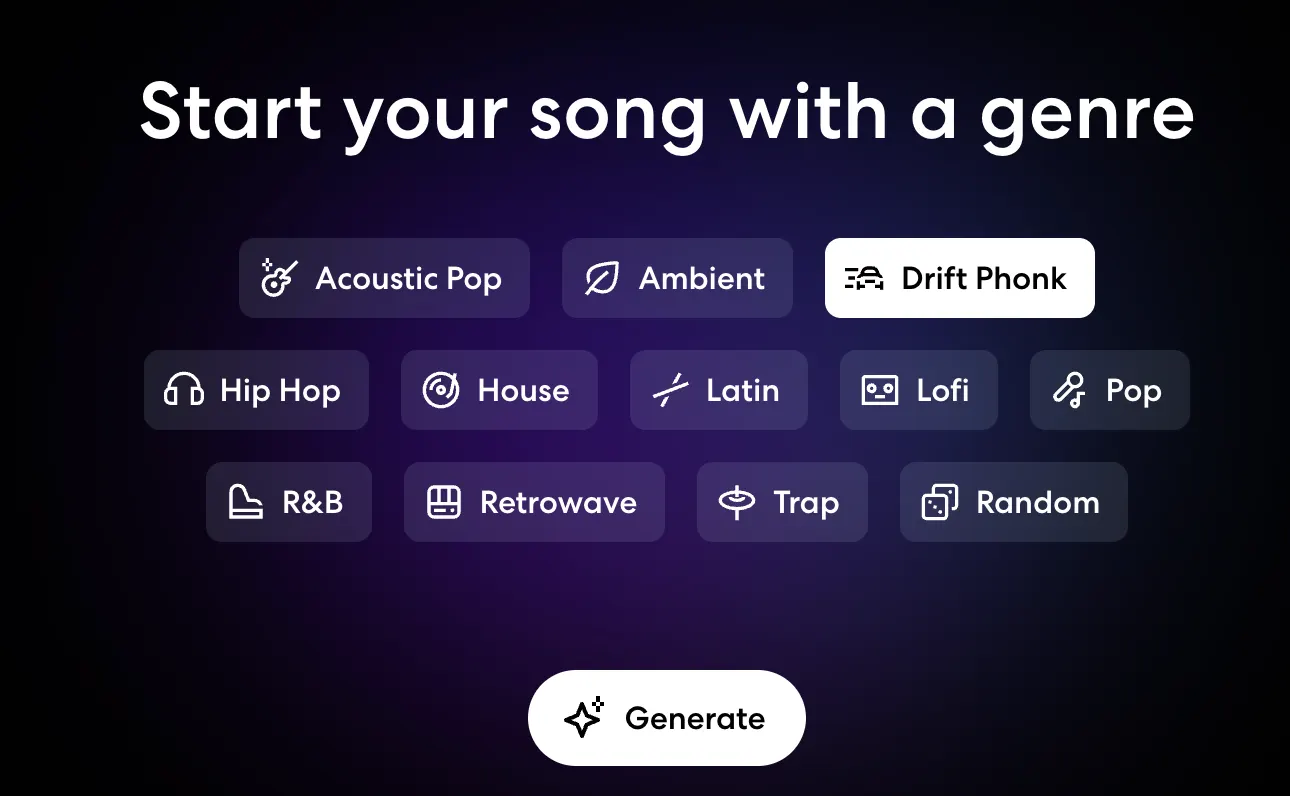
SongStarter allows creators to choose a musical genre before generating an idea. Depending on the current version of the platform, users can explore a variety of contemporary styles and musical directions.
Genre selection provides an important starting constraint. A relaxed lo-fi idea, for example, naturally leads to a different musical direction from a trap, pop, rock, or electronic concept.
3. Lyrics and Emoji Input
One of SongStarter's more interesting features is the ability to use a short lyric, phrase, or emoji as creative input.
You can enter something as simple as “late night drive”, “summer memories”, or an emoji that represents the mood you have in mind. The idea is not to write a complicated AI prompt but to give the system a small creative signal.
This makes the tool particularly approachable for musicians who are comfortable describing feelings and musical ideas but have no interest in prompt engineering.
4. Multiple Musical Variations
SongStarter allows users to explore different generated ideas instead of having to accept the first result.
This is important in practical use. AI-generated music is subjective, and the first composition may be technically acceptable but completely wrong for the project. Generating several alternatives gives the user a better chance of finding something worth developing.
5. Mood, Tempo, Key and Genre Controls
SongStarter provides controls for musical characteristics such as genre, mood, tempo, and key.
These controls are useful when the basic composition is promising but the emotional direction is not quite right. Instead of throwing away an interesting chord progression because it feels too slow or too bright, you can experiment with different settings and hear how the idea changes.
6. Mood Variations
SongStarter has offered multiple mood variations for generated ideas, allowing creators to explore different emotional interpretations of the same general musical concept.
This can be useful when the composition works but the atmosphere does not. A melody that initially feels cheerful might become more appropriate for a reflective project after experimenting with a different mood.
7. Direct Integration With BandLab Studio
One of SongStarter's biggest practical advantages is that the generated idea can be taken directly into BandLab Studio.
Once inside Studio, users can edit MIDI, change instruments, record vocals, add effects, modify the arrangement, adjust levels, and continue producing the song.
8. Royalty-Free Use of Generated Ideas
BandLab states that SongStarter ideas can be used without paying royalties to the original creator of the generated idea.
However, royalty-free use should not automatically be interpreted as exclusive copyright ownership. Users planning to commercially release music should understand the applicable rights and terms rather than assuming that AI-generated material automatically receives the same copyright protection as wholly human-created material.
✨ What Makes SongStarter Different?
It Focuses on the Starting Point
Many newer AI music services are built around generating complete songs from text. SongStarter takes a different approach.
Its job is to help you get moving. Sometimes a musician does not need a finished three-minute track. They simply need an interesting chord progression, rhythm, or melodic idea that opens up a direction for the song.
It Fits Into a Real Music Production Workflow
SongStarter is not simply an AI website where you generate audio and download a finished file. It is integrated with BandLab Studio, so the generated material can immediately become part of an editable music project.
That reduces the distance between AI experimentation and actual music production.
No Complicated Prompting Required
Some generative music platforms depend heavily on detailed text prompts. SongStarter keeps the interaction much simpler.
Choose a genre, optionally enter a short phrase or emoji, generate ideas, listen, and edit. The workflow feels closer to using a musical idea generator than operating a traditional generative AI system.
AI Assists Rather Than Replaces the Producer
SongStarter is designed around the idea that the human creator continues the process. The generated material is only the beginning.
Once the idea enters BandLab Studio, the user remains responsible for the arrangement, instrumentation, vocals, sound selection, effects, editing, and overall artistic direction.
Part of a Large Creator Ecosystem
BandLab has built a large global community around online music creation and collaboration. The company has publicly described its platform as serving more than 100 million creators.
SongStarter benefits from this existing ecosystem because users can move from generating an idea to recording, editing, collaborating, and sharing music without switching to an unrelated production platform.
🎹 Practical Use Cases for SongStarter
Songwriting
If you already have lyrics but cannot decide what the music should sound like, SongStarter can provide a starting rhythm, harmonic progression, or melodic direction.
Beat Making
Beat producers can use SongStarter to explore rhythmic ideas quickly, especially when they feel that their own production has started becoming repetitive.
Rap and Hip-Hop
A generated beat or chord progression can become the foundation for freestyle sessions, verses, hooks, demos, or a complete rap production.
Pop Music
Pop writers can use generated musical ideas as the foundation for developing their own verses, choruses, bridges, vocal melodies, and arrangements.
Lo-Fi and Background Music
SongStarter can provide starting points for relaxed instrumental music, study tracks, background music, personal projects, and online content.
Music Education
Teachers and students can use generated compositions to study rhythm, harmony, structure, and arrangement. A generated idea can be opened in a DAW and examined as a practical example.
Production Practice
Beginners can avoid spending an hour staring at an empty DAW project. Instead, they can start with an existing idea and practice arranging, mixing, recording, sound design, and mastering.
Breaking Creative Blocks
This is arguably SongStarter's most natural use case. When you have been working on the same musical idea for too long, generating several completely different starting points can help reset your creative process.
🛠️ How to Use BandLab SongStarter
Step 1: Create a BandLab Account
Create a free BandLab account through the BandLab website or mobile application. SongStarter is integrated into BandLab rather than operating as a completely separate service.
Step 2: Open SongStarter
Open BandLab and enter the creation area. Select SongStarter from the available music creation tools.
Step 3: Choose a Genre
Select a genre that is reasonably close to the direction you want. You do not need to make the perfect choice. The goal is simply to give the generator a useful starting point.
Step 4: Add a Short Idea
If you have a lyric, phrase, or mood in mind, enter it as an additional creative signal.
- Late night drive
- Summer after midnight
- Missing someone
- City lights
- Rainy Sunday
- 🌙
- 🌧️
You can also generate an idea without providing a text input.
Step 5: Generate the Music
Generate an idea and listen to the result. Do not expect the first result to be a finished song. The more useful question is whether it contains one element worth developing.
Step 6: Explore Variations
Try different moods, tempos, keys, or genres. A composition that initially sounds ordinary can become much more interesting after changing its musical setting.
Step 7: Generate Again if Necessary
If none of the results work, generate another idea. There is no reason to force a weak composition into your project simply because it was the first one generated.
Step 8: Open the Idea in BandLab Studio
Once you find a promising result, move it into BandLab Studio and begin editing it as a normal music project.
Step 9: Add Your Own Creative Work
Add vocals, instruments, drums, effects, transitions, samples, and arrangement changes. Rewrite parts that do not fit the song.
Step 10: Develop the Final Track
The most useful approach is to treat SongStarter as the first step of the production process. The final musical identity should come from the creator's own decisions rather than simply leaving the generated idea untouched.
🧠 Tips for Getting Better Results
Keep the Input Short
SongStarter does not require long prompts. Short ideas such as “rainy city at midnight” or “summer road trip” are enough to give the generator a creative direction.
Use Genre as the Main Constraint
If you already know the general style you want, select the genre first. The short text or emoji input works better as an additional creative signal rather than an attempt to describe every musical detail.
Generate Several Ideas
Do not stop after the first result. The purpose of SongStarter is exploration. Generate multiple ideas and look for the one that immediately suggests a chorus, verse, bassline, vocal melody, or overall atmosphere.
Experiment With Tempo and Key
A promising composition can feel completely different after changing its tempo or key. Before throwing away an idea, try modifying these settings.
Do Not Leave the Generated Material Untouched
The best way to use SongStarter is as raw material. Replace instruments, change the drum pattern, rewrite the melody, add your own bassline, rearrange sections, and record your own vocals.
Use It for the First Section
A practical workflow is to use SongStarter for the first 8 or 16 bars and then build the rest yourself. This keeps the AI involved while allowing the song to develop its own identity.
Save Ideas for Later
Not every interesting idea needs to become a song immediately. Save unusual ideas that do not fit today's project. They may become useful when you start another track.
💻 Installation and Access
Web
SongStarter is available through BandLab's web platform. A modern browser is sufficient to access the tool and continue generated ideas inside BandLab Studio.
Windows
Windows users can access SongStarter through the BandLab web application using a supported browser. A separate Windows installation is not required for the core SongStarter workflow.
Mac
Mac users can access SongStarter through the BandLab website and continue working on generated projects through BandLab Studio.
iPhone and iPad
SongStarter is integrated into BandLab's iOS experience, allowing users to generate ideas from an iPhone or iPad.
Android
Android users can access SongStarter through the BandLab mobile application and use the same basic workflow of selecting a direction, generating ideas, experimenting with variations, and developing the result.
Browser Extensions
SongStarter does not require a separate browser extension. The feature is built into the BandLab platform.
Music Production Environment
The generated idea can be developed inside BandLab Studio, where users can work with virtual instruments, MIDI, audio recording, effects, editing, mixing, and other music-production tools.
💰 BandLab SongStarter Pricing
SongStarter itself is free to use. You do not need to purchase a separate AI generation subscription simply to experiment with SongStarter.
Free BandLab Account
The free BandLab experience provides access to the basic creation environment and SongStarter. Users can experiment with generated ideas and continue developing them inside BandLab Studio.
This makes SongStarter particularly accessible for beginners and independent musicians who do not want to pay for every AI-generated musical idea.
BandLab Membership
BandLab also offers paid membership plans that add broader music-production features. These paid plans are not required simply to use SongStarter.
BandLab's paid membership offering has included BandLab Membership features such as additional Sounds, advanced creative tools, enhanced mixing capabilities, and other creator services. Pricing and included features can change over time, so the current membership offer should be checked before subscribing.
BandLab Pro and Higher-Tier Features
BandLab has also introduced higher membership tiers and additional premium capabilities as its creator ecosystem has expanded. These are aimed at users who want more advanced production tools rather than people who only want to experiment with SongStarter.
Enterprise Pricing
SongStarter is not positioned as a traditional enterprise SaaS product, so there is no standard enterprise SongStarter subscription comparable to enterprise CRM or productivity software.
For most individual musicians, students, hobbyists, and independent producers, the important point is simple: you can start using SongStarter without paying for a premium AI music subscription.
👥 Who Should Use BandLab SongStarter?
Beginner Musicians
SongStarter is particularly approachable for beginners who know the kind of music they want to create but are still learning how to build chord progressions, beats, and arrangements.
Songwriters
Songwriters who already have lyrics or a concept can use SongStarter to find an instrumental direction before developing the rest of the composition.
Beat Producers
Producers can use it to explore unexpected starting points, especially when they notice that their own beats are beginning to follow the same patterns.
Rappers and Vocalists
A generated instrumental idea can provide something to freestyle over, build a hook around, or use as the foundation for a demo.
Music Students
Students can experiment with harmony, rhythm, genre, and arrangement without needing to create every musical element from scratch.
Content Creators
YouTubers, streamers, short-form video creators, and independent filmmakers can use generated ideas as starting points for original background music and soundtracks.
Professional Producers
Experienced producers may not need AI to create basic music, but SongStarter can still be useful when a project becomes repetitive or when a new creative direction is needed quickly.
People Without Formal Music Training
SongStarter is accessible to non-musicians because the interface does not require detailed knowledge of music theory or complicated prompt syntax.
🌍 Global Usage and BandLab's Reach
SongStarter benefits from BandLab's large international creator community. BandLab has publicly described its platform as having more than 100 million creators around the world.
The platform has users across North America, Europe, Asia-Pacific, Latin America, and other regions. Its web and mobile approach has made it particularly accessible to independent musicians and younger creators who may not have access to expensive studio equipment.
BandLab's overall user base should not, however, be confused with SongStarter's individual user count. BandLab does not publish a continuously updated public figure showing exactly how many people use SongStarter each month, how many SongStarter generations are created, or how many downloads the specific feature receives.
For that reason, precise claims about SongStarter's monthly traffic, downloads, or country-by-country user numbers should be treated carefully unless they are supported by a current and reliable analytics source.
The more useful conclusion is that SongStarter has access to a very large international audience because it is built directly into BandLab's existing music creation platform.
⚖️ BandLab SongStarter: Pros and Cons
Pros
- Free to use: The core SongStarter experience does not require a paid AI music subscription.
- Easy to understand: Users can start with a genre, short phrase, emoji, or no detailed input at all.
- Good for writer's block: The tool is specifically useful when you need a musical idea rather than a finished song.
- Integrated with BandLab Studio: Generated ideas can be developed immediately in a full music-production environment.
- Useful for different experience levels: Beginners can use it to learn, while experienced producers can use it for inspiration.
Cons
- Not a complete text-to-song system: Users looking for finished songs with AI-generated vocals may need a different type of AI music platform.
- Limited fine-grained control: SongStarter is intentionally simple, so it does not provide the same level of detailed prompting and generation control found in some specialized AI music systems.
- Results may require significant editing: The generated material is generally more useful as a starting point than as a finished commercial production.
- Copyright questions remain important: Royalty-free use does not necessarily mean that every AI-generated element receives exclusive copyright protection.
🔍 BandLab SongStarter vs. Similar AI Music Tools
SongStarter occupies a different position from full AI song generators. The most useful comparison is based on what you actually need: a quick musical idea, a complete AI-generated song, a production environment, or advanced control over generated music.
| Tool | Main Focus | Best For | Pricing Approach | Main Difference |
|---|---|---|---|---|
| BandLab SongStarter | AI musical idea generation | Songwriters, beginners, producers | Free | Designed primarily to provide a starting point that can be developed inside a DAW. |
| Suno | Complete AI song generation | Users who want finished AI songs | Free tier plus paid plans | Produces more complete songs, including AI vocals, rather than simply providing a starting idea. |
| Udio | Generative music and songs | AI music experimentation | Free access plus paid plans | Provides a broader generative song workflow, while SongStarter is simpler and more production-oriented. |
| AIVA | AI composition | Instrumental music and soundtracks | Free tier plus paid plans | More focused on AI composition and soundtrack creation. |
| SOUNDRAW | AI background music | Video creators and commercial content | Subscription-based | More focused on customizable background music for content production. |
| Stable Audio | Generative audio and music | Advanced AI audio experimentation | Free access plus paid options | Provides a broader generative audio workflow rather than a simple songwriting starting point. |
SongStarter vs. Suno
Suno and SongStarter are useful at different stages of music creation. Suno is designed to generate substantially more complete songs from text prompts, including vocals and arrangements. SongStarter is much more focused on providing a musical foundation that the user can continue developing.
If you want to hear a complete AI-generated song immediately, a full generative music platform is more appropriate. If you want a starting point for your own production, SongStarter is a better match for that workflow.
SongStarter vs. Udio
Udio is focused on generative music and complete song creation. SongStarter is less ambitious but easier to understand as a songwriting tool because the goal is to give the musician material to continue editing.
SongStarter vs. AIVA
AIVA is more composition-oriented and can be useful for soundtrack and instrumental workflows. SongStarter is more immediate and casual, especially for people who simply need an idea to start a project.
SongStarter vs. SOUNDRAW
SOUNDRAW is built more around creating customizable background music for content creators. SongStarter is closer to a songwriting assistant where the generated idea is the beginning of the creative process rather than the final deliverable.
🎧 A Realistic SongStarter Workflow
Imagine a songwriter has written the line “We only talk when the city sleeps” but cannot decide what the song should sound like.
Instead of opening a completely empty DAW project and trying to invent everything at once, the songwriter can enter the phrase into SongStarter, choose an appropriate genre, and generate several ideas.
One version might have an interesting chord progression but feel too fast. Another might have the right mood but an unsuitable rhythm. A third might immediately suggest a chorus.
The songwriter can then change the tempo or key, explore another variation, and open the most promising idea in BandLab Studio.
From there, the AI-generated material becomes only the foundation. The songwriter can write a new vocal melody, replace the drums, change the chord voicings, add bass, restructure the arrangement, record vocals, and mix the track.
This is a much more realistic way to use SongStarter than expecting it to create a finished commercial song with one click.
📌 Final Verdict: Is BandLab SongStarter Worth Using?
BandLab SongStarter is worth trying if your main problem is getting started rather than finishing a song.
It is not the most sophisticated AI music generator available, but that is not really what it is trying to be. Its strength is removing the intimidating blank project. Choose a genre, provide a small amount of direction if you want, generate several ideas, and you immediately have something to work with.
SongStarter is particularly useful for:
- Beginners learning music production
- Songwriters dealing with creative blocks
- Rappers looking for beat ideas
- Producers experimenting with unfamiliar genres
- Vocalists who need an instrumental foundation
- Content creators experimenting with original music
- Students learning composition and arrangement
It is less suitable if your goal is to type a detailed prompt and receive a polished three-minute song with finished vocals, arrangement, and production. A full AI song-generation service is better suited to that workflow.
The biggest practical reason to try SongStarter is its accessibility. The core feature is free, it is integrated into BandLab, and there is no need to learn complicated AI prompting before making your first experiment.
The best way to think about BandLab SongStarter is simple: it is a creative starting point, not a replacement for a songwriter or producer. Use it when you have nothing, keep the parts that inspire you, change the rest, and make the final track your own. For that specific purpose, SongStarter is a useful and approachable AI music tool.
Comments