

Braintrust: A Complete Guide to AI Evaluation and Observability
Braintrust is built for a part of the AI industry that is easy to overlook: making sure AI applications continue to work reliably after they move beyond the demo stage. Rather than acting as a general-purpose chatbot or AI writing assistant, Braintrust helps development teams evaluate AI outputs, monitor production behavior, compare prompts and models, and improve application quality over time.
For teams building AI agents, customer-support assistants, RAG applications, internal copilots, and other LLM-powered products, Braintrust provides a structured way to answer a practical question: Is our AI system genuinely improving, or are we simply guessing?
🧠 What Is Braintrust?
Braintrust is an AI evaluation and observability platform developed by Braintrust Data, Inc., a company focused on improving the quality and reliability of AI applications.
The company emerged in 2023, during the rapid expansion of production-grade generative AI applications. Its early focus was helping development teams test and measure large language model outputs instead of relying entirely on manual reviews or informal “vibe checks.”
Braintrust is positioned as an evaluation-first platform for LLM applications. It combines evaluation datasets, experiments, scoring systems, prompt testing, production tracing, human feedback, and quality monitoring in one environment.
The platform is designed to address several problems that appear when an AI application becomes more complex:
- AI responses can vary significantly from one request to another.
- A prompt that works during testing may fail in production.
- A new model may improve one task while damaging another.
- AI agents may select the wrong tools or follow inefficient workflows.
- Developers may struggle to identify why an answer was incorrect.
- Teams need measurable quality standards before releasing updates.
In straightforward terms, Braintrust acts as a quality-control layer for AI software. It does not replace the underlying model provider or application framework. Instead, it helps teams understand, test, and improve the AI system they are building.
⚙️ Core Features of Braintrust
1. LLM Evaluation
Braintrust allows developers to evaluate AI responses using predefined test cases, scoring rules, model-based judges, custom code, and human feedback.
Teams can measure qualities such as:
- Answer accuracy
- Instruction following
- Relevance
- Factual consistency
- Tone and formatting
- Tool-use correctness
- Safety and policy compliance
This makes it easier to turn vague feedback such as “the chatbot feels worse” into measurable results.
2. Evaluation Datasets
Teams can create and manage datasets containing real user questions, expected answers, reference information, and difficult edge cases.
These datasets become repeatable test suites. When a prompt, model, retrieval method, or agent workflow changes, the same examples can be run again to check whether quality improved or declined.
3. Experiments and Model Comparison
Braintrust supports experiments involving different prompts, models, retrieval strategies, and system configurations.
For example, a team can compare models from different providers against the same evaluation dataset. The purpose is not simply to find the cheapest model, but to understand which configuration provides the right balance of quality, speed, and cost for a specific task.
4. Production Tracing and Observability
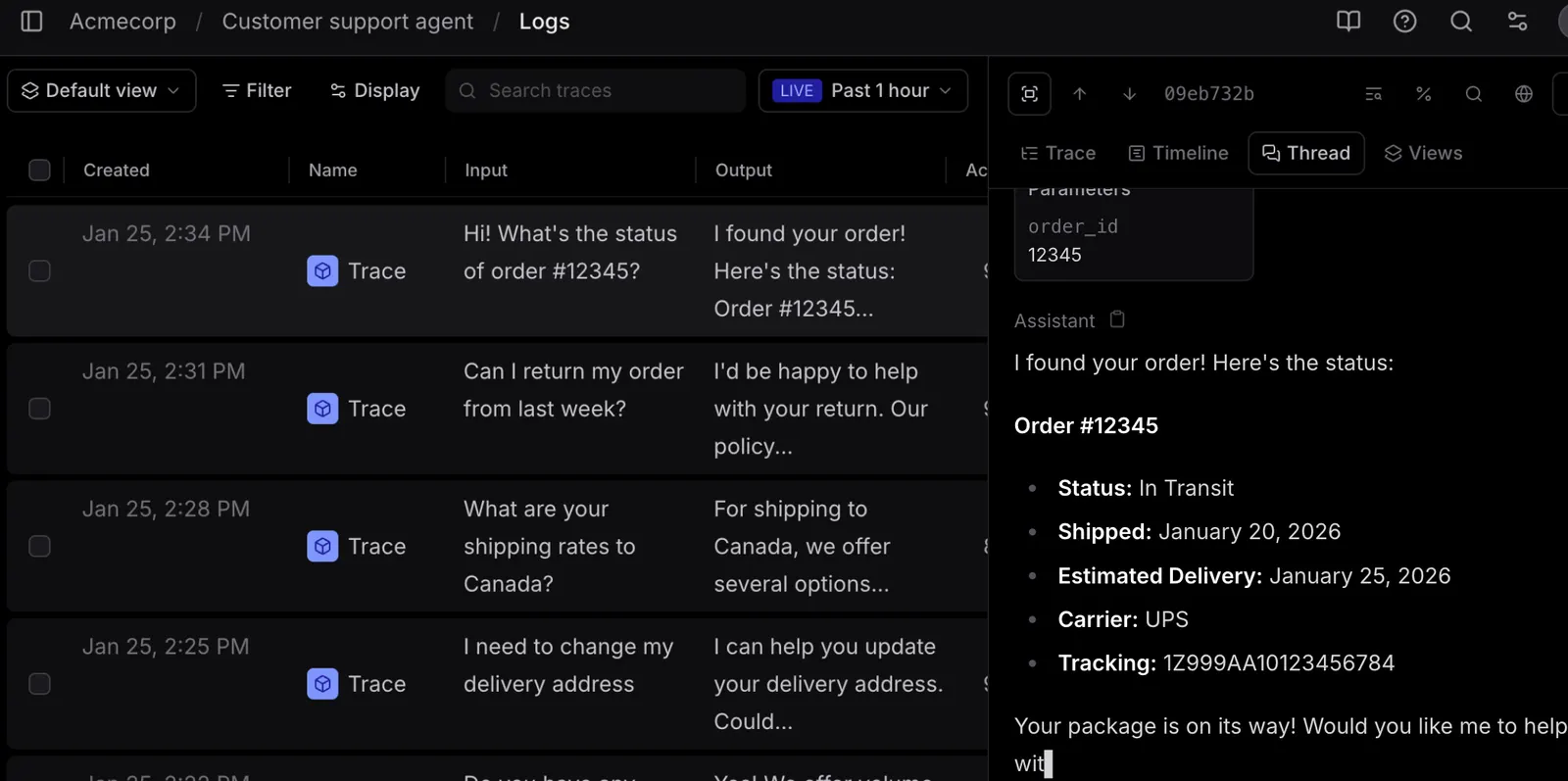
Braintrust records detailed information about AI application behavior, including prompts, model responses, latency, token usage, tool calls, and multi-step execution paths.
This is particularly useful for AI agents and RAG systems. When an answer is wrong, developers can inspect the chain of events instead of looking only at the final response.
5. Prompt Playground
The prompt playground provides an environment for testing instructions and comparing outputs before making changes to production code.
Developers can experiment with system prompts, user instructions, model settings, and example inputs. Results can then be used to refine prompts or create more reliable evaluation cases.
6. Automated Scoring
Braintrust supports several scoring approaches, including LLM-as-a-judge evaluations, custom code scorers, automated checks, and human review.
Code-based scorers are useful for objective requirements such as:
- Whether a JSON response is valid
- Whether required fields are present
- Whether prohibited content appears
- Whether the correct tool was called
- Whether the response follows a required format
7. Human Review and Annotation
Automated scoring is useful, but it cannot judge every business requirement perfectly. Braintrust allows people to review traces and provide feedback manually.
This is valuable for customer support, legal content, medical information workflows, brand voice, and other situations where human judgment remains necessary.
8. Quality Gates and Continuous Evaluation
Braintrust can be integrated into development workflows so that AI quality checks become part of the release process.
Instead of deploying a new prompt or model and waiting for users to report problems, teams can run evaluation tests before release and establish minimum quality requirements for important tasks.
✨ What Makes Braintrust Different?
Evaluation Comes Before Dashboards
Many observability platforms begin with logs, traces, and dashboards. Braintrust places evaluation at the center of the workflow.
This distinction matters because AI systems are not always broken in a traditional software sense. An application may run without technical errors while still producing inaccurate, irrelevant, or misleading answers. Braintrust is designed to measure these quality problems directly.
Designed for AI-Specific Failure Modes
Traditional application monitoring can tell a team that an API returned an error or that response time increased. Braintrust helps investigate problems such as:
- The model ignored an important instruction.
- The RAG system retrieved irrelevant documents.
- An agent selected the wrong tool.
- A prompt update caused a regression.
- The answer sounded convincing but was factually incorrect.
A Continuous Improvement Loop
One of Braintrust’s most useful concepts is the connection between production traces and evaluation datasets.
A real user interaction can reveal a failure. That interaction can then be reviewed, converted into a test case, added to an evaluation dataset, and used to prevent the same issue from returning in a future release.
Useful for Simple and Agentic Systems
Braintrust can support a basic prompt-response application, but it becomes more valuable when a system includes retrieval, multiple model calls, external tools, sub-agents, and complex decision-making.
Usage-Based Pricing
Braintrust’s pricing model is based largely on processed data, scores, model credits, and retention rather than charging separately for every team member. This can work well for engineering teams with many collaborators, although usage costs need to be monitored carefully.
💼 Practical Use Cases for Braintrust
AI Customer Support
Support teams can evaluate whether an AI assistant provides accurate answers, follows company policies, escalates difficult cases, and maintains an appropriate tone.
Useful evaluation criteria include answer accuracy, escalation behavior, resolution rate, and whether the assistant invents information that is not present in the knowledge base.
RAG Applications
For retrieval-augmented generation systems, Braintrust can help determine whether the system retrieves the right documents and uses them correctly.
Teams can test different embedding models, chunking strategies, retrieval settings, and prompts against the same collection of questions.
AI Agents and Tool-Calling Workflows
AI agents often fail in ways that are difficult to diagnose. They may choose an incorrect tool, call a tool repeatedly, skip a required step, or produce a final answer based on incomplete information.
Braintrust’s tracing and evaluation features help developers inspect these multi-step workflows.
Internal Company Copilots
Organizations building internal assistants for documents, HR policies, technical support, or operations can use Braintrust to test whether responses are accurate and appropriate for employees.
AI Writing and Content Generation
Marketing and content teams can evaluate generated copy against brand guidelines, tone requirements, factual constraints, and formatting rules.
For example, an ecommerce company could test whether product descriptions avoid unsupported claims and consistently include required product details.
AI Coding Assistants
Development teams can use evaluation datasets to test code-generation tasks, bug-fixing prompts, documentation generation, and code explanation workflows.
Automated checks can verify whether generated code compiles, passes unit tests, or follows specific formatting requirements.
AI-Powered Search
Search products can use Braintrust to evaluate relevance, ranking quality, answer completeness, and whether generated summaries accurately reflect source documents.
Model Migration
When a company changes from one model provider to another, Braintrust can help compare both systems using the same production-like test cases.
This is useful when a team wants to reduce API costs without sacrificing answer quality.
🛠️ How to Use Braintrust
Step 1: Create an Account
Start by creating a Braintrust account using an available sign-in method. The free Starter plan allows users to begin experimenting without immediately committing to a paid subscription.
Step 2: Create a Project
After signing in, create a project for the AI application you want to evaluate.
A project might represent:
- A customer-support chatbot
- An internal company assistant
- A RAG search system
- An AI coding agent
- A content-generation workflow
Step 3: Connect Your Application
Integrate Braintrust with your application using its supported SDKs, APIs, or tracing methods. The exact setup depends on your programming language and application architecture.
Commonly tracked information includes prompts, model responses, tool calls, latency, token usage, and execution metadata.
Step 4: Create an Evaluation Dataset
Begin with a small collection of realistic examples. Include both ordinary requests and difficult cases.
A customer-support dataset might include:
- Common product questions
- Questions with missing information
- Requests requiring human escalation
- Questions designed to expose hallucinations
- Requests involving multiple company policies
Step 5: Define Scoring Rules
Decide how outputs should be evaluated. Some requirements can be checked with code, while others may require an LLM judge or human reviewer.
A practical evaluation setup might measure:
- Correctness
- Relevance
- Policy compliance
- Response format
- Human satisfaction
Step 6: Run Experiments
Test different prompts, models, retrieval methods, or agent configurations against the same dataset.
Compare not only average scores, but also individual failures. A high average score can hide serious problems in a small number of important cases.
Step 7: Monitor Production Traces
Once the application is live, inspect real interactions and identify recurring problems.
Pay attention to:
- Unexpectedly long response times
- Repeated tool calls
- High token consumption
- Low evaluation scores
- Incorrect retrieval results
- Frequent human escalations
Step 8: Turn Real Failures into New Tests
When a production issue is discovered, add it to the evaluation dataset. This creates a growing library of real-world cases that can be tested before future releases.
🎯 Tips for Getting Better Results with Braintrust
Start with Real User Questions
A small dataset based on actual customer or employee questions is usually more useful than a large collection of artificial examples.
Test Failure Cases on Purpose
Do not evaluate only easy questions. Include ambiguous, incomplete, adversarial, outdated, and difficult requests.
Separate Different Quality Dimensions
Do not combine everything into one vague score. Accuracy, tone, speed, cost, and formatting should be measured separately whenever possible.
Use Code-Based Checks for Objective Requirements
If a response must contain valid JSON, a specific field, or a valid URL, use deterministic checks rather than asking another language model to judge every detail.
Review Low-Scoring Examples Manually
A score tells you that something may be wrong, but the actual trace often explains why. Read failed examples and look for patterns in prompts, retrieval, tools, or application logic.
Evaluate Changes in Small Batches
When changing a prompt or model, test the change against a focused dataset first. This makes it easier to understand which modification caused a quality shift.
Track Cost and Latency Alongside Quality
A model that produces slightly better answers may not be worth the additional cost or response time for every use case. A useful evaluation process should consider the complete trade-off.
Keep Your Evaluation Dataset Updated
AI applications change over time. Add new failure cases, new product information, and new user behaviors regularly so that your tests remain relevant.
💻 Installation and Access Options
Braintrust is primarily a web-based platform and developer infrastructure service rather than a traditional consumer desktop application.
- Web: Available through a modern desktop web browser.
- Windows: Accessible through browsers such as Chrome, Edge, or Firefox. A dedicated Windows desktop application is not the main access method.
- macOS: Accessible through a desktop browser. Developers can also integrate Braintrust into local development environments.
- iOS: The web interface may be accessible through a mobile browser, but Braintrust is not primarily designed as a mobile evaluation app.
- Android: Available through a mobile browser where supported, although most professional workflows are better suited to desktop use.
- API and SDKs: Intended for developers who want to connect Braintrust with their own AI applications.
- Browser Extensions: A browser extension is not the central product experience.
- Self-Hosted Deployment: Enterprise-level deployment options may be available for organizations with advanced privacy, security, or infrastructure requirements.
In practice, Braintrust is best used alongside a code editor, development environment, CI/CD pipeline, and the AI application being tested.
💰 Braintrust Pricing
Braintrust uses a combination of subscription pricing and usage-based billing. Costs may depend on processed data, evaluation scores, model credits, and data retention.
Starter — Free
The Starter plan is designed for individuals, early experiments, and small teams.
- $0 per month
- Unlimited users
- Unlimited projects
- Unlimited datasets
- Unlimited playgrounds and experiments
- 1 GB of processed data included per month
- 10,000 scores included per month
- 14-day data retention
- Limited monthly model credits
Additional usage may be billed separately according to the current pricing structure.
Pro — $249 per Month
The Pro plan is aimed at AI-native teams that need more evaluation capacity and advanced collaboration features.
- $249 per month
- 5 GB of processed data included
- 50,000 scores included
- 30-day data retention
- Custom charts and dashboards
- Environment management
- Advanced evaluation workflows
- Priority support
- Additional access controls and team features
Enterprise — Custom Pricing
Enterprise pricing is customized according to usage, security requirements, deployment preferences, and support needs.
Enterprise-level capabilities may include:
- Custom data retention policies
- Expanded data export options
- Role-based access control
- Single sign-on and enterprise authentication
- Premium support
- Service-level agreements
- Privacy and compliance arrangements
- Hosted, private, or on-premises deployment options
Pricing note: Braintrust pricing can change, and usage-based charges may become significant when a team evaluates large volumes of traces or runs test suites frequently. Companies should estimate processed data, scoring volume, and retention requirements before moving into production.
👥 Who Should Use Braintrust?
AI Engineers
Braintrust is particularly relevant for engineers building LLM applications, agent workflows, RAG systems, and model-powered features.
Machine Learning Teams
ML teams can use the platform to compare models, monitor quality changes, and maintain evaluation datasets across development cycles.
Software Developers
Developers responsible for AI-powered products can use Braintrust to debug multi-step execution and introduce automated quality checks into release workflows.
AI Product Managers
Product managers can use evaluation results to understand whether a new AI feature actually improves user experience rather than relying only on anecdotal feedback.
AI Startups
Startups developing AI support agents, research assistants, workflow automation tools, or vertical AI applications may benefit from establishing evaluation practices early.
Enterprise AI Teams
Large organizations can use Braintrust to coordinate testing across multiple teams, models, applications, and deployment environments.
Who Probably Does Not Need It?
Braintrust is not a natural fit for someone who simply wants to write emails, summarize documents, generate images, or chat with an AI assistant. Those users are generally better served by general-purpose AI tools.
🌍 Global Usage and Market Position
Braintrust is aimed at the international developer and enterprise AI market rather than a single country or consumer audience. Its potential users include AI startups, software companies, SaaS businesses, enterprise engineering teams, and organizations deploying internal AI systems.
The platform is particularly relevant in regions with active AI software development communities, including:
- United States
- Canada
- United Kingdom
- Germany
- France
- Israel
- Singapore
- Australia
- India
- Japan and South Korea
Braintrust belongs to the broader developer-tools and AI infrastructure ecosystem. Its users are more likely to interact with the platform through SDKs, integrations, evaluation projects, and production monitoring than through a traditional mobile app.
Public information does not provide a consistently verified global monthly active user figure, app download count, or country-by-country traffic breakdown. Since Braintrust is primarily a developer platform, traditional app-download metrics are also less meaningful than SDK adoption, project usage, production traces, and enterprise deployments.
For this reason, claims about exact user numbers or traffic should be treated carefully unless they come directly from Braintrust or a reputable analytics provider with a clearly explained methodology.
⚖️ Braintrust Pros and Cons
Advantages
- Evaluation-focused design: AI quality measurement is treated as a core development activity rather than an optional reporting feature.
- Strong debugging visibility: Detailed traces help developers investigate complex model and agent behavior.
- Flexible scoring: Teams can combine automated checks, LLM judges, custom code, and human review.
- Useful for continuous improvement: Production failures can be converted into repeatable evaluation cases.
- Suitable for complex AI systems: It works well with RAG pipelines, agents, tool calls, and multi-step workflows.
Disadvantages
- Not designed for casual users: People looking for a general AI assistant will find the platform overly technical.
- Requires engineering effort: Meaningful results depend on proper instrumentation, datasets, scoring rules, and integration.
- Usage costs can be difficult to predict: Large trace volumes and frequent evaluation runs may increase the bill.
- Evaluation quality depends on test design: Poor datasets or weak scoring criteria can produce misleading conclusions.
🔍 Braintrust Compared with Similar Tools
| Tool | Main Focus | Typical Users | Pricing Approach | Best Use Case |
|---|---|---|---|---|
| Braintrust | AI evaluation and observability | AI engineers, product teams, enterprises | Free tier, Pro subscription, usage-based charges, enterprise pricing | Testing and improving production LLM applications |
| LangSmith | LLM tracing, debugging, and evaluation | Developers using LangChain and related workflows | Free and paid usage-based plans | Tracing and evaluating LangChain-based applications |
| Langfuse | LLM observability and evaluation | Developers and engineering teams | Cloud plans and self-hosting options | Open-source-oriented monitoring and tracing workflows |
| Arize Phoenix | AI observability and evaluation | ML engineers and data teams | Open-source and enterprise-oriented options | Tracing, evaluation, and troubleshooting AI systems |
| Weights & Biases | Machine learning experiment tracking | ML teams and research organizations | Free and enterprise plans | Broader ML experimentation and model lifecycle management |
| Humanloop | Prompt management and human feedback | AI product and engineering teams | Custom or usage-based business pricing | Prompt development and human-in-the-loop workflows |
Braintrust vs. LangSmith
LangSmith is a natural choice for teams already working heavily with LangChain and LangGraph. Braintrust places stronger emphasis on evaluation workflows and quality measurement across different AI architectures.
Braintrust vs. Langfuse
Langfuse is attractive to teams that prioritize open-source flexibility and self-hosting. Braintrust offers a more managed, productized experience, although advanced private deployment options may depend on the enterprise agreement.
Braintrust vs. Arize Phoenix
Arize Phoenix is strongly associated with observability, model troubleshooting, and open-source tooling. Braintrust is more centered on evaluation-driven development and the process of turning AI quality into release criteria.
Braintrust vs. General AI Assistants
Comparing Braintrust with ChatGPT, Claude, or Gemini as if they were direct competitors would be misleading. General AI assistants generate content for end users. Braintrust helps developers test and monitor the AI systems behind products.
📝 Final Verdict: Is Braintrust Worth Using?
Braintrust is worth considering if your team is building a serious AI application and has reached the point where manually checking a few outputs is no longer enough.
It is especially useful when your product includes:
- AI agents
- RAG or enterprise search
- Customer-support automation
- Multiple model providers
- Tool-calling workflows
- High-volume production traffic
- Strict accuracy or compliance requirements
The platform’s main value is not that it makes an AI model smarter by itself. Its value is that it gives teams a repeatable method for discovering weaknesses, comparing alternatives, and preventing known problems from returning.
Braintrust is recommended for: AI engineers, AI startups, SaaS companies, enterprise development teams, and product organizations that need measurable AI quality.
Braintrust may not be worth the effort for: casual AI users, small teams experimenting with simple prompts, or businesses that do not yet have a real AI application to evaluate.
Overall, Braintrust is best understood as an engineering and quality-assurance platform for AI software. If your team is moving from AI prototypes toward reliable production systems, it can provide the structure needed to replace guesswork with measurable testing and continuous improvement.
Comments