

📄 ChatPDF: AI PDF Reader for Document Analysis, Research, and Q&A
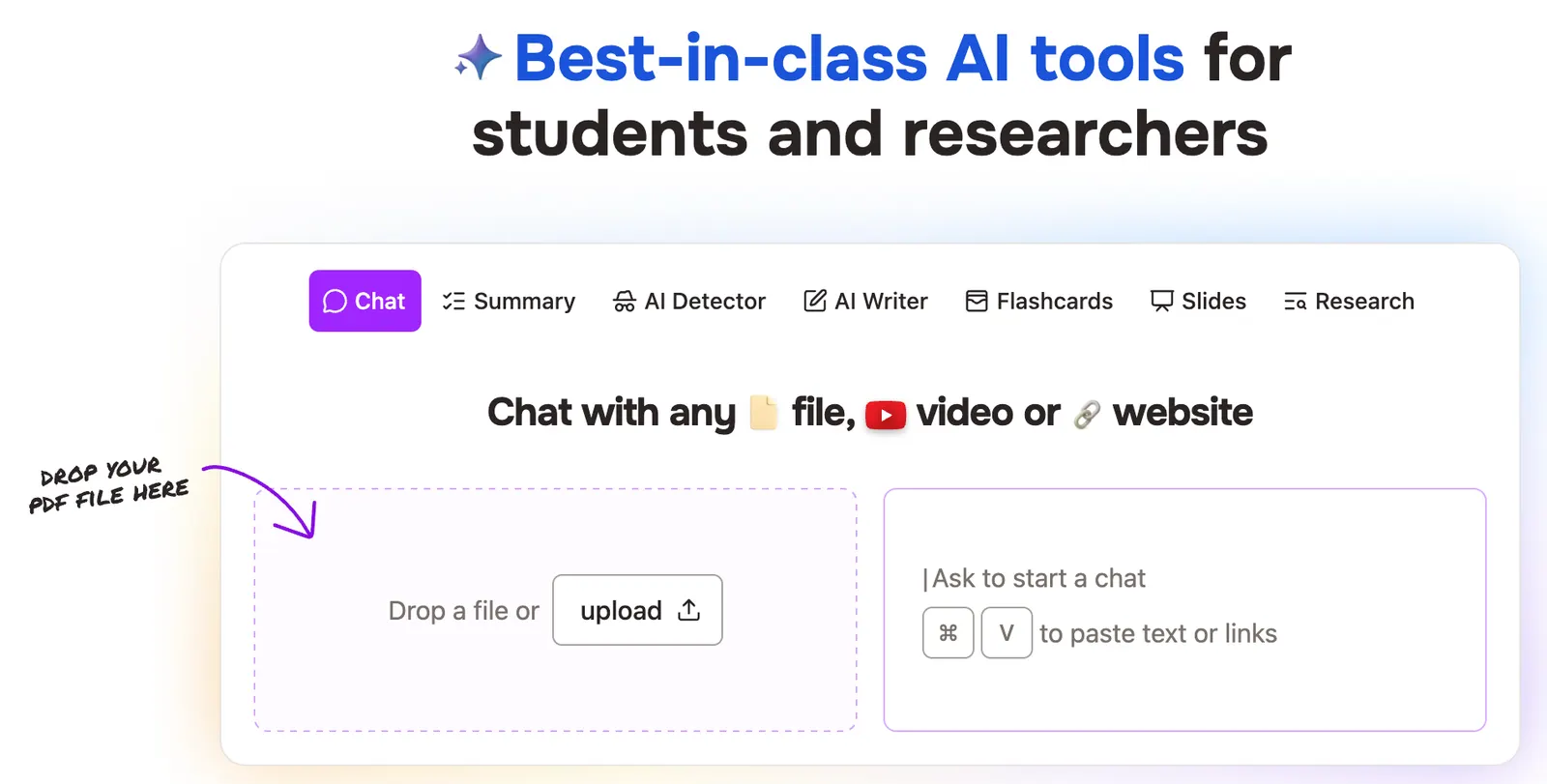
ChatPDF is an AI-powered document analysis tool that lets you upload a PDF and have a conversation with the document. Instead of manually scrolling through dozens or hundreds of pages, you can ask questions in natural language and get answers based on the uploaded file.
It is particularly useful for research papers, textbooks, business reports, technical documentation, manuals, presentations, and other information-heavy documents. The basic idea is simple: upload a document, ask questions, find the relevant information, and verify the answer against the source.
ChatPDF is not designed to replace a general-purpose AI assistant. Its focus is narrower, and that is actually part of its appeal. If your immediate problem is understanding a long document, you can get started without building a complicated workflow first.
🏢 What Is ChatPDF?
ChatPDF is an AI document analysis platform developed by ChatPDF GmbH, a company based in Berlin, Germany. The company was founded in 2023, and ChatPDF launched publicly on Product Hunt in March 2023.
The original product was built around a straightforward idea: instead of searching through a PDF manually, users could upload the document and ask questions about it. The AI would analyze the document and provide answers in a conversational interface.
The service initially became particularly popular among students and researchers because academic papers are often long, technical, and difficult to navigate. Its use cases have since expanded to business reports, manuals, contracts, presentations, textbooks, technical documents, and other files.
Today, ChatPDF is best described as an AI document assistant rather than simply a PDF reader. Its purpose is to help users understand and extract information from documents faster.
🎯 What Problem Does ChatPDF Solve?
Reading a long document is not always difficult because the information itself is complicated. Often, the real problem is finding the specific information you need.
Imagine receiving a 100-page industry report. You may only care about market growth, customer behavior, risks, and the final recommendations. Normally, you would search through the document, read several sections, take notes, and repeat the process.
With ChatPDF, you can start by asking:
“What are the five most important findings in this report, and what evidence supports each finding?”
You can then continue with more specific questions based on the answers.
That is the core problem ChatPDF solves: turning long-document reading and searching into a natural-language conversation.
⚙️ ChatPDF Core Features
💬 1. Chat With PDF Documents
The central feature is conversational PDF analysis. Upload a document and ask questions using ordinary language.
You can ask about a specific section, definition, statistic, argument, conclusion, table, recommendation, or technical detail. There is no need to remember the exact wording used in the document.
🔎 2. Source References
ChatPDF is designed to connect its answers with information contained in the uploaded document. References to the source make it easier to locate the relevant material and check whether the AI interpreted the document correctly.
This is especially important for academic and professional work. An AI-generated answer is much more useful when you can quickly compare it with the original text.
📚 3. Multi-Document Analysis
ChatPDF supports workflows involving multiple documents. This can be useful when comparing research papers, reports, product documents, or other sources.
For example, instead of reading three papers separately and making your own comparison notes, you can ask:
“Compare the research methods used in these papers and explain where their conclusions agree and disagree.”
📝 4. AI Document Summarization
ChatPDF can summarize long documents, but the most useful approach is to tell it exactly what information you want.
- Executive summaries
- Key findings
- Important statistics
- Research methodology
- Limitations
- Recommendations
- Risks
- Conclusions
🌍 5. Multilingual Document Analysis
ChatPDF supports multilingual document workflows. Users can work with documents in different languages and ask questions in the language they prefer.
This is useful for international students, researchers, global teams, and professionals who regularly work with documents written in English or other languages.
📂 6. Support for Different File Formats
Despite its name, ChatPDF is not limited to PDF files. The service has expanded its document support to include formats such as Word, PowerPoint, Markdown, and text files.
This makes it more practical for everyday office work where information may exist in several different formats.
🎓 7. AI Flashcards
ChatPDF can generate AI-powered flashcards from document content. This is particularly useful for students who want to turn textbooks, research papers, or course material into revision exercises.
📊 8. AI Presentation Generation
ChatPDF also provides an AI presentation feature. Users can turn information from a document into a presentation structure and then review or edit the result.
This can save time when a report or research paper needs to be converted into presentation material.
✨ What Makes ChatPDF Stand Out?
There is nothing particularly revolutionary about the idea of chatting with a PDF anymore. Many modern AI products can analyze uploaded documents.
ChatPDF's advantage is its focus.
The entire workflow is built around documents. You upload the file, ask questions, receive answers, and return to the source when you need to verify something.
That makes it particularly convenient for people who do not want to learn a complicated research platform.
Another practical advantage is the source-oriented experience. When an AI gives you an answer about a document, the next question should always be: “Where did this information come from?” ChatPDF makes that verification process easier than a completely generic chatbot interface.
It is also fast to understand. Someone who has never used an AI document tool can generally figure out the basic workflow within a few minutes.
💼 Real-World Use Cases
🎓 Students and Education
Students can upload textbooks, research papers, lecture notes, study guides, and other learning materials.
Useful tasks include explaining difficult concepts, summarizing chapters, generating exam questions, finding important definitions, and creating flashcards.
🔬 Academic Research
Researchers can use ChatPDF to screen papers before deciding which documents require a deeper read.
For example:
“What research question does this paper attempt to answer?”
“What methodology was used, and what limitations does the author acknowledge?”
“What evidence supports the main conclusion?”
✍️ Writing and Content Creation
Writers can use ChatPDF to extract information from reports, research papers, white papers, industry studies, and other reference material before writing an article.
This is especially useful when the writer needs to understand a large amount of source material before starting the actual writing.
💻 Programming and Technical Work
Developers can use ChatPDF to understand API documentation, technical manuals, product specifications, architecture documents, and implementation guides.
For example, instead of searching through a long technical manual, you can ask the AI to explain the authentication requirements or identify the relevant configuration parameters.
🎨 Design
Designers can use ChatPDF with brand guidelines, UX research reports, product requirement documents, client briefs, and design specifications.
A designer could upload a brand guideline and ask the AI to extract typography rules, logo usage restrictions, color requirements, and other important design constraints.
📣 Marketing
Marketing teams can analyze market reports, customer research, campaign reports, competitor information, product documents, and industry studies.
A useful prompt might be:
“Extract the main customer pain points from this report and group them into five marketing themes.”
💼 Business and Management
Managers can use ChatPDF to review project reports, business proposals, internal documentation, financial reports, and other lengthy documents.
Instead of reading the entire document first, they can quickly identify the sections that deserve closer attention.
⚖️ Contracts and Legal Documents
ChatPDF can help locate clauses, dates, obligations, conditions, definitions, and other information inside lengthy documents.
However, it should not be treated as a substitute for professional legal review. Important contractual conclusions should always be checked against the original document and reviewed by a qualified professional when necessary.
🚀 How to Use ChatPDF
1️⃣ Open ChatPDF
Open ChatPDF in a modern web browser. The web interface is the easiest way to get started.
2️⃣ Upload a Document
Select the PDF or another supported document that you want to analyze. ChatPDF processes the file and prepares it for conversation.
3️⃣ Ask for an Overview
Start with a broad question before moving into detailed analysis.
Example:
“Give me a concise overview of this document. Identify the main topic, five key findings, important evidence, major limitations, and the final conclusion.”
4️⃣ Ask Specific Questions
After getting the overview, ask targeted follow-up questions.
“What methodology does the author use?”
“Which argument has the strongest evidence?”
“What are the main limitations mentioned by the authors?”
5️⃣ Investigate Important Sections
If a particular section is important, ask more detailed questions about it rather than repeatedly asking for another general summary.
6️⃣ Verify the Answer
For important information, check the original document and the cited source section. This is particularly important when working with legal documents, financial information, academic research, medical material, or technical specifications.
🧠 How to Get Better Results From ChatPDF
🎯 Ask Specific Questions
One of the easiest ways to improve the quality of the output is to make your prompt specific.
Less useful:
“Summarize this report.”
More useful:
“Summarize this report in approximately 600 words. Focus on revenue growth, customer acquisition, market risks, important statistics, and the recommendations in the conclusion.”
👤 Tell It Who the Answer Is For
The same document can require very different explanations depending on the reader.
“Explain this research paper to a college student with no background in statistics.”
Or:
“Explain the technical section to a product manager who understands software products but does not write code.”
📌 Ask for Evidence
When accuracy matters, ask the AI to identify the relevant page or section.
“Use only information contained in the uploaded document. For every major claim, identify the relevant page or section.”
📊 Request a Specific Format
If you need structured information, tell ChatPDF how you want it presented.
“Create a table with four columns: problem, evidence, business impact, and recommendation.”
🔄 Use a Multi-Step Conversation
Do not expect one enormous prompt to produce the perfect analysis of a 150-page document.
A better workflow is:
- Understand the overall document.
- Identify the important sections.
- Ask detailed questions about those sections.
- Extract the information you actually need.
- Verify important claims against the source.
🚫 Tell It Not to Guess
If accuracy matters, explicitly tell the AI what to do when information is missing.
“If the answer cannot be found in the document, say that the information is not available instead of making an assumption.”
💻 ChatPDF Installation and Supported Platforms
🌐 Web
The web application is the main way to use ChatPDF. It works through a modern browser and does not require a traditional desktop installation.
🪟 Windows
Windows users can access ChatPDF through the web browser. The browser version provides the core document-analysis experience without requiring a dedicated Windows installation.
🍎 Mac
Mac users can also use ChatPDF through the browser. The service can be accessed from modern versions of macOS without installing traditional desktop software.
📱 iPhone and iPad
ChatPDF has an official iOS application published by ChatPDF GmbH. The application provides mobile access to ChatPDF's document-analysis features and includes in-app purchases.
🤖 Android
An official Android application is available through Google Play. The mobile version provides access to PDF chat and other document-related AI features.
🌐 Browser Extensions and Integrations
ChatPDF has expanded beyond its standalone website and mobile applications with integrations such as Google Workspace. Availability of individual integrations can change as the product evolves.
For most users, the web version remains the simplest starting point.
💰 ChatPDF Pricing
🆓 Free Plan
ChatPDF provides a free option for occasional document analysis.
The current free offering allows users to analyze up to two documents per day. This is enough for someone who occasionally needs to understand a research paper, business report, manual, or other PDF.
⭐ ChatPDF Plus
The Plus plan is designed for people who use ChatPDF regularly and need higher usage limits and additional features.
Current US App Store pricing lists ChatPDF Plus at approximately $14.99 per month or $89.99 per year. Actual pricing may vary depending on location, platform, taxes, promotions, and billing method.
🏢 Enterprise and Business
ChatPDF does not currently provide a simple public enterprise price table comparable to the consumer subscription.
Companies planning to use ChatPDF with internal or confidential documents should confirm current enterprise pricing, security policies, data retention, administration capabilities, support, and contractual terms before adopting it at scale.
💡 Is ChatPDF Worth Paying For?
For occasional users, the free version may be sufficient.
For students and professionals who analyze documents every week, the paid version can save a meaningful amount of time.
There is one important consideration: if you already subscribe to a general-purpose AI assistant that can analyze PDFs, you should compare the two workflows before paying for another subscription. ChatPDF's advantage is its document-focused experience, not the fact that it is the only AI tool capable of reading PDFs.
🌎 ChatPDF Global Usage
ChatPDF has grown considerably since its launch in 2023. According to the company's public information, the platform has been used by more than 10 million researchers and handles more than 1 million questions per day.
ChatPDF has also appeared in major discussions and rankings surrounding consumer generative AI applications, including Andreessen Horowitz's 2024 list of widely used generative AI applications.
The official Android application currently reports more than 100,000 downloads on Google Play. This number should not be interpreted as the total number of ChatPDF users because a large portion of usage happens through the web.
ChatPDF is designed for an international audience and supports multilingual document workflows. However, the company does not publish a detailed current breakdown of active users by country, so precise country-level user figures should be treated carefully.
Its natural audience includes students, researchers, office workers, analysts, writers, marketers, developers, and professionals who regularly work with long documents.
👍 ChatPDF Advantages
- Easy to start: the basic workflow is simple enough for first-time AI users.
- Document-focused: the interface is built around reading and analyzing uploaded files.
- Useful source references: answers can be checked against the original document.
- Good research workflow: particularly useful for papers, reports, textbooks, manuals, and technical documents.
- More than basic PDF chat: additional features such as multi-document analysis, flashcards, multilingual support, and AI presentations broaden its use cases.
👎 ChatPDF Disadvantages
- Not a complete AI workspace: it is more focused than general-purpose AI assistants and is not designed to handle every creative or technical task.
- AI accuracy still has limits: complex tables, scanned documents, unusual formatting, and ambiguous language can lead to mistakes.
- Free usage is restricted: two documents per day may not be enough for heavy users.
- Potential subscription overlap: users who already pay for a general AI assistant may find that some of the functionality overlaps.
⚖️ ChatPDF vs. Other AI PDF Tools
ChatPDF operates in a crowded AI document-analysis market. The important difference between these products is usually not whether they can read a PDF, but what happens after the document has been uploaded.
| Tool | Primary Focus | Best-Known Workflow | Pricing Approach |
|---|---|---|---|
| ChatPDF | PDF and document Q&A | Upload a document and ask questions | Free + paid subscription |
| NotebookLM | Source-based research | Combine multiple sources and build a research notebook | Free + paid Google plans |
| Adobe Acrobat AI Assistant | PDF management and AI | Edit, manage, summarize, and analyze PDFs | Acrobat subscription plans |
| AskYourPDF | Document chat and integrations | Chat with documents and connect them to other workflows | Free + paid plans |
| Humata | Research document analysis | Analyze and question research documents | Free + paid plans |
| Claude | General-purpose AI | Documents combined with writing, coding, reasoning, and analysis | Free + paid plans |
The practical choice depends on the job.
If your typical task is “I have one PDF and need to understand it quickly,” ChatPDF's focused interface makes sense.
If your task is “I have dozens of sources and need to conduct a research project,” a multi-source research tool may be more appropriate.
If you need PDF editing, signing, document management, and AI analysis in the same application, a traditional PDF platform with AI features may fit better.
If you need PDF analysis plus coding, writing, brainstorming, data analysis, and general reasoning, a general-purpose AI assistant may provide more value from one subscription.
```🎓 Who Should Use ChatPDF?
🎓 Students
Students who regularly read research papers, textbooks, lecture notes, and study material can use ChatPDF to speed up reading and revision.
🔬 Researchers
Researchers can use it to screen papers, locate relevant information, compare sources, understand methodologies, and identify limitations.
💻 Developers
Developers can use it to navigate technical documentation, API references, manuals, and specifications.
🎨 Designers
Designers can use it with brand guidelines, client briefs, UX research, product requirements, and design documentation.
📣 Marketers
Marketing professionals can use it to analyze market research, industry reports, customer studies, product information, and competitor material.
💼 Business Professionals
Managers, consultants, analysts, and office workers can use it to quickly extract useful information from reports and business documents.
👤 General Users
Even ordinary users can benefit from ChatPDF when dealing with complicated manuals, application documents, financial information, contracts, or other long files.
🔍 ChatPDF: Final Review
ChatPDF is worth trying if your main problem is dealing with long documents.
Its strongest point is not that it can do something completely unique. The AI industry has moved far beyond the point where “chat with a PDF” is a novel feature.
The real value is the combination of a simple interface, document-focused workflow, natural-language questions, source references, and additional features such as multi-document analysis and AI-generated study material.
For students and researchers, it can reduce the amount of time spent searching through papers. For business users, it can make long reports easier to navigate. For writers and marketers, it can speed up the research stage. For developers and designers, it can make large technical or project documents easier to understand.
However, there is no reason to use ChatPDF simply because it is an AI PDF tool. If you already have a general-purpose AI subscription that handles your documents well, adding another subscription may not make sense.
ChatPDF makes the most sense when document analysis is a regular part of your work and you prefer a dedicated document interface.
For occasional PDF questions, the free version is enough to test the idea. For frequent document-heavy work, the paid plan becomes more relevant. For complex research involving many different sources, or workflows requiring advanced reasoning, coding, data analysis, or creative work, it is worth considering a broader AI platform alongside ChatPDF.
Overall, ChatPDF is a practical and approachable AI document assistant rather than an all-purpose AI platform. Its strength is doing one job clearly: helping you understand documents faster.
❓ Frequently Asked Questions About ChatPDF
❓ Is ChatPDF free?
Yes. ChatPDF offers a free tier for basic document analysis. The current free allowance supports analysis of up to two documents per day.
❓ Do I need an account to use ChatPDF?
Basic use can be started without creating an account. Creating an account provides access to additional features and makes it easier to maintain your document history and workflows.
❓ Can ChatPDF analyze research papers?
Yes. Research papers are one of the most common use cases. You can ask about the research question, methodology, results, limitations, conclusions, and specific sections of a paper.
❓ Can ChatPDF analyze multiple PDFs?
Yes. ChatPDF supports multi-document workflows, allowing users to work with multiple files and compare information between them.
❓ Can ChatPDF read Word and PowerPoint files?
Yes. The platform has expanded beyond PDF and supports additional document formats, including Word and PowerPoint files.
❓ Does ChatPDF work on iPhone?
Yes. ChatPDF provides an official iOS application in addition to its mobile web experience.
❓ Does ChatPDF work on Android?
Yes. An official ChatPDF Android application is available through Google Play.
❓ Is ChatPDF useful for business?
Yes. Business users can use it to analyze reports, manuals, proposals, product documents, market research, and other lengthy files. Companies should review the service's current security and data-handling policies before uploading confidential information.
❓ Can ChatPDF replace reading a document?
No. It can reduce the amount of time needed to locate and understand information, but it should not be treated as a replacement for reviewing important source material. AI can misunderstand or omit information, particularly in complicated documents.
❓ Is ChatPDF good for students?
Yes. Students can use it for research papers, textbooks, study notes, summaries, explanations, exam preparation, and AI-generated flashcards.
❓ Is ChatPDF better than a general AI chatbot?
That depends on the workflow. ChatPDF is focused specifically on document analysis, while general AI assistants cover a much wider range of tasks. If most of your work involves PDFs and documents, ChatPDF's focused interface can be useful. If you need writing, coding, research, brainstorming, data analysis, and document analysis in one place, a general-purpose AI assistant may be more convenient.
Comments