🔎 What Is Devin?
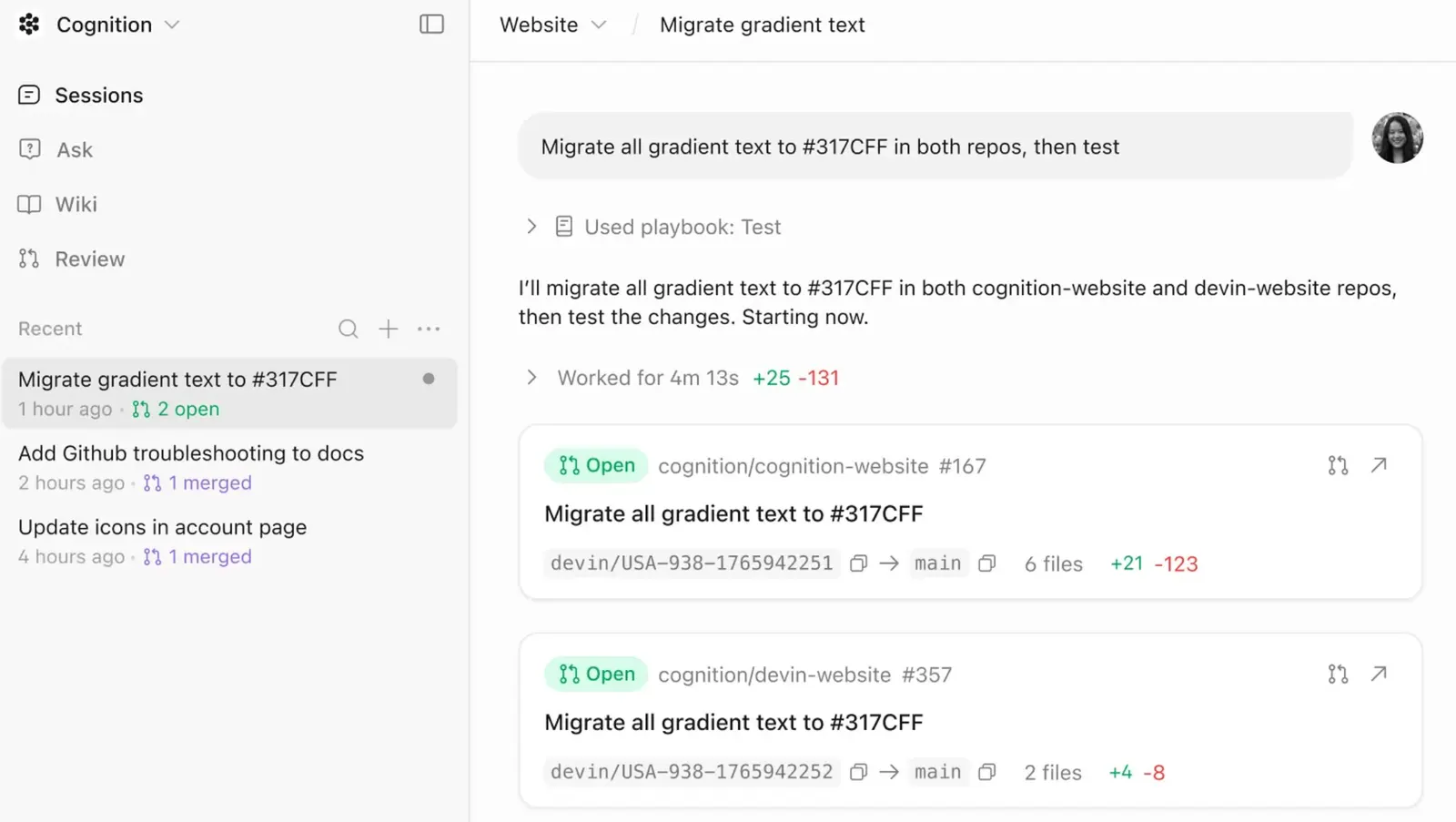
Devin is an autonomous AI software engineering platform developed by Cognition. Unlike a traditional AI coding assistant that mainly suggests code inside an editor, Devin is designed to take responsibility for an entire development task. It can inspect a repository, make a plan, write code, run commands, test its changes, investigate errors, and prepare the resulting work for human review.
Cognition describes Devin as an autonomous AI software engineer built to help engineering teams work through real software backlogs. Its capabilities include refactoring code, fixing bugs, handling user requests, writing unit tests, reproducing bugs, reviewing pull requests, and building internal tools.
The distinction is important. Devin is not simply an AI chatbot inside an IDE. It is closer to assigning a software task to an AI engineering teammate that works inside a controlled development environment and reports the result back to you.
Devin has evolved considerably since its original launch. The current product includes cloud-based sessions, parallel agents, scheduled work, code review, integrations, knowledge about a company's codebase, and local development through Devin Desktop and Devin CLI.

🧠 How Devin Actually Works
A useful way to understand Devin is to think of it as a combination of an AI model, a development environment, and an agentic workflow.
When you give Devin a task, it can first inspect the relevant repository and understand the existing implementation. It then determines what needs to change, edits files, uses the terminal, runs tests, investigates failures, and continues working until it reaches a usable result or needs human input.
Each Devin session operates in its own working environment. This is important because the agent is not merely returning suggested code in a chat window. It has a place where it can actually create files, run builds, execute tests, inspect output, and iterate on the implementation.
That makes Devin particularly useful when the difficult part is not writing one function, but figuring out where the change belongs and how it affects the rest of the application.
🛠️ What Can Devin Do?
💻 Write and Modify Code
Devin can create new code and modify existing code across a repository. You can describe the desired change in ordinary language instead of manually specifying every file that needs to be changed.
🐛 Investigate and Fix Bugs
Give Devin an error message, failing test, issue, or reproduction case and ask it to investigate. It can trace the relevant code, reproduce the problem, identify a likely cause, make a fix, and run tests to verify the result.
🧪 Write and Run Tests
Testing is an important part of Devin's workflow. It can create unit tests, execute existing test suites, inspect failures, and make additional changes when the implementation does not behave as expected.
🔄 Refactor Existing Systems
Devin can help with repetitive refactoring work such as updating APIs, changing patterns across multiple files, migrating code, cleaning up technical debt, and modernizing older implementations.
🔍 Review Pull Requests
Devin can review pull requests and identify potential problems. This is useful for teams that want another layer of automated review before code reaches production.
🏗️ Build Internal Tools
Internal dashboards, automation scripts, administrative interfaces, data utilities, and other small engineering projects are a natural fit. These tasks can otherwise consume valuable developer time even though they are not the company's primary product.
📋 Handle Backlog Tasks
One of Devin's more interesting use cases is taking relatively well-defined engineering tickets from a backlog and working on them without requiring a developer to sit in front of the computer for the entire process.
🚀 Devin's Biggest Advantage: Independent Task Execution
The strongest reason to use Devin is not simply that it writes code quickly. Modern coding assistants can already do that.
The more meaningful advantage is delegation.
Instead of asking an AI one question at a time, you can give Devin a complete engineering objective and let it work through multiple steps.
"Investigate why users are receiving intermittent 500 errors from the billing endpoint. Reproduce the problem, identify the root cause, implement a fix, add a regression test, and open a pull request with a summary of the changes."
That is much closer to an engineering assignment than a conventional coding prompt.
For teams with a large backlog of small and medium-sized engineering tasks, this difference can be significant.
☁️ Devin Cloud and Parallel Engineering
Devin's cloud environment is designed around long-running development sessions. You can start work and allow Devin to continue working while you focus on another task.
Multiple Devin sessions can also work in parallel. For example, one agent can investigate a backend bug while another handles a frontend ticket and another reviews a pull request.
This changes the way teams can use AI in development. Instead of using AI only when a developer is actively typing, a team can delegate several independent tasks and review the results as they become available.
The approach works best when tasks can be separated cleanly. Sending several agents into the same complicated part of a codebase at the same time can create conflicts and unnecessary review work.
🧩 Devin's Codebase Knowledge and Context
Devin can retain and use information about a company's codebase and engineering practices. This can help it work with project-specific conventions that would otherwise need to be explained repeatedly.
This is useful for mature engineering teams because the hardest part of many software tasks is not syntax. It is knowing things such as which service owns a particular feature, which database table should be used, which deployment process is required, or which internal convention the team follows.
The more useful context Devin has, the less time developers need to spend explaining the same project rules repeatedly.
🔌 Integrating Devin Into Existing Development Workflows
Devin is designed to fit into existing development workflows rather than forcing a team to move everything into a separate application.
It can connect with development platforms and collaboration tools, including GitHub, GitLab, Slack, and other services. Devin can also work with tools through MCP-based integrations when properly configured.
Slack integration is particularly useful for teams that already discuss bugs and engineering tasks in chat. A developer can provide a problem to Devin and have it start a development session, investigate the issue, and return with its findings or a pull request.
This makes Devin more practical for teams that already manage engineering work through tickets, pull requests, and collaboration tools.
🌎 Devin's Position in the Global AI Coding Market
Devin became one of the most visible products in the AI software engineering category after Cognition introduced the idea of an autonomous AI software engineer. The product attracted significant attention because it moved the conversation beyond code completion toward autonomous task execution.
Today, Devin operates in a rapidly changing market that includes AI coding environments, coding agents, autonomous development platforms, and AI-enhanced IDEs. Products such as GitHub Copilot, Cursor, Windsurf, Claude Code, and other agent-based tools increasingly overlap with parts of Devin's workflow.
That means Devin should not be evaluated simply by asking whether it can write code. The more relevant comparison is how well it handles an entire engineering task from investigation through implementation and verification.
Cognition's current product direction is heavily focused on engineering teams and complex development work, rather than positioning Devin as merely a beginner's coding assistant.
🧑💻 How to Use Devin Step by Step
Step 1: Create an Account
Create a Devin account and choose the appropriate plan. The free tier allows users to test the product before committing to paid usage.
Step 2: Connect Your Code Repository
Connect the GitHub or GitLab repositories that Devin needs to work with. Depending on your organization's setup, administrators can control repository access and permissions.
Step 3: Configure the Development Environment
Make sure Devin has the required dependencies, environment configuration, commands, and testing instructions. A poorly configured development environment can make even a capable agent look unreliable.
Step 4: Give Devin a Specific Task
Describe the objective, expected behavior, relevant constraints, and definition of done. The better the task description, the less time Devin will spend guessing what you meant.
Step 5: Let Devin Investigate
For anything beyond a trivial change, allow Devin to inspect the repository before jumping directly into implementation.
Step 6: Review the Result
Review the code changes, tests, logs, and pull request. If something is wrong, give Devin specific feedback and let it iterate.
Step 7: Merge Only After Verification
Do not treat "Devin says it is fixed" as proof. Run the appropriate tests and, for important applications, perform human review before merging.
💡 How to Write Better Devin Tasks
The quality of the task description has a noticeable effect on autonomous coding agents.
Instead of writing:
"Fix the login."
Give it something closer to:
"Users are occasionally redirected to the login page after refreshing the dashboard. Investigate the authentication flow, reproduce the problem, identify the root cause, and fix it without changing the existing session expiration policy. Add a regression test and verify the existing authentication tests still pass."
The second instruction gives Devin a target, a suspected area, a constraint, and a definition of completion.
For larger projects, it is also useful to tell Devin which files, services, tickets, documentation, or previous decisions are relevant.
🎯 Best Practices for Reliable Results
Start With Well-Defined Work
Devin works best when the objective can be described clearly. Bug fixes, test coverage, migrations, refactoring, small features, and well-scoped product tasks are usually easier to delegate than vague architectural projects.
Give It a Definition of Done
Tell Devin what must be true when the task is complete. This could include passing tests, a working API endpoint, a pull request, documentation, or a specific user behavior.
Provide Constraints
Tell the agent what it must not change. This is especially important for database schemas, authentication systems, public APIs, payment logic, and production infrastructure.
Ask for Tests
If Devin changes business logic, ask for regression tests. A code change without verification is much less useful than one accompanied by evidence that the expected behavior works.
Keep Tasks Independent
Parallel agents work best when their tasks do not constantly modify the same files. Split work around clear boundaries whenever possible.
Review the Diff, Not Just the Summary
AI agents are good at producing convincing explanations. The code itself is what matters. Review the actual diff, especially around authentication, permissions, database operations, and payment-related functionality.
💰 Is Devin Free? Pricing and Plans
Yes. Devin offers a free plan as well as paid plans. The current self-serve lineup includes Free, Pro, and Max, while teams and larger organizations have additional options.
- Free — $0/month: Designed for users who want to try Devin with a limited usage allowance.
- Pro — $20/month: Provides a larger included quota and access to additional models and capabilities.
- Max — $200/month: Intended for heavy individual users who need substantially more usage.
- Teams: Designed for engineering teams that need shared administration, collaboration, and centralized management.
- Enterprise: Custom pricing for organizations requiring advanced security, administration, support, and deployment options.
Devin's billing model combines an included usage allowance with additional usage options. The amount of work Devin can perform depends on the plan, model, and complexity of the tasks being executed.
This is important when evaluating the cost. A monthly subscription should not be interpreted as unlimited autonomous software engineering. Long-running tasks involving repeated builds, tests, debugging, and multiple iterations can consume significantly more resources than simple code changes.
💵 Understanding Devin's Usage-Based Costs
The cost of an autonomous coding task depends on the amount of work Devin has to perform. A simple modification may consume relatively little usage, while a complicated debugging session can require multiple model calls, terminal commands, builds, tests, and iterations.
This means companies should evaluate Devin based on the amount of useful engineering work completed rather than simply looking at the monthly subscription price.
For example, if Devin completes a repetitive engineering task that would normally take a developer several hours, the subscription can be easy to justify. If the agent repeatedly fails and requires extensive human correction, the economics become much less attractive.
🖥️ Do You Need to Install Devin?
Not necessarily. The main Devin experience is cloud-based, so you can use Devin without installing a traditional desktop IDE.
For developers who want local development workflows, Cognition also provides Devin Desktop and Devin CLI. Devin Desktop provides a local interface for working with coding agents, while the CLI allows developers to interact with Devin from a terminal-based workflow.
This gives developers more flexibility: cloud sessions are useful for delegated work, while local tools are better suited to developers who want to stay closer to their existing development environment.
🧪 Tasks That Are a Good Fit for Devin
Devin tends to be most useful when a task has a clear objective but still requires several engineering steps.
- Fixing reproducible bugs
- Adding regression tests
- Refactoring repetitive code
- Updating dependencies
- Migrating APIs
- Building internal tools
- Implementing relatively self-contained features
- Investigating failing tests
- Reviewing pull requests
- Generating technical documentation from a codebase
- Handling repetitive engineering backlog items
These tasks have something in common: there is a reasonably clear definition of success.
🚧 Where Devin Can Struggle
Complex Architecture Decisions
An agent can propose an architecture that looks reasonable but does not fit the long-term requirements of the product. Humans still need to make major architectural decisions.
Ambiguous Requirements
If the ticket itself is unclear, Devin can spend a lot of time solving the wrong problem. AI does not magically remove ambiguity from poorly defined product requirements.
Large Legacy Codebases
Older systems can contain undocumented behavior, hidden dependencies, inconsistent conventions, and fragile integrations. Devin may need more context and supervision in these environments.
Long Debugging Sessions
An agent can sometimes get trapped in a loop: change code, run tests, encounter another failure, make another change, and repeat. When this happens, human intervention is usually more efficient than simply allowing the session to continue.
Production-Critical Changes
Anything involving authentication, authorization, payments, customer data, infrastructure, or security deserves careful human review even when Devin appears confident about the result.
🔐 Security and Enterprise Considerations
Devin is intended for real engineering work, so security becomes much more important once it is connected to private repositories and internal systems.
Enterprise customers may require controls around repository access, authentication, data retention, deployment architecture, and organizational permissions. Before connecting Devin to a production organization, teams should understand exactly which repositories, secrets, services, and external integrations the agent can access.
Teams should also apply the same security principles they would use with human developers: use least-privilege access, protect secrets, review changes, and avoid giving an AI agent unnecessary permissions.
🔄 Devin Compared With Traditional AI Coding Assistants
| Capability | Traditional AI Assistant | Devin |
|---|---|---|
| Code autocomplete | Strong | Available through its development tools |
| Chat-based coding help | Common | Yes |
| Multi-file editing | Increasingly common | Core workflow |
| Run commands | Depends on the product | Yes |
| Run tests | Depends on the product | Core capability |
| Long-running tasks | Limited | Major focus |
| Parallel agents | Varies | Supported |
| Pull-request workflow | Varies | Strong focus |
| Cloud development environment | Varies | Core part of Devin |
The practical difference is autonomy. A conventional assistant often waits for the developer to ask the next question. Devin is designed to continue working through the task itself.
🆚 Devin vs. Windsurf and Cursor
Devin, Windsurf, and Cursor increasingly overlap, but they approach the problem from different starting points.
Cursor is primarily an AI-first code editor. Windsurf has emphasized AI-native editing and agent workflows. Devin is more explicitly positioned as an autonomous software engineer that can work independently in cloud environments.
The difference becomes especially noticeable when you delegate work for an extended period. A developer using an AI editor may remain actively involved in the editing process, while Devin is designed to take a task and continue working until it has a result or needs assistance.
That does not make Devin automatically better. Developers who prefer to stay inside their editor and control every change may prefer an AI-native IDE. Teams with a large backlog of well-defined tasks may get more value from Devin's autonomous workflow.
👥 Who Should Use Devin?
🏢 Software Engineering Teams
Devin makes the most sense for teams that already have a software development process and want to delegate repetitive engineering work.
🚀 Startups
Small teams can use Devin to increase engineering capacity without immediately adding another full-time developer for every backlog item.
🧑💻 Experienced Developers
Senior developers may benefit the most because they can define good tasks, recognize incorrect implementations quickly, and review AI-generated changes efficiently.
🛠️ Engineering Managers
Managers can use Devin for backlog cleanup, repetitive maintenance, testing, documentation, and other work that often competes with higher-value engineering projects.
🎓 Beginners
Beginners can use Devin to learn, but it should not become a substitute for learning programming fundamentals. If you cannot understand the code Devin produces, you are not in a good position to maintain it safely.
⚠️ Common Devin Problems and Practical Solutions
1. Devin Takes the Wrong Approach
Stop the session and explain the constraint rather than repeatedly asking it to "try again." A clear correction is usually more useful than another vague instruction.
2. The Agent Changes Too Many Files
Ask it to minimize the scope of the change and avoid unrelated refactoring. This makes the resulting pull request easier to review.
3. Tests Pass but the Feature Is Still Wrong
Tests only verify what they cover. If the requirements are not represented in the tests, Devin can technically pass every test while still implementing the wrong behavior.
4. Devin Uses Too Much Usage
Large models, long sessions, repeated retries, extensive repository context, and repeated test runs can increase consumption. Break large tasks into smaller units when possible.
5. Devin Gets Stuck
Give it the exact error output and explain what you observed. If it has already tried several approaches, consider resetting the task with a clearer diagnosis rather than letting it continue indefinitely.
📈 How Businesses Should Measure Devin
Counting how many lines of code Devin generates is a poor way to measure its value.
A better measurement system looks at:
- Engineering hours saved
- Tasks completed without direct developer intervention
- Pull requests successfully merged
- Time from ticket creation to completed pull request
- Number of review iterations required
- Regression or defect rate
- Cost per successfully completed engineering task
This is especially important because an AI agent that produces a lot of code but requires extensive human cleanup may not actually increase productivity.
The goal is not to maximize AI activity. The goal is to increase the amount of useful software the engineering team can ship.
🏁 Is Devin Worth Using?
Devin is one of the more ambitious AI development tools because it is trying to automate an entire slice of software engineering rather than simply make developers type faster.
Its strongest use case is well-defined engineering work that normally takes a developer several hours: investigating a bug, implementing a contained feature, writing tests, refactoring code, reviewing a pull request, or handling repetitive maintenance.
It is less convincing when the task requires deep product judgment, complex architecture decisions, unclear requirements, or extensive knowledge of business context that has not been provided to the agent.
The current pricing model also means that businesses should evaluate Devin based on completed engineering work rather than the monthly subscription alone. A relatively inexpensive plan can be valuable if it eliminates several hours of repetitive work, but expensive if the agent spends its allowance repeatedly fixing its own mistakes.
The most realistic way to think about Devin is not as a replacement for programmers. It is a new layer of engineering capacity: an AI teammate that can take clearly defined work, operate independently for a while, and return something a human developer can review and ship.

Comments