

Dzine AI Review: Features, Pricing, Use Cases, and Alternatives
Dzine AI is an AI-powered creative platform for generating images, editing existing visuals, designing characters, and producing videos. Its biggest selling point is creative control. Instead of relying entirely on text prompts and hoping for a good result, users can guide composition, adjust individual elements, reuse visual styles, and refine images through multiple editing tools.
This makes Dzine worth considering for designers, content creators, marketers, and anyone who regularly produces visual content. This review covers its main features, practical applications, pricing, limitations, and how it compares with tools such as Midjourney, Adobe Firefly, and Canva.
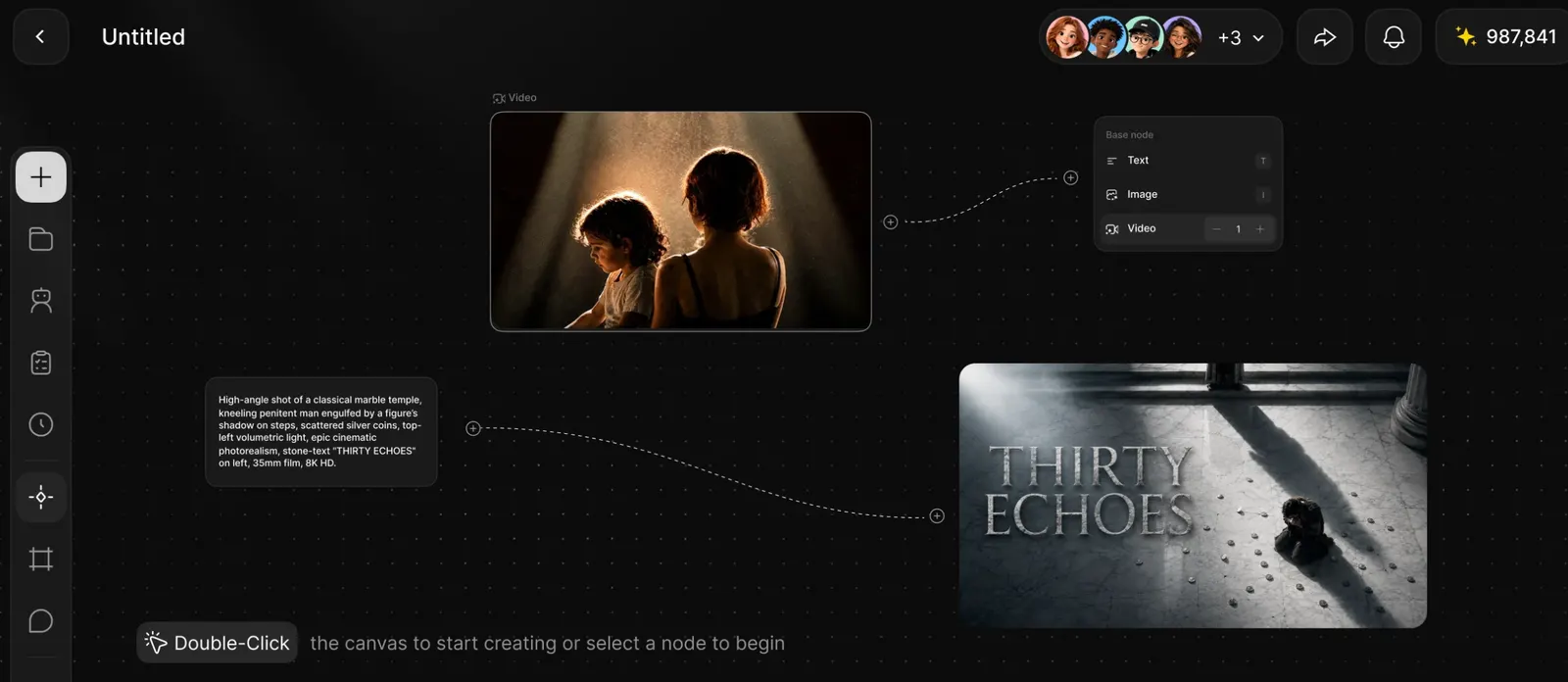
🎨 What Is Dzine AI?
Dzine AI is an AI image and video creation platform operated by SeeKoo LLC, according to its terms of service. The product focuses on helping users generate and edit visual content through a combination of generative AI models and hands-on creative controls.
The platform has developed beyond a basic text-to-image generator. Its toolkit includes AI image generation, image-to-image transformation, local image editing, background removal, character tools, video generation, lip-sync features, and image enhancement. The exact tools available depend on the user's subscription and the current product lineup.
A precise original launch date is not clearly established in the company's publicly available information reviewed for this article, so assigning a specific date without stronger evidence would be misleading. What is clear is that Dzine has evolved from an AI image and design tool into a broader creative workspace.
The problem Dzine tries to solve is familiar to anyone who has used an AI image generator for real work: getting an attractive first image is one thing, but getting the right image is another. A generated character may look different from one scene to the next, a product may appear in the wrong position, or an otherwise good image may contain an unwanted object. Dzine provides tools to guide and correct these details instead of forcing users to start over every time.
In practical terms, Dzine is best understood as an AI-assisted visual production tool. It helps users turn an idea, reference image, sketch, or existing design into something more usable for a project.
⚙️ 10 Key Features of Dzine AI
1. 🖼️ Text-to-Image Generation
Users can describe a scene, object, character, or design in natural language and generate an image from the prompt. You can specify the subject, setting, lighting, mood, camera angle, color palette, and artistic style.
This is useful for concept art, social media graphics, advertising ideas, illustrations, mood boards, and early-stage design exploration. The quality of the result still depends on the prompt, selected model, and clarity of the description.
2. 🔄 Image-to-Image Transformation
Image-to-image generation lets users upload an existing visual and use it as a starting point for a new result. Rather than describing every detail from scratch, users can preserve parts of the original composition while changing the style, appearance, or other visual elements.
This can be useful when the original layout matters. A designer can start with a rough sketch or reference image and guide the AI toward a more polished result.
3. 🎭 Character Consistency Tools
Keeping a character recognizable across multiple images is a common challenge in AI illustration. Dzine offers character-related tools that help users build reusable visual references and generate characters in different scenes, poses, or outfits.
This is useful for comics, storyboards, children's illustrations, game concepts, branded mascots, and recurring characters in social content. Consistency is not automatic in every situation, so reference images and repeated testing may still be necessary.
4. ✂️ Local Editing and Object Insertion
Local editing allows users to change a specific area of an image instead of regenerating the entire composition. Depending on the editor and model, users can add an object, modify a selected region, or replace a detail while keeping the rest of the image relatively stable.
For example, a marketer might want to change the background of a product image without changing the product itself. A designer might want to add an accessory to a character without recreating the entire scene.
5. 🧹 AI Eraser and Background Removal
The AI eraser can remove unwanted objects or visual distractions, while background removal helps separate a subject from its surroundings. These tools are useful for cleaning up product photography, preparing portraits, removing clutter, and creating images for online stores or promotional materials.
Results vary with image complexity. Fine hair, transparent materials, overlapping objects, and complicated edges may require additional editing.
6. 🎨 Style Transfer and Custom Styles
Dzine offers style controls that help users create visuals with a more consistent look. Depending on the feature, creators can select predefined styles or save reusable styles for recurring projects.
This is helpful for brands that need multiple graphics to share a similar visual identity, or illustrators who want to develop a recognizable look across a series of images. Reusable styles can also reduce the need to rewrite a long style description for every generation.
7. 🎬 AI Video Generation
Dzine's creative toolkit includes AI video generation from text or images, with supported models and options varying by plan. Users can turn a visual idea into a short moving sequence or animate a still image for a social media post, concept video, or creative presentation.
AI video is useful for rapid experimentation, but it is not a guaranteed replacement for conventional video production. Motion consistency, character details, timing, and scene continuity may require several attempts.
8. 🗣️ Lip Sync and Face Tools
Dzine includes lip-synchronization and face-related tools. These features can help creators produce talking-character clips, dialogue-based content, or visual variations for video projects.
They may be useful for explainers, entertainment content, character animation, and some marketing workflows. When using a real person's face or voice, make sure you have the necessary permission and disclose synthetic content when appropriate.
9. ✨ Image and Video Enhancement
Enhancement and upscaling tools can improve the apparent quality or resolution of generated visuals. Depending on the plan and source material, users may have access to different enhancement levels, including higher-resolution exports.
This can help when an image needs to be used in a larger layout or when a creative asset needs a cleaner finish. Upscaling cannot reliably restore every missing detail, however, and may sometimes invent texture rather than recover original information.
10. 📦 Asset Management and Creative Workflow Tools
Dzine provides ways to organize and reuse creative assets, including saved images, characters, and styles. Its broader creative workspace also supports connected image and video workflows, rather than treating every generation as an isolated task.
For people working on recurring campaigns, character series, or client projects, this can be more useful than a tool that only generates one image at a time. Higher-tier plans may provide more storage, more saved assets, and additional concurrent jobs.
🌟 What Makes Dzine AI Stand Out?
More Control Than a Simple Prompt Box
Many AI image generators work mainly through prompts: describe what you want, generate a few results, and keep trying until one is close enough. Dzine also supports reference images, canvas-based composition, local edits, and other ways to steer the result.
That distinction matters when a visual has to meet a brief. If the subject must stay in a particular position, the product needs to remain recognizable, or several images need to share a common look, creative control can save time.
Generation and Editing in the Same Workflow
Dzine combines image generation with tools for fixing, adjusting, and enhancing the result. Instead of exporting every draft to a separate editor, users can perform many routine changes within the same platform.
It will not replace every professional image editor, but it can reduce the number of applications needed for everyday AI-assisted design work.
Useful for Repeated Visual Content
Dzine's character and style features are particularly relevant when a project requires a series of related images. Think of a mascot appearing in different settings, a group of illustrations with the same visual treatment, or a product campaign that needs multiple variations.
These tools do not guarantee perfect consistency, but they offer more ways to guide it than a workflow that depends only on independent text prompts.
A Broad Set of Creative Models and Tools
Dzine brings multiple AI image and video capabilities into one workspace. This can be convenient for creators who want to experiment with different models without managing separate subscriptions for every task.
The trade-off is that not every model or feature is available on every plan, and credit costs can vary considerably between operations.
Designed for Visual Production, Not Just Experimentation
The platform is aimed at people who need to move from a rough idea to a usable asset. Image editing, saved styles, reusable characters, enhancement, and video tools make it more relevant to ongoing creative work than a generator used only for occasional inspiration.
💼 Practical Use Cases for Dzine AI
Graphic Design and Illustration
Designers can generate concept art, explore different styles, create illustrations, test compositions, and produce variations for client discussions. Dzine is particularly useful in the early and middle stages of a project, when the goal is to explore options quickly before finalizing the design.
Marketing and Social Media
Marketing teams can create campaign concepts, social graphics, promotional visuals, and short AI-generated clips. A reusable style can help keep a campaign visually coherent, while image editing tools make it easier to adapt an asset to a new format or message.
E-commerce and Product Images
Online sellers can experiment with product backgrounds, lifestyle scenes, and promotional imagery. Background removal and local editing can also help prepare product visuals for different layouts.
For actual product listings, accuracy matters more than visual drama. Check that the AI has not altered the product's shape, color, material, logo, or important features before publishing an image.
Character Design and Storyboarding
Writers, illustrators, game developers, and video creators can use Dzine to develop characters, explore outfits and expressions, and generate visual references for scenes. Character tools can help maintain a more recognizable appearance across a sequence.
Short-Form Video and Animation Concepts
Creators can use text-to-video or image-to-video tools to build short visual sequences for TikTok, Instagram Reels, YouTube Shorts, and other content formats. These clips can work well for concept testing, visual hooks, and lightweight promotional content.
Presentations and Internal Business Content
Teams can generate custom illustrations, campaign mockups, and visual concepts for presentations. This is useful when stock imagery feels too generic or when a project needs a visual direction before a designer commits to a polished version.
Education and Personal Creative Projects
Students and hobbyists can experiment with visual storytelling, illustration styles, character creation, and basic design concepts. The platform lowers some technical barriers, although users still need to learn how to give clear instructions and judge the quality of the results.
What Dzine is not primarily for: It is not a general-purpose chatbot, a coding assistant, or a dedicated long-form writing tool. Its core strength is visual content.
🧭 How to Use Dzine AI: A Step-by-Step Guide
Step 1: Create an Account
Open the Dzine web platform and register using one of the sign-in options currently offered. Check the account terms and available free credits before starting a large project.
Step 2: Sign In and Open a Creative Tool
After logging in, choose the tool that matches your goal. For a new illustration, start with text-to-image. To restyle an existing picture, use image-to-image. For a small correction, look for a local editing or eraser tool. If the project requires motion, choose an available video workflow.
Step 3: Write a Clear Prompt
Describe the main subject, the environment, the composition, the lighting, and the visual style. Avoid relying on a long list of vague adjectives. A concise description of what must appear in the image is often more useful than a paragraph full of words such as "beautiful," "amazing," and "professional."
Step 4: Add a Reference Image When Needed
If you already have a rough sketch, product photo, character reference, or layout in mind, upload it when the selected tool supports reference images. A visual reference can communicate composition and appearance more clearly than text alone.
Step 5: Generate and Compare Variations
Generate a small batch of options and compare them against the brief. Look at the details that actually matter: subject placement, proportions, background, colors, text legibility, and overall consistency. Do not choose an image solely because it looks impressive at first glance.
Step 6: Refine the Best Result
Use local editing, object insertion, background removal, or other available tools to correct specific problems. If the main composition is already good, targeted changes are usually more efficient than repeatedly generating a completely new image.
Step 7: Enhance and Export
When the visual is ready, use the appropriate enhancement or export option. Check the resolution and file format required by your destination. Social media, web pages, print layouts, and video projects may all need different output specifications.
Step 8: Review Rights and Final Details
Before publishing or delivering the asset, check for unwanted artifacts, incorrect product details, accidental text, and potential rights issues. If the image includes recognizable people, trademarks, or third-party reference material, make sure your intended use is permitted.
💡 Tips for Getting Better Results With Dzine AI
Describe the Image in a Useful Order
A practical prompt structure is: subject, action or pose, setting, composition, lighting, color palette, and visual style.
For example: "A matte black skincare bottle on a pale stone pedestal, centered in the frame, soft daylight from the left, subtle beige background, premium minimalist product photography, clean shadows, generous negative space."
This gives the model a clear subject and layout rather than relying on a collection of disconnected style words.
Separate Must-Haves From Nice-to-Haves
Decide which elements cannot change. For a product image, that might be the bottle shape, label, and brand color. For a character, it might be the hairstyle, clothing, and facial features. Use references and editing tools to protect those details wherever possible.
Use Image References for Composition
If the layout matters, do not expect text alone to reproduce it precisely. A rough sketch or reference image can help communicate subject placement, proportions, and the relationship between elements.
Make One Important Change at a Time
When an image is almost right, avoid changing the subject, style, lighting, and background in one request. Ask for one specific adjustment first. This makes it easier to see whether the change helped or introduced a new problem.
Build a Reusable Style
For a recurring project, keep a record of successful prompts, reference images, and style settings. If your plan supports saved or trained styles, use them to make future generations more consistent. This is especially useful for brand content and character series.
Keep an Eye on Credit Consumption
Different models and operations can consume very different amounts of credits. A simple variation may cost much less than a high-resolution generation or advanced video operation. Test the composition at a lower-cost setting first when possible, then spend more credits on the final version.
Inspect the Image at Full Size
AI artifacts can be easy to miss in a thumbnail. Before publishing, zoom in on faces, hands, product labels, edges, and background details. If the image contains text, check every character manually.
Use the Right Tool for the Problem
Use image-to-image when the original composition should remain recognizable, local editing when only one region needs to change, background removal when isolating a subject, and enhancement when the image is already good but needs a cleaner export. Choosing the right operation can save both time and credits.
💻 Installation and Platform Availability
Web Browser
The main Dzine experience is available through a web browser. This is the most straightforward way to access its image and video creation tools on a computer, and it does not require users to install a traditional desktop graphics application.
Windows and macOS
Windows and Mac users can access the web platform through a compatible browser. A dedicated native desktop application is not required for the core browser workflow. If you encounter a separate application advertised under the Dzine name, verify the developer and product identity before installing it.
iOS and Android
Mobile availability needs extra care. App stores may contain applications using the Dzine AI name that are published by third-party developers rather than the operator of the main Dzine web platform. Do not assume that an app with a similar name is the official mobile version.
Before installing a mobile app, verify the publisher, privacy policy, subscription terms, and whether the app connects to the same account and services as the web product. Confirm current availability through reliable product documentation rather than inferring it from an unrelated listing.
Browser Extensions
Dzine's main creative workflow does not require a browser extension. If an extension claims to provide Dzine functionality, check its publisher and permissions carefully before installing it.
Practical recommendation: Start with the web version. It is the clearest way to evaluate the platform without accidentally signing up for a separate app with different pricing or terms.
💰 Dzine AI Pricing: Free, Paid, and Team Plans
Dzine uses a credit-based pricing model for many AI operations. Users receive a certain number of credits with a subscription, and different models or tools deduct different amounts. As a result, the number of images or videos you can create depends not only on the plan but also on the models, resolution, and features you choose.
Free Access
New free users have been offered 100 credits after sign-up. Free access is useful for exploring the interface and testing a few workflows, but it is not designed for unlimited production. The platform's FAQ has also stated that free-plan generations may be public or eligible to appear in the community feed, while private generation is available to subscribers. Check the current terms before uploading sensitive material.
Beginner Plan
The Beginner plan has been listed at $8.99 per month when billed monthly, with an annual billing option shown at an effective $7 per month, or $84 billed annually. A limited-time first-month offer may also appear.
The listed allowance is 1,000 credits per month. This can suit casual creators or people who are still learning the platform, but high-cost video and advanced editing operations can use the allowance quickly.
Creator Plan
The Creator plan has been listed at $24.99 per month on monthly billing, or an effective $20 per month with annual billing, totaling $240 per year. It includes 6,000 credits per month and additional features such as credit rollover, according to the published plan comparison.
This is the more relevant tier for freelancers, content creators, and designers who use Dzine regularly and want more room to iterate.
Master Plan
The Master plan has been listed at $59.99 per month with monthly billing, or an effective $50 per month when billed annually, totaling $600 per year. It includes 9,000 monthly credits and broader access to image models under the platform's fair-use policy, including unlimited-image allowances for certain models as specified by the plan.
This tier may make sense for frequent users who generate a high volume of images or need more storage and concurrent jobs. The exact meaning of "unlimited" is governed by the plan's fair-use terms and should not be interpreted as unlimited use of every operation.
Master Pro Plan
The Master Pro plan has been listed at $149.99 per month with monthly billing, or an effective $120 per month when billed annually, totaling $1,440 per year. It includes 30,000 credits per month, larger asset storage, more concurrent jobs, and broader allowances for selected image and video features.
This is a high-cost option intended for people with substantial creative production needs. Casual users are unlikely to need it.
Team and Enterprise Use
Dzine promotes team-oriented workflows, including shared projects, member management, asset organization, and credit oversight. Organizations should check the current team offer or contact the company for a quote rather than assuming that an individual subscription includes all collaboration and administration features.
Extra Credits and Credit Rollover
Published pricing information has described credit top-ups for eligible Creator plans and above, with examples of $10 for 2,000 additional credits, $20 for 4,000, and $50 for 10,000. Unused subscription credits may roll over for up to three months on eligible plans, while the Beginner plan does not offer the same rollover allowance. Top-up credits follow separate validity rules.
Pricing summary: These figures reflect previously published plan information and are not a guarantee of the price you will see at checkout. Promotional offers, regional pricing, feature access, credit costs, and plan names can change. Check the current plan comparison and terms before paying.
🌎 Global Usage and Popularity
Dzine has an international audience of creators, designers, marketers, and people experimenting with AI-generated visual content. Its tools are relevant to several global markets where AI image and video production is becoming part of everyday content work.
Dzine's own marketing has stated that the platform is trusted by more than 5 million creators. This is a company-reported figure and should not be treated as a verified count of monthly active users or paying subscribers.
Third-party website analytics estimated approximately 1.52 million visits to dzine.ai in August 2026, up from about 1.35 million in July and 1.27 million in June. These are estimated website visits, not unique people, downloads, or registered users.
The same August 2026 estimate placed India at around 17.3% of visits, Bangladesh at 16.6%, and the United States at 14.7%, followed by Brazil and Russia. Country rankings can change from month to month, and other analytics providers may report different distributions because of their data sources and methods.
There is no sufficiently reliable public figure for the total number of Dzine mobile downloads across all stores. Since the main platform is web-based, website visits are a more useful public indicator than assuming that app downloads reflect the product's entire user base.
For businesses evaluating the platform, popularity is only one factor. More important questions include whether the current features meet the team's requirements, how predictable credit costs are, and whether the service's usage rights and privacy terms fit the intended workflow.
👥 Who Should Use Dzine AI?
Graphic Designers and Illustrators
Dzine is a strong candidate for designers who need to explore visual directions, edit generated images, work with references, or create related assets. It is especially useful when composition and consistency matter more than generating a single attractive image.
Social Media Managers and Marketers
People responsible for regular content production can use Dzine to create campaign visuals, promotional images, and short videos. It can help teams test more creative concepts without commissioning a fully polished asset for every early idea.
Freelancers and Creative Agencies
Freelancers may benefit from faster concept development and visual iteration. Agencies can use the platform for mood boards, client presentations, draft illustrations, and selected production assets, provided they verify licensing and client requirements.
Video Creators and Animators
Creators who want to experiment with image-to-video, lip sync, or AI-assisted character content may find Dzine useful. It is best suited to workflows where AI-generated clips can be reviewed and refined rather than expected to be perfect on the first attempt.
E-commerce Sellers
Online sellers can use image editing and background tools to produce promotional scenes and alternate product presentations. They should carefully inspect every result to ensure the generated visual does not misrepresent the actual product.
Students and Hobbyists
Students, independent artists, and hobbyists can use Dzine to experiment with illustration, character concepts, and visual storytelling. Free credits offer a starting point, although the credit system means users should be selective about expensive operations.
Who May Not Need It?
Someone who only wants to generate a few decorative images may find a simpler or cheaper image generator sufficient. People who need advanced vector illustration, detailed typography, precise print production, or extensive manual compositing may still need dedicated software such as Adobe Illustrator, Photoshop, or other specialist tools.
⚖️ Dzine AI: Pros and Cons
Advantages
- Useful creative control: Reference images, canvas-based composition, and local editing give users more ways to guide an image than text prompts alone.
- Broad visual toolkit: Image generation, editing, character features, enhancement, and video tools are available within one creative environment.
- Helpful for recurring projects: Reusable styles and character-related features can support more consistent visual series.
- Suitable for rapid iteration: Users can test concepts, correct details, and generate alternatives without rebuilding every asset from scratch.
- Flexible model choices: The platform offers access to multiple image and video models, allowing users to choose according to the task and available plan.
Disadvantages
- Credits can disappear quickly: High-resolution generation, advanced editing, and video operations may consume substantially more credits than simple tasks.
- Results still need supervision: Character consistency, accurate text, complex hands, product details, and video continuity can remain unreliable.
- Pricing can be confusing: Monthly credits, model-specific costs, fair-use limits, rollover rules, and promotional offers make it necessary to calculate the real cost of a workflow.
- Not a complete replacement for professional software: Some projects still require manual editing, precise typography, advanced layer control, or specialized production tools.
🔄 Dzine AI vs. Midjourney, Adobe Firefly, and Canva
Dzine AI vs. Midjourney
Midjourney is well known for producing visually distinctive images and artistic results. It is a strong option when image aesthetics and stylistic exploration are the main priorities. Dzine is worth considering when the workflow also requires more direct editing, composition control, character-related tools, and access to image and video functions in one workspace.
Best fit: Midjourney for users who prioritize its image-generation style; Dzine for users who want generation plus hands-on refinement and a broader creative toolkit.
Dzine AI vs. Adobe Firefly
Adobe Firefly is attractive to creators who already use Adobe applications and want AI features integrated with familiar design workflows. Adobe also provides a broader professional creative ecosystem. Dzine's appeal is its dedicated AI creation environment, including composition-oriented image workflows and a range of image and video tools.
For professional teams, compare the specific features, licensing terms, integrations, and subscription costs rather than assuming that either platform is automatically better for commercial work.
Dzine AI vs. Canva
Canva is built around accessible graphic design, templates, presentations, and publishing workflows. It is often a more direct choice for people who need to assemble social media posts, flyers, slides, and branded layouts quickly. Dzine is more focused on generating and transforming the visual assets themselves.
Best fit: Canva for template-based design and layout production; Dzine for AI-generated imagery, image manipulation, character work, and selected video workflows. Some users may benefit from using both.
Quick Comparison
| Tool | Main Strength | Best Use Case | Pricing Approach |
|---|---|---|---|
| Dzine AI | Image generation, editing control, character tools, and video features | Visual creators who need to generate and refine assets | Free credits plus credit-based paid plans |
| Midjourney | Distinctive AI image generation and artistic styles | Concept art, visual exploration, and stylized imagery | Subscription plans; current pricing should be checked |
| Adobe Firefly | AI creative features within the Adobe ecosystem | Designers and teams using professional creative software | Plan- and credit-based options; current pricing varies |
| Canva | Templates, layouts, presentations, and accessible design tools | Marketing materials, social posts, slides, and everyday graphics | Free and paid plans; AI allowances depend on the plan |
Prices and included features across these products change frequently. The table compares their general positioning, not an exact feature-by-feature guarantee for every subscription tier.
🔐 Commercial Use, Privacy, and Copyright
Before using Dzine for client work or commercial campaigns, review the current terms that apply to your account, the selected model, and the content you generate. Commercial use permissions can depend on the specific tool, plan, and underlying content.
Do not assume that a generated image is automatically free of copyright, trademark, likeness, or other legal concerns. If a design resembles a recognizable brand, character, or real person, review the risk before publishing it. This is particularly important for paid advertising and product packaging.
Privacy also deserves attention. The platform's FAQ has stated that free-plan creations may be public or selected for the community feed, while private generation is available to subscribers. Check the latest settings and terms before uploading confidential client files, unreleased product designs, personal photographs, or other sensitive material.
For business workflows, establish a simple review process: confirm the asset's origin, check the applicable rights, inspect the final result, and keep a record of the prompts and edits where appropriate.
❓ Frequently Asked Questions About Dzine AI
Is Dzine AI free?
Dzine offers free access with a limited credit allowance. New users have been offered 100 credits, but the amount available and the features accessible without payment may change. Paid plans provide larger allowances and additional capabilities.
Can Dzine AI generate videos?
Yes. The platform includes AI video workflows such as text-to-video and image-to-video, with supported models and limits depending on the plan.
Can Dzine AI keep a character consistent across images?
It offers character-related tools and reusable references intended to help maintain consistency. Results still depend on the source material, prompt, model, and scene complexity, so review each generation rather than assuming every detail will remain identical.
Does Dzine AI work on Windows and Mac?
The main platform can be accessed through a compatible web browser on Windows and macOS. A native desktop installation is not necessary for the core web workflow.
Is there an official Dzine AI mobile app?
Mobile app listings using the Dzine AI name may come from separate developers. Verify the publisher and privacy terms before installing an app, and do not assume that a third-party listing is the same service as the main Dzine web platform.
How much does Dzine AI cost?
Published individual plans have included Beginner at $8.99 per month, Creator at $24.99, Master at $59.99, and Master Pro at $149.99 when billed monthly. Annual billing may reduce the effective monthly price. Always confirm the current pricing page before subscribing.
Do Dzine AI credits roll over?
Credit rollover depends on the plan. Published terms have listed no rollover for Beginner and rollover of up to three months for eligible higher plans. Top-up credits follow separate rules.
Can I use Dzine AI images commercially?
Commercial use may be available, but users should check the current terms for the specific plan and model. You are still responsible for evaluating third-party rights, trademarks, likenesses, and other potential restrictions.
Is Dzine AI suitable for beginners?
Yes, beginners can start with text-to-image generation and gradually learn reference-based editing and other tools. The interface offers several creative options, so it may take some experimentation to understand which workflow gives the best result.
Is Dzine AI better than Midjourney?
Neither is universally better. Midjourney is a strong choice for users who prioritize its distinctive image-generation results. Dzine is more compelling when users want a broader set of editing controls, character features, and image-to-video tools in one workspace.
🏁 Final Verdict: Is Dzine AI Worth Using?
Dzine AI is worth trying if your work involves creating, editing, and reusing visual content rather than simply generating a single image. Its most practical advantage is the combination of image generation with tools that help users control composition, fix local details, manage character and style references, and experiment with video.
For designers, freelancers, marketers, and content creators, the platform can speed up concept development and reduce repetitive editing. It is especially useful when a project needs several related images or when the first AI-generated result is close but not quite right.
There are two things to consider before paying. First, the credit system makes costs dependent on the actual workflow, so estimate how many generations, edits, and video operations you expect to run each month. Second, do not expect AI to handle every finishing detail. Text, product accuracy, character consistency, and complex visual elements still need human review.
Our verdict: Dzine AI is a good fit for creators who want more control over AI-generated visuals and prefer having several image and video tools in one workspace. Start with the free credits, test one real project from beginning to end, and upgrade only if the editing controls and monthly allowance justify the cost. If you mainly need templates and polished layouts, Canva may be simpler. If your priority is a specific image-generation aesthetic, Midjourney may be the better starting point.
Comments