

📱 What Is FeedHive?
FeedHive is an AI-powered social media management platform designed to help creators, marketers, and small teams create, schedule, publish, recycle, and analyze social media content more efficiently. It was launched in 2016 and has positioned itself as a modern alternative to traditional scheduling tools by combining AI writing assistance, smart publishing, content recycling, and workflow automation.
Unlike basic schedulers that only let you queue posts, FeedHive focuses on helping users get more value from every piece of content. It supports multiple social platforms, provides AI-generated post ideas, suggests optimal publishing times, and allows teams to manage accounts, comments, and performance data from one dashboard.
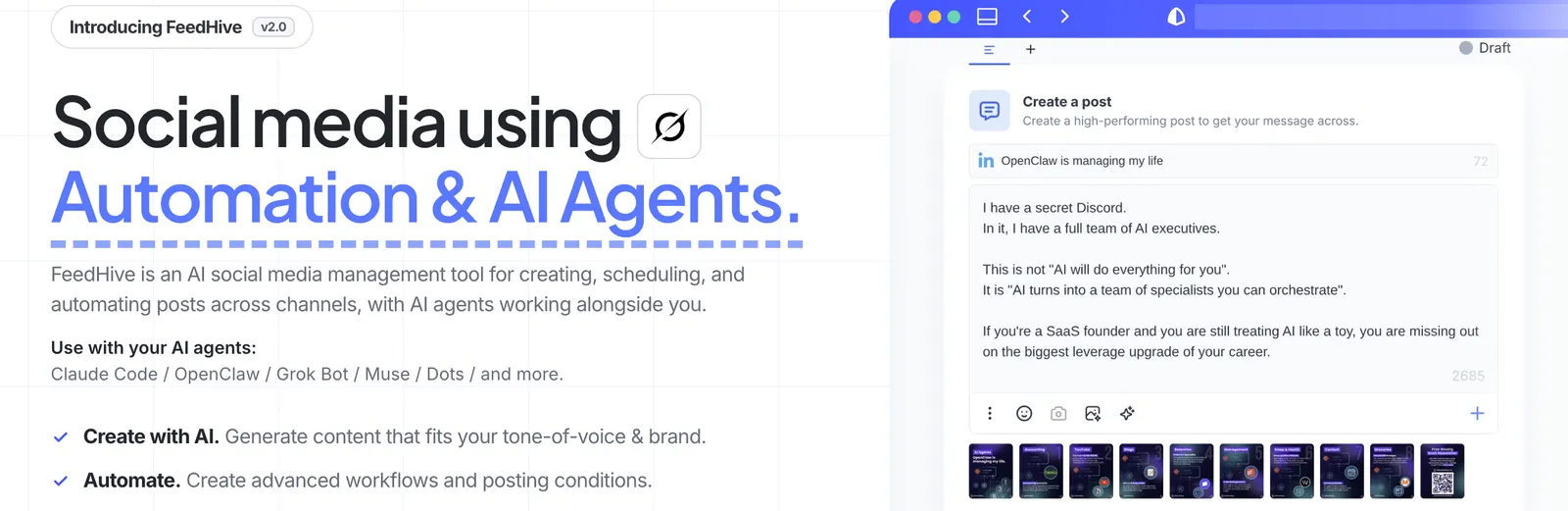
⚙️ Core Features
- AI Writing Assistant: generates post ideas, rewrites captions, adjusts tone, and helps overcome writer’s block.
- Smart Scheduling: recommends publishing times based on past audience engagement and platform behavior.
- Content Recycling: automatically identifies high-performing posts and suggests reposting them at optimal intervals.
- Conditional Automation: triggers follow-up actions when posts reach certain engagement thresholds, such as adding comments, links, or reminders.
- Social Inbox: consolidates comments, replies, and mentions across connected accounts.
- Team Collaboration: supports workspaces, approval workflows, and multi-member access.
- Analytics Dashboard: tracks post performance, audience growth, engagement trends, and platform-level results.
- Post Templates: provides reusable templates for faster content creation across platforms.
- Hashtag Management: helps organize and reuse hashtag groups for different content categories.
- Visual Content Calendar: displays scheduled posts in a calendar view for easier planning.
🌟 What Makes FeedHive Stand Out
FeedHive’s strongest differentiator is its combination of AI writing and content recycling. Many social media tools help you publish once, but FeedHive is built to extend the lifespan of content. Its recycling engine can surface older posts that performed well and schedule them again without manual searching.
The conditional automation feature is also distinctive. Instead of only publishing posts at a fixed time, FeedHive can react to engagement signals. For example, if a post receives more likes than average, it can automatically add a follow-up comment with a link, discount code, or call to action.
Its AI assistant is integrated directly into the publishing workflow, so users can generate drafts, shorten long captions, or rewrite posts for different platforms without leaving the tool.
🎯 Best Use Cases
- Content creators: maintain consistent posting schedules across multiple platforms.
- Social media managers: manage client accounts, approvals, and reporting from one place.
- Small marketing teams: collaborate on posts, reuse templates, and track performance.
- Personal brands: build authority on LinkedIn, X, Instagram, and Facebook.
- Agencies: handle multiple brands with shared workflows and reusable content libraries.
- Growth-focused accounts: use recycling and conditional posts to keep high-performing content active.
🚀 How to Use It
- Create an account: sign up for FeedHive and choose a plan that fits your needs.
- Connect social accounts: link LinkedIn, X, Instagram, Facebook, TikTok, and other supported platforms.
- Set up your workspace: add team members, define content categories, and organize hashtag groups.
- Create or import posts: write new content, use AI suggestions, or upload existing drafts.
- Enable smart scheduling: allow FeedHive to recommend publishing times based on audience data.
- Configure recycling rules: choose which posts can be reused and how often.
- Add conditional automation: set triggers for follow-up comments, link drops, or engagement-based actions.
- Monitor performance: review analytics to refine content strategy and posting frequency.
💡 Tips for Better Results
- Use AI as a starting point: let the assistant generate ideas, then refine tone and facts manually.
- Recycle selectively: only reuse posts that previously performed well or remain evergreen.
- Avoid spammy repetition: adjust recycling intervals so followers do not see identical posts too often.
- Test conditional posts: use them to add links, calls to action, or follow-up questions after strong engagement.
- Keep hashtag groups organized: create separate sets for different niches, platforms, or campaigns.
- Review analytics weekly: identify which formats, topics, and posting times drive the most engagement.
📱 Supported Platforms
FeedHive supports major social networks including LinkedIn, X, Instagram, Facebook, TikTok, and YouTube. It works as a web-based platform, so users can manage content from desktop browsers without installing separate software. Mobile access depends on the platform’s own apps, while scheduling, analytics, and automation are handled inside FeedHive’s dashboard.
💲 Pricing
FeedHive offers a free trial, typically seven days, so users can test its AI writing, scheduling, and recycling features before subscribing. Paid plans are tiered based on the number of social accounts, team members, AI usage limits, and automation capabilities.
Entry-level plans have been advertised around $19 per month, while higher tiers add more accounts, advanced analytics, team collaboration tools, and larger AI quotas. Annual billing usually provides a discount. Because pricing can change by region and plan, it is best to check the current FeedHive pricing page before subscribing.
👤 Who Should Use It
- Solo creators: who need AI help and automated scheduling.
- Small businesses: that want consistent social media presence without a large team.
- Marketing agencies: managing multiple client accounts and content calendars.
- LinkedIn and X writers: focused on thought leadership and audience growth.
- Content-heavy brands: that publish frequently and want to recycle strong posts.
It is less suitable for enterprises that need advanced social listening, customer support ticketing, CRM integration, or large-scale compliance workflows.
🌍 Market Position
FeedHive occupies a middle ground between simple schedulers and enterprise social suites. It is more capable than lightweight tools focused only on posting, but more affordable and approachable than heavy platforms built for large marketing departments.
Its audience tends to include creators, startups, agencies, and small marketing teams that want AI assistance, automation, and content recycling without paying enterprise-level prices. It is especially popular among users who publish regularly on LinkedIn, X, Instagram, and Facebook.
👍 Pros and 👎 Cons
Pros:
- Strong AI writing assistant integrated into the posting workflow.
- Content recycling helps extend the value of past posts.
- Conditional automation adds smart follow-up actions.
- Clean interface with calendar view and hashtag management.
- More affordable than enterprise social media platforms.
- Suitable for individuals, agencies, and small teams.
Cons:
- Less suitable for large enterprises needing advanced listening and CRM tools.
- AI outputs still require human editing for accuracy and brand voice.
- Advanced features may be limited on lower-tier plans.
- Not primarily designed for customer support ticket management.
⚖️ How FeedHive Compares to Similar Tools
- FeedHive vs Buffer: Buffer is simpler and easier to start with, but FeedHive offers stronger AI writing, recycling, and conditional automation.
- FeedHive vs Hootsuite: Hootsuite provides enterprise-level monitoring, reporting, and integrations, while FeedHive is lighter, cheaper, and more creator-friendly.
- FeedHive vs Later: Later excels at Instagram visual planning, whereas FeedHive is stronger for multi-platform publishing and content reuse.
- FeedHive vs SocialBee: SocialBee also supports content recycling, but FeedHive’s AI assistant and conditional automation are more prominent.
- FeedHive vs Sprout Social: Sprout Social is better for large teams, social listening, and customer care, while FeedHive suits smaller teams focused on content production.
🏁 Bottom Line
FeedHive is a strong choice for creators, marketers, and small teams that want to publish smarter rather than just publish more. Its AI writing assistant, content recycling, and conditional automation make it especially useful for accounts that post frequently and want to maximize the reach of each idea.
It works best for users who manage multiple social accounts, care about consistent publishing, and want automation without enterprise complexity. If you need advanced social listening, customer support workflows, or large-scale compliance tools, a platform like Sprout Social or Hootsuite may be more appropriate. For most creators and small teams, FeedHive offers a practical balance of AI assistance, automation, and affordability.
Comments