

📱 What Is Foxit?
Foxit is a global PDF and document management software provider, best known for Foxit PDF Editor, Foxit PDF Reader, and its AI Assistant. It offers a full document lifecycle solution: viewing, editing, converting, OCR, e-signing, form handling, annotation, security, and AI-powered document analysis.
Foxit is often positioned as a lighter, faster, and more affordable alternative to Adobe Acrobat. In 2026, it has expanded its AI capabilities with a dedicated AI ribbon tab, Agentic AI features, research agents, and smarter document chat, while also deepening enterprise security and industrial document workflows.
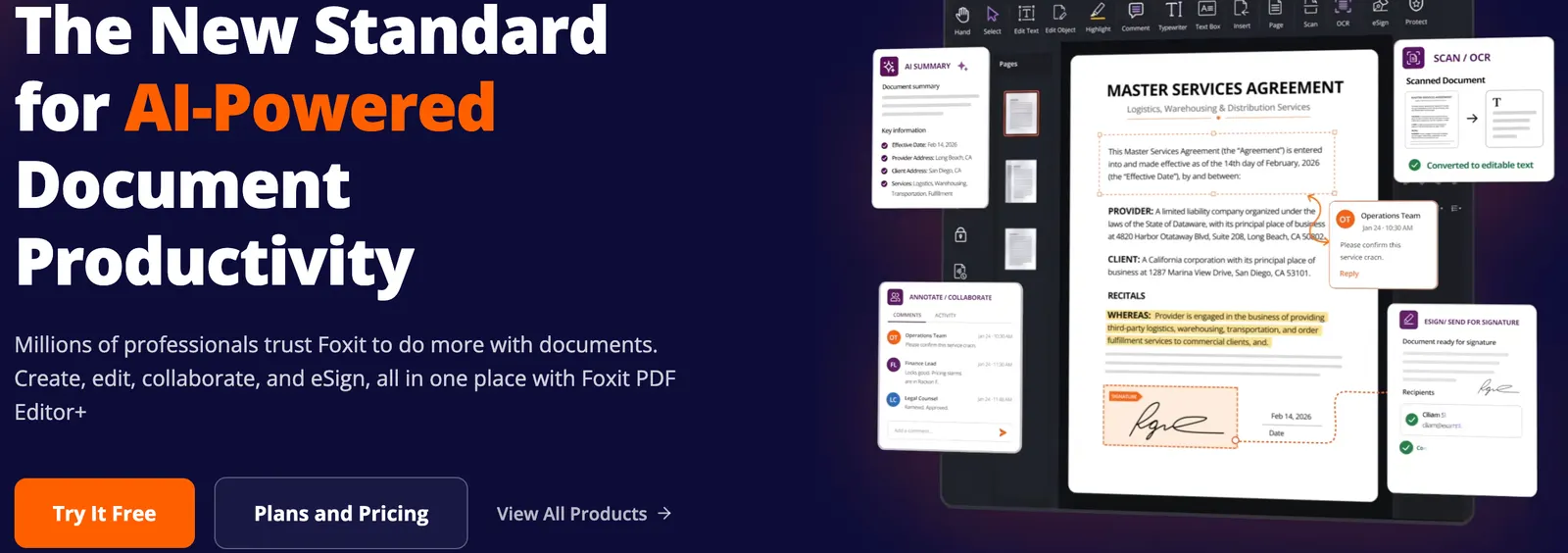
⚙️ Core Features
- PDF editing: edit text, images, tables, headers/footers, watermarks, and page layout directly inside PDFs.
- OCR: convert scanned PDFs and images into searchable, editable documents with strong multilingual recognition.
- Format conversion: convert PDFs to/from Word, Excel, PowerPoint, images, HTML, and CAD formats.
- AI Assistant: summarize documents, rewrite text, translate content, ask questions, and chat with PDFs.
- Agentic AI: advanced document chat, live web search, and a Research Agent that breaks dense PDFs into structured summaries.
- AI summary-to-image: generate formatted long images from key document content for quick sharing.
- Smart Redact: automatically detect and remove sensitive information before sharing documents.
- Security tools: encryption, permissions, digital signatures, and a PDF Operation Inspector that flags risky JavaScript or embedded actions.
- Forms and eSign: create interactive forms, collect data, and send documents for electronic signature.
- Collaboration: annotations, comments, cloud sync, and integrations with Google Drive, OneDrive, SharePoint, Dropbox, and Microsoft 365.
- Industrial edition: CAD-style viewing, PDF ↔ CAD conversion, engineering measurement, 3D PDF support, and multi-party drawing review.
🌟 What Makes Foxit Stand Out
Foxit’s strongest advantage is balancing professional PDF editing with approachable pricing. It covers most Acrobat Pro workflows—editing, OCR, conversion, forms, redaction, and e-sign—while usually costing less and launching faster on typical PCs.
Its AI tools are also maturing quickly. Instead of only offering basic summarization, Foxit now supports document chat with images, multi-document comparison, AI bookmarking, research agents, and security-focused features such as Smart Redact and PDF operation inspection.
For Chinese and enterprise users, Foxit adds extra value through OFD support, domestic system compatibility, localized pricing, and enterprise deployment options. This makes it especially relevant for government, education, legal, finance, and industrial teams.
🎯 Best Use Cases
- Legal and compliance teams: redact sensitive data, compare contracts, and manage signed documents.
- Finance and HR: process scanned forms, extract tables, and automate document review.
- Researchers and students: summarize papers, ask questions, translate content, and generate structured notes.
- Engineering and construction: review CAD-related PDFs, measure drawings, and manage project documentation.
- General office workers: convert PDFs, merge files, add signatures, and edit text without switching tools.
- Enterprises replacing Acrobat: reduce licensing costs while keeping strong editing, OCR, and security.
🚀 How to Use It
- Choose a product: Foxit PDF Reader for viewing/annotating, or Foxit PDF Editor for full editing and AI features.
- Install or open the web version: desktop versions work on Windows and macOS; a web editor is also available.
- Open a PDF: drag files in or connect cloud storage such as OneDrive, Google Drive, or SharePoint.
- Edit or convert: modify text, replace images, convert formats, or run OCR on scanned files.
- Use AI Assistant: summarize, translate, rewrite, or chat with the document.
- Apply security: encrypt files, add permissions, redact sensitive content, or check risky operations.
- Share or sign: send for e-signature, export results, or collaborate with comments.
- Manage AI credits: advanced AI features may use monthly credits depending on your plan.
💲 Pricing Overview
Foxit pricing varies by region, platform, and edition. International plans in 2026 commonly show:
- Foxit PDF Editor: around $10.99/month or $129.99/year.
- Foxit PDF Editor+: around $13.99/month or $159.99/year, adding AI Assistant, Smart Redact, mobile access, and more cloud storage.
Chinese pricing is listed separately. Recent plans include a web version around ¥120/year, Mac version around ¥239/year, Standard/Professional editions from roughly ¥20–¥30/month, Professional+ around ¥50/month, and a perpetual V13 edition from about ¥1,360.
AI Assistant credits, eSign envelopes, enterprise deployment, and industrial features may affect final cost. Always check the official Foxit store or sales team for current local pricing.
👤 Who Should Use It
- Professionals who edit PDFs regularly: contracts, reports, manuals, proposals, and forms.
- Teams migrating from Adobe Acrobat: want similar capabilities at a lower price.
- Chinese and enterprise users: need OFD support, domestic compliance, or localized service.
- Researchers and analysts: need fast summarization, translation, and document Q&A.
- Engineering and industrial teams: need CAD-related PDF viewing, measurement, and drawing review.
🌍 Market Position
Foxit is one of the most established Adobe Acrobat alternatives. It is not a pure AI app like some newer PDF chat tools, but it has integrated AI deeply into a full PDF editor. This makes it stronger than lightweight AI readers for serious editing, security, and enterprise deployment.
In 2026, Foxit competes with Adobe Acrobat Pro, Wondershare PDFelement, Nitro PDF, PDF-XChange Editor, and AI-first PDF assistants. Its differentiation comes from mature editing, strong OCR, industrial features, and a growing Agentic AI layer.
👍 Pros and 👎 Cons
Pros:
- Comprehensive PDF editing, OCR, conversion, and form tools.
- AI Assistant covers summarization, chat, translation, rewriting, and image-based queries.
- Smart Redact and PDF Operation Inspector improve document security.
- Generally lighter and more affordable than Adobe Acrobat.
- Strong support for Windows, macOS, web, mobile, and enterprise deployment.
- Industrial edition adds CAD-related workflows and engineering measurement.
Cons:
- AI features may require credits or higher-tier plans.
- Some advanced redaction, admin, and eSign features are limited to higher editions.
- Cloud collaboration is capable but less ecosystem-deep than Adobe Document Cloud.
- Perpetual licenses may not include future major version upgrades.
⚖️ How Foxit Compares to Similar Tools
- Foxit vs Adobe Acrobat: Acrobat remains the industry standard with deeper cloud and creative-app integration. Foxit is usually cheaper, faster to launch, and easier to deploy at scale.
- Foxit vs Wondershare PDFelement: Both target Acrobat alternatives. Foxit has stronger enterprise, security, and industrial features; PDFelement often appeals to users who want a simpler consumer-friendly editor.
- Foxit vs PDF-XChange Editor: PDF-XChange is very lightweight and powerful on Windows. Foxit offers broader cross-platform support, AI tools, and enterprise features.
- Foxit vs AI-only PDF chat tools: AI-only tools are great for quick Q&A, but Foxit provides full editing, OCR, security, forms, and e-sign in one platform.
🏁 Bottom Line
Foxit is one of the most practical all-round PDF platforms in 2026. It combines solid PDF editing, strong OCR, document security, e-signature, and increasingly capable AI assistance into a single suite. For users who only need quick PDF chat, lighter tools may be enough. But for professionals who must edit, convert, protect, sign, and analyze documents, Foxit offers a strong balance of capability, performance, and price.
It is especially compelling for teams looking to reduce Adobe Acrobat costs, Chinese users needing OFD and domestic compatibility, and industrial teams handling CAD-related PDFs. The main caveat is that advanced AI, redaction, and collaboration features may require higher-tier plans or credit-based usage.
Comments