

Getimg.ai Review: AI Image Generator, Video Creation, Features, Pricing, and Alternatives
Getimg.ai is an AI-powered creative platform that helps users generate images, edit existing visuals, create videos, upscale images, and produce other audiovisual content from a single workspace. Instead of committing to one image-generation model, users can access multiple AI models and choose the one that best suits a particular creative task.
For designers, marketers, content creators, and small businesses, this approach can simplify everyday creative work. You can generate a product concept, explore different illustration styles, refine an image, and prepare assets for publication without switching between several separate applications.
Founded in 2022, Getimg.ai has evolved from an AI image-generation and editing service into a broader creative studio. Its current offering includes image generation, video generation, image enhancement, background removal, resizing, music generation, and speech generation. The platform also provides an API for developers who want to integrate generative media into their own products.
Quick verdict: Getimg.ai is worth considering if you want several AI creative tools and multiple generation models in one place. Its main advantage is convenience and flexibility. However, the subscription credit system means that the advertised number of credits does not translate into a fixed number of finished images or videos.
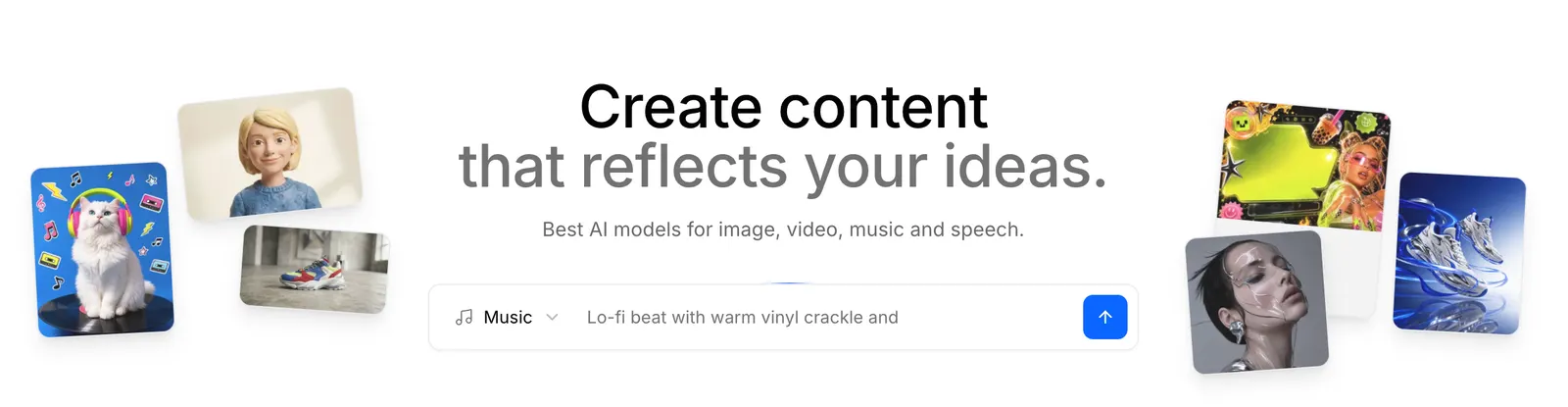
📌 What Is Getimg.ai?
Getimg.ai is a web-based AI content creation platform developed by Getimg. It uses generative AI models to transform text prompts and visual references into digital content. Its image tools support creative generation and editing, while its broader studio includes video and audio capabilities.
The platform initially gained attention for its AI image generation and editing workflows, including inpainting and outpainting. It has since expanded into a multi-model environment where users can access different image and video generation technologies through a shared interface.
- Product name: Getimg.ai.
- Founded: 2022, according to the company's published product information.
- Developer: Getimg.
- Category: AI image generation, image editing, video generation, and creative automation.
- Primary audience: Designers, illustrators, marketers, content creators, developers, and businesses.
- Access: Web-based creative studio, with a separate developer API offering.
- Business model: Credit-based subscriptions for the creative studio, plus separate pay-as-you-go API pricing.
The key idea behind Getimg.ai is simple: users should not need to learn a completely different application every time they want to use a different AI model. The platform brings multiple models and common editing operations into one workflow.
🛠️ 10 Key Features of Getimg.ai
1. AI Text-to-Image Generation
Describe an image in natural language and let the platform generate a visual interpretation. You can request product photography, illustrations, portraits, landscapes, posters, concept art, and other creative assets. Results depend on the selected model, prompt, and generation settings.
2. Multiple AI Image Models
Getimg.ai brings together models from providers such as Google, OpenAI, Black Forest Labs, ByteDance, and other AI developers. Depending on current availability and subscription tier, users can choose among technologies such as FLUX, GPT Image, Nano Banana, and Seedream. This makes it easier to compare different approaches without managing separate accounts for every model.
3. AI Image Editing
Image editing workflows allow users to refine existing visuals with AI. Depending on the selected model and available controls, this can include changing elements, adjusting a scene, modifying an image's appearance, or creating an alternative version from a reference.
4. Inpainting and Outpainting
Inpainting is used to modify selected areas of an image, while outpainting expands the image beyond its original boundaries. These techniques are useful when removing unwanted objects, changing backgrounds, extending a composition, or adapting a visual to a different layout.
5. AI Video Generation
The platform provides AI video creation tools that can turn prompts and supported image inputs into moving content. Video generation is useful for social media, creative previews, advertising concepts, and short visual stories. Available models, durations, and credit costs vary.
6. Image Upscaling
AI upscaling increases image resolution and can improve perceived detail. Getimg.ai advertises enhancement options reaching 16K on eligible plans and workflows. Actual output resolution depends on the selected tool, input image, and plan.
7. Smart Image Resizing
Resize creative assets for different placements, including social media posts, advertising layouts, presentations, and web content. This helps reduce repetitive production work when the same visual needs to appear in multiple formats.
8. Background Removal
Background-removal tools help isolate a product, person, or other foreground subject. This is useful for e-commerce listings, promotional graphics, profile images, and product mockups. Fine edges, hair, transparency, and complex backgrounds should still be checked before publishing.
9. AI Music and Speech Generation
Getimg.ai's broader creative studio includes music and speech generation. These capabilities can help creators explore background audio, narration, and supporting media without leaving the platform. Availability and credit requirements depend on the selected feature.
10. API for Developers
The separate Getimg.ai API gives developers access to image and video generation models through programmatic requests. The image API uses a consistent request structure across supported models, making it easier to test alternatives or add generation features to an application. The API has separate billing and does not automatically come with a standard creative-studio subscription.
Feature note: Model availability, resolution limits, generation controls, and credit consumption can change. Check the options displayed in your account before planning a production workflow around a specific capability.
✨ What Makes Getimg.ai Different?
One Workspace for Multiple Models
One of Getimg.ai's most practical advantages is that it brings several image-generation models together. Different models can excel at different tasks, such as typography, photorealistic materials, illustration, or reference-based editing. Having alternatives in one interface reduces the friction of comparing them.
More Than an Image Generator
Some AI tools focus mainly on generating still images. Getimg.ai combines image generation with editing, enhancement, video, and audio capabilities. This is particularly useful for creators who need a collection of related assets rather than one isolated image.
Reusable Visual References
The platform offers Elements, which can preserve reusable visual references such as a style, palette, or recurring character. This can help maintain a more consistent creative direction across a project, although it does not guarantee perfect consistency in every generation.
Automatic Model Selection
Getimg.ai offers an Auto mode designed to select a suitable model for a prompt. This can be helpful for beginners who are not sure which model to choose. More experienced users can switch models manually when they want to compare results or target a specific visual style.
Useful Enhancement Tools
Upscaling and resizing are not glamorous features, but they solve real production problems. A generated image may look good on screen yet need a higher resolution or different aspect ratio before it can be used in a campaign or printed design.
The trade-off is that an all-in-one platform may not provide the deepest controls available in every specialist tool. Users who need highly precise editing or advanced professional compositing should evaluate whether the available workflow meets their standards.
💼 Practical Use Cases for Getimg.ai
E-Commerce and Product Marketing
Generate product concepts, experiment with lifestyle backgrounds, create promotional graphics, and prepare images for different listing formats. Sellers should verify that generated visuals accurately represent the real product and do not mislead customers about its features or appearance.
Social Media Content
Creators can produce illustrations, campaign visuals, thumbnails, and supporting video clips for platforms such as Instagram, TikTok, YouTube, and Pinterest. Resizing and enhancement tools can help prepare assets for different placements.
Graphic Design and Illustration
Designers can explore styles, build mood boards, generate concept artwork, and create alternative visual directions before finalizing a design. Reusable Elements can help maintain a shared look across related assets.
Advertising and Branding
Marketing teams can use Getimg.ai to test creative concepts, generate campaign imagery, and develop early visual directions for client presentations. Human review remains important for typography, brand accuracy, legal compliance, and final production quality.
Blogging and Website Design
Website owners can create article illustrations, landing-page visuals, banners, and supporting graphics tailored to their content. Custom-generated assets may help a website develop a more consistent visual identity than relying entirely on generic stock imagery.
Video Production
Creators can explore short generated clips for advertisements, visual storytelling, and social content. For projects requiring exact timing, subtitles, transitions, or detailed audio mixing, a dedicated video editor may still be necessary.
Software Development
Developers can use the API to integrate AI image or video generation into content platforms, design tools, e-commerce systems, and automated workflows. For example, an application could generate a visual based on a user's description without requiring that user to visit a separate creative website.
Education and Personal Projects
Students, teachers, and hobbyists can use the platform to illustrate ideas, create presentation visuals, experiment with artistic styles, and explore how generative AI works. The free or entry-level allowance, where available, is a sensible place to start.
🚀 How to Use Getimg.ai: Step-by-Step Guide
Step 1: Create an Account
Open Getimg.ai in a web browser and follow the available sign-up instructions. Review the current free access, credit allocation, and subscription options before deciding whether to purchase a plan.
Step 2: Open the Creative Studio
Choose the workflow you need, such as image generation, image editing, video creation, upscaling, or background removal. Starting with one specific task makes it easier to understand which tools and settings matter.
Step 3: Write a Clear Prompt
Describe the subject, environment, visual style, composition, lighting, and intended use. For example: "A premium black wireless headphone on a matte stone pedestal, soft studio lighting, neutral beige background, realistic product photography, clean composition, space for advertising copy."
Step 4: Select Auto Mode or a Model
Use Auto mode if you prefer the system to select a suitable model. Choose a specific model if you want greater control or wish to compare results across different generators.
Step 5: Set the Output Format
Choose the aspect ratio, resolution, and other available settings according to the intended use. A square image may work well for a product listing, while a wide image is often more suitable for a website banner or video thumbnail.
Step 6: Generate and Evaluate
Submit the prompt and review the output. Check subject accuracy, composition, text rendering, lighting, and unwanted artifacts. If you are creating several related assets, also check whether the visual style remains consistent.
Step 7: Refine or Edit
Adjust the prompt or use available editing tools to improve the result. Make one or two meaningful changes at a time rather than rewriting every instruction after each attempt.
Step 8: Upscale, Resize, and Export
Once you have a suitable result, upscale or resize it if necessary, then export it in a format appropriate for the project. Check the file dimensions, image quality, and any applicable watermark or export restrictions.
Step 9: Review Credit Consumption
Check the credit cost shown before each action. Video generation, high-resolution output, and more advanced models can consume credits differently from basic image generation.
🧠 Getimg.ai Prompt Tips for Better Results
Describe the Intended Result
Instead of writing "make a product image," explain the product, its setting, the target audience, and the desired mood. A clear brief gives the model more useful direction.
Use a Repeatable Prompt Structure
A practical format is subject + environment + composition + lighting + style + intended use. For example, a website hero image might require a wide composition with empty space on one side for text.
Be Specific About Text in Images
If your image needs a headline or product label, include the exact wording and describe where it should appear. Choose a model known for strong text rendering when that capability matters. Always proofread generated text before publication.
Use Reference Images and Elements
When supported, reference images can guide subject appearance, composition, or style. Save reusable Elements for projects that need a consistent palette, character, or visual direction.
Change One Variable at a Time
If the first result has good composition but poor lighting, change the lighting instruction rather than replacing the entire prompt. This makes it easier to learn which changes improve the output.
Choose the Right Model for the Task
Do not assume one model is best at everything. Test a small number of alternatives for tasks such as product photography, typography, detailed illustration, or reference-based editing. Compare usable results rather than relying on a single impressive sample.
Example: A Better Marketing Prompt
Weak prompt: "Create an image for a skincare brand."
Improved prompt: "Minimal luxury skincare campaign featuring a frosted glass serum bottle on pale limestone, soft morning sunlight, subtle botanical shadows, warm ivory and sage palette, premium editorial product photography, bottle centered slightly to the right, generous negative space on the left for headline text, realistic materials, clean composition."
The improved prompt defines the product, lighting, color palette, layout, and intended advertising use. It gives the model a more concrete creative brief and reduces the need for repeated guesswork.
💻 Getimg.ai Installation and Platform Availability
- Web browser: The primary way to use the creative studio. No conventional desktop installation is required for standard browser-based generation.
- Windows: Use the browser-based platform. A separate native Windows application is not confirmed by the product information reviewed.
- macOS: Browser access is the straightforward option for most users.
- iOS: Mobile browser access may be available. Check the current app listings if you specifically need a dedicated iPhone application.
- Android: Mobile browser access may be available. A dedicated Android application should be verified before assuming it is supported.
- Browser extension: A dedicated official browser extension is not confirmed.
- Developer integration: The API can be integrated into supported applications through HTTP requests and official SDKs, including Node.js and Python clients.
For designers and casual users, the browser interface is usually sufficient. Developers who need automated generation should investigate the separate API rather than attempting to automate the ordinary web interface.
💰 Getimg.ai Pricing: Free Access and Paid Plans
Getimg.ai uses a credit-based subscription model for its creative studio. The amount of content you can produce depends on the model, resolution, generation type, and additional processing. The following prices are based on the English pricing page's published plan information and should be checked again before purchase.
| Plan | Published Pricing | Monthly Credits | Best For |
|---|---|---|---|
| Entry | $15/month; $180 billed yearly | 8,000 | Individuals and occasional creators |
| Core | $35 monthly list price; $26/month equivalent on annual billing | 19,000 | Regular creators and small projects |
| Plus | $79 monthly list price; $59/month equivalent on annual billing | 42,500 | Frequent generation and creative production |
| Ultra | $199 monthly list price; $149/month equivalent on annual billing | 107,500 | High-volume professional workflows |
The annual prices shown above represent the published annual-billing equivalents, with the annual total billed upfront. Taxes may apply. The Entry tier lists access to selected models, while higher tiers offer broader model access and larger generation batches.
Is Getimg.ai Free?
Check the current account and pricing pages for any available free access or trial allowance. The English pricing information reviewed here primarily lists paid subscription tiers, so a permanently free monthly allowance should not be assumed.
What Do Credits Actually Buy?
Credits are consumed by actions rather than translating into one universal image count. A basic image may cost much less than a high-resolution generation or a video. The pricing page provides estimated output quantities for selected models, but those estimates should not be treated as interchangeable across all models and settings.
Does Getimg.ai Offer Commercial Rights?
Getimg.ai states that paid subscriptions include commercial-use rights for created images and videos, subject to its terms and applicable third-party rights. Review the current terms before using outputs in client projects, advertisements, merchandise, or other commercial work.
Is There an Enterprise Plan?
The platform advertises business and team-oriented options, including collaborative creative features. Enterprise arrangements may depend on the business requirements. Confirm seat limits, administration, support, security requirements, and pricing with the provider if you are evaluating it for a larger organization.
Does a Subscription Include API Access?
No. Getimg.ai explicitly states that the API is a separate product with separate pricing. Its developer API uses pay-as-you-go billing, with image generation advertised from $0.015 per image and video generation from $0.022 per second, depending on the model and settings.
🌍 Getimg.ai Global Usage and Popularity
Getimg.ai serves an international audience of designers, digital artists, content creators, and developers. Its multi-model approach gives it relevance in markets where users want to compare AI image generators or produce different kinds of creative assets without maintaining several subscriptions.
How Many Users Does Getimg.ai Have?
Getimg.ai's published AI art generator page advertises more than 10 million users. This is a company-reported figure, and the page does not establish that all of those users are monthly active customers. It should therefore be described as the company's stated user figure rather than an independently verified active-user count.
How Much Content Does It Generate?
The developer API page advertises more than one million generations daily. This refers to the API's reported generation volume and should not be confused with the total number of people using the consumer creative studio.
Which Countries Use Getimg.ai?
A reliable, current country-by-country breakdown of active users was not established in the information reviewed for this article. The service is accessible to an international audience, but naming specific countries as its largest markets without dated analytics would be speculative.
What About Website Traffic and Downloads?
Website visits, registered accounts, active users, API requests, and model downloads measure different things. Public traffic estimates may help describe general interest, but they do not establish how many people actually create content or pay for subscriptions. A verified current download total for a native desktop or mobile application was not established either.
For market research and SEO content, use the company's own stated figures with clear attribution and dates. Do not present generation volume or cumulative registrations as monthly active users.
⚖️ Getimg.ai Pros and Cons
Advantages
- Multiple models in one place: Users can explore different generation approaches without repeatedly switching platforms.
- Broad creative toolkit: Image generation, editing, resizing, upscaling, video, and audio capabilities support several stages of content production.
- Useful for marketing and design: The platform suits product concepts, social graphics, illustrations, and campaign visuals.
- Reusable visual references: Elements can help maintain a more consistent creative direction across a series of assets.
- Developer API: The separate API offers a path to integrating generative media into custom software and automated workflows.
Disadvantages
- Credits can be difficult to compare: Different models and settings consume different amounts, making a subscription's practical value dependent on actual usage.
- Not every model is available on every tier: Entry-level users may have more limited model selection than higher-tier subscribers.
- Generated results still need review: AI images can contain distorted details, inaccurate text, inconsistent objects, or misleading product representations.
- Specialist workflows may offer deeper control: Professional designers and video editors may still need dedicated software for precise compositing, timeline editing, or advanced finishing.
The main question is not whether Getimg.ai can generate impressive content. It is whether the content is usable for your actual work without consuming too many credits or requiring excessive correction.
🔍 Getimg.ai vs. Midjourney, Leonardo AI, Adobe Firefly, and Runway
Getimg.ai competes with several different types of creative AI products. Some focus on image generation, some emphasize design workflows, and others specialize in video. The most useful comparison depends on what you need to produce.
| Tool | Main Strength | Best Use Case | Pricing Approach |
|---|---|---|---|
| Getimg.ai | Multiple image and video models in one workspace | Mixed creative workflows and model comparison | Credit-based subscriptions; separate API billing |
| Midjourney | Distinctive AI image creation and artistic direction | Concept art, stylized images, and visual exploration | Subscription plans |
| Leonardo AI | Image generation and creative asset workflows | Digital art, game assets, and visual concepts | Credit-based plans and paid tiers |
| Adobe Firefly | Creative generation integrated with Adobe workflows | Design production and editing within the Adobe ecosystem | Plans and generative-credit arrangements |
| Runway | AI video generation and video-oriented creative tools | Generated footage and video production workflows | Subscription and usage-based limits |
Getimg.ai vs. Midjourney
Getimg.ai is attractive when you want to compare multiple image models and use editing or enhancement tools in the same workspace. Midjourney is worth considering when its particular artistic output and image-generation workflow better match your needs. Test both with the same creative brief rather than assuming one is universally better.
Getimg.ai vs. Leonardo AI
Both platforms appeal to digital artists and creators who need generated visual assets. Getimg.ai emphasizes access to multiple models and a broad set of creative tools. Leonardo AI is an alternative to evaluate for its own image-generation and asset-creation workflows. Compare the available controls, output quality, and credit consumption for your specific project.
Getimg.ai vs. Adobe Firefly
Getimg.ai is worth considering if model variety is a priority. Adobe Firefly may be more convenient for teams already working inside Adobe's creative applications. Businesses should compare their existing software subscriptions, editing needs, licensing requirements, and production processes.
Getimg.ai vs. Runway
Getimg.ai combines image and video creation with image editing and enhancement, while Runway is particularly relevant for video-centered workflows. If you mainly produce generated footage, evaluate video quality, motion control, output duration, and editing features. If your work includes many still images as well as video, Getimg.ai's broader toolkit may be more convenient.
Which Platform Offers Better Value?
There is no reliable winner based on subscription price alone. The cost of usable output depends on how many generations you need, which models you use, how much editing is required, and whether your workflow needs video or audio as well as images. Run a small trial with representative tasks before committing to an annual plan.
👥 Who Should Use Getimg.ai?
Students and Educators
Getimg.ai can help with presentation visuals, illustration, concept development, and creative assignments. Check the current free access and credit terms before relying on it for a large project.
Designers and Illustrators
Designers can use the platform to explore styles, create early concepts, edit visual references, and prepare images for different formats. Those who need precise vector editing or complex compositing may still need specialist design software.
Marketing Professionals
Marketers can create campaign concepts, product visuals, social media assets, and advertising variations. The platform is most useful when visual experimentation is frequent and several asset types are needed.
E-Commerce Sellers
Online sellers can use AI-generated backgrounds, promotional graphics, and product presentation concepts. Actual product details must remain accurate, especially for listings where generated imagery could misrepresent the item.
Content Creators
Bloggers, YouTubers, and social media creators can generate illustrations, thumbnails, video concepts, and supporting media. The platform is a practical option for people who need visuals regularly but do not want to manage several separate AI tools.
Developers and Startups
Developers can investigate the API when they need image or video generation inside an application. Startups should calculate API costs separately from the consumer subscription and account for the additional engineering needed to build a reliable production workflow.
Large Businesses
Teams producing many creative assets may benefit from shared workflows and business-oriented features. Before adopting the platform organization-wide, evaluate permissions, content handling, support, commercial terms, and the total cost at expected usage levels.
🔐 Commercial Use, Privacy, and Copyright Considerations
Getimg.ai states that paid subscriptions include commercial-use rights for created images and videos. However, permission to use generated content commercially does not automatically eliminate all copyright, trademark, privacy, or publicity-right concerns.
- Review the current terms governing generated content and commercial use.
- Do not upload confidential business documents, customer information, or private images without checking the platform's data-handling policies.
- Use reference images, logos, and other source materials only when you have the necessary rights or permission.
- Review generated images for inaccurate product details, misleading claims, or unintended similarities to protected content.
- Check whether your intended use requires additional legal review, especially for advertising, merchandise, and client deliverables.
- For API integrations, review the separate API terms, billing conditions, and applicable data-handling requirements.
For businesses, the safest approach is to treat AI generation as one part of the creative process. Human review remains important before publishing content under a brand name or using it in a paid campaign.
❓ Frequently Asked Questions About Getimg.ai
1. What is Getimg.ai used for?
Getimg.ai is used for AI image generation, image editing, upscaling, resizing, background removal, video generation, and other creative media workflows.
2. Is Getimg.ai free?
Check the current pricing page for any available free access or trial allowance. The published English pricing information reviewed here lists paid Entry, Core, Plus, and Ultra tiers, so do not assume a permanent free monthly plan.
3. How much does Getimg.ai cost?
The published English pricing page lists Entry at $15 per month, Core at $35 per month, Plus at $79 per month, and Ultra at $199 per month, with lower monthly equivalents available on annual billing for some tiers. Confirm the final price before subscribing.
4. Does Getimg.ai support video generation?
Yes. Its creative studio includes AI video generation, with available models and output limits depending on the selected workflow and subscription.
5. Can I use Getimg.ai for commercial projects?
Paid subscriptions include commercial-use rights according to the platform's published FAQ. You should still review the current terms and check any third-party rights that may apply to your content.
6. Does Getimg.ai have an API?
Yes. The developer API supports image and video generation. It is a separate product with separate pay-as-you-go pricing, so a creative-studio subscription does not automatically include API access.
7. Can Getimg.ai create consistent characters?
Reusable Elements and reference-based workflows can help maintain a consistent visual direction. However, exact identity and detail consistency are not guaranteed across every generation.
8. Does Getimg.ai work on Windows and Mac?
The browser-based platform can be accessed from compatible desktop browsers. A dedicated native desktop application is not confirmed by the product information reviewed here.
9. Is Getimg.ai better than Midjourney?
It depends on your needs. Getimg.ai is useful for accessing multiple models and creative tools in one place, while Midjourney may be preferable for users who favor its particular image-generation style. Compare actual results for your intended use.
10. Is Getimg.ai suitable for beginners?
Yes. Auto mode and natural-language prompting make it accessible to people who are new to AI image generation. Users can start with simple prompts and explore more advanced settings as their needs grow.
🏁 Final Verdict: Is Getimg.ai Worth Using?
Getimg.ai is a strong option for people who want a flexible AI creative workspace rather than a tool limited to one generation model. Its combination of image generation, editing, enhancement, video, audio, and API access gives it practical value for creators who regularly produce different kinds of digital content.
Getimg.ai is worth trying if:
- You frequently create images for marketing, websites, e-commerce, or social media.
- You want to compare multiple AI image models without managing several separate platforms.
- You need image editing, resizing, or upscaling alongside generation.
- You want to experiment with AI video and audio within the same broader creative environment.
- You are a developer looking for an API to integrate image or video generation into your product.
Consider alternatives if:
- You only need one highly specialized creative workflow and do not benefit from a multi-model platform.
- You require precise manual editing or professional production controls beyond the available tools.
- You need predictable, high-volume output but have not yet calculated how quickly credits will be consumed.
- You need a specific native mobile application or integration that has not been confirmed.
Overall assessment: Getimg.ai is worth testing for creators who value model choice and an all-in-one workflow. Its biggest strength is convenience, not a guarantee that every model will outperform every competitor. Start with a small project, compare several models, measure the cost of usable output, and only upgrade when the time saved justifies the subscription.
Comments