

Grain AI Review: Features, Pricing, Benefits, and Best Use Cases
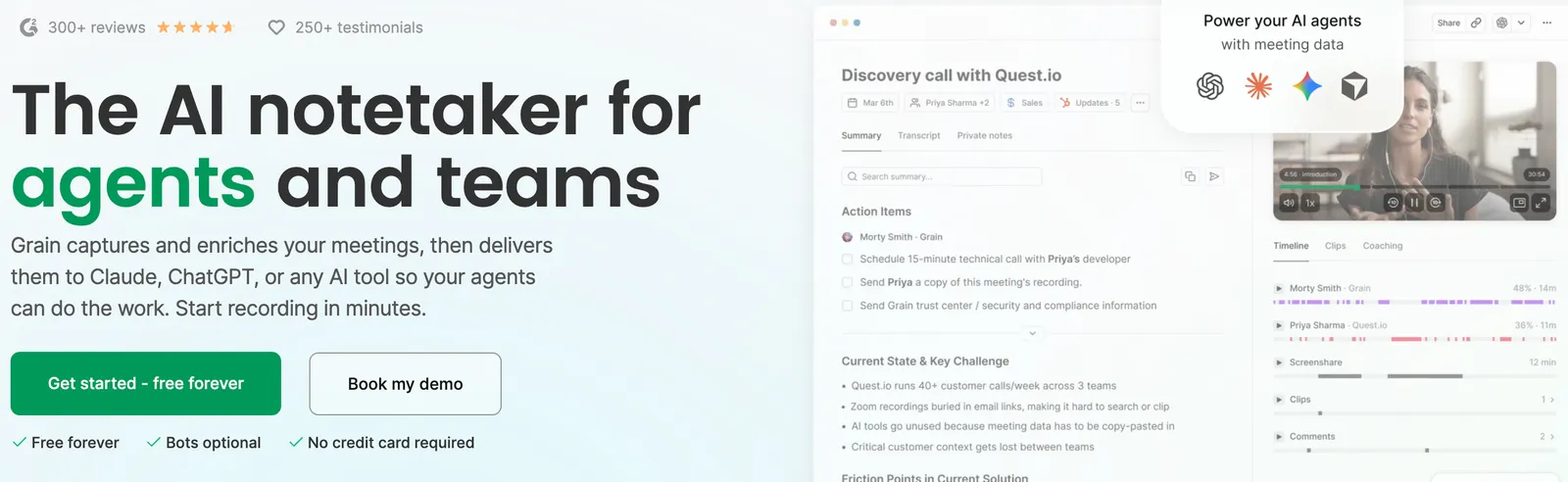
Grain is an AI-powered meeting assistant that records conversations, generates meeting notes, summarizes important discussions, and turns customer feedback into shareable insights. It is designed for sales teams, product managers, UX researchers, customer success professionals, and other teams that need to capture what people say during meetings and turn it into useful work.
What makes Grain interesting is that it goes beyond basic transcription. Users can search conversations, ask AI questions about meeting content, create video highlights, customize notes, and connect meeting information with tools such as Slack, HubSpot, Salesforce, ChatGPT, and Claude. For teams that spend hours reviewing customer calls or documenting meetings, Grain can reduce repetitive work and make important information easier to find.
This review explores Grain's main features, practical applications, pricing structure, advantages, limitations, and alternatives to help you decide whether it fits your workflow.
🔎 What Is Grain?
Grain is an AI meeting assistant and conversation intelligence platform that captures meeting content and transforms it into searchable transcripts, AI-generated notes, action items, and shareable video clips. Its tools are designed to help teams preserve important information from customer conversations and make that information accessible across an organization.
Rather than relying on handwritten notes or manually reviewing entire recordings, users can return to a searchable meeting library, ask questions about conversations, and share the most relevant moments with colleagues. Grain is especially useful when a company wants to understand customer needs, improve sales follow-ups, document user research, or make meeting outcomes easier to act on.
The platform supports workflows involving sales, customer success, product development, and user experience research. It can also connect meeting data with external AI assistants and business applications, allowing teams to use conversation information in their existing workflows.
Grain's current product direction also emphasizes AI agents and integrations. Its website describes ways to export enriched transcripts, connect AI assistants through its MCP server and API, and use meeting context in tools such as ChatGPT and Claude.
Grain is a cloud-based service. Its exact capabilities depend on the subscription plan, account configuration, and connected applications.
⚙️ The Main Features of Grain
1. AI Meeting Recording
Grain captures meetings so users can review the conversation after it ends. It supports common online meeting platforms, including Zoom, Google Meet, Microsoft Teams, and Webex, with additional options for capturing desktop audio and importing recordings depending on the workflow.
Recording rules can help teams decide which meetings should be captured automatically. This is useful for organizations that conduct frequent customer calls and want a consistent record without asking every employee to start a recording manually.
Teams should configure recording permissions and participant notifications carefully, particularly when meetings involve confidential business information or personal data.
2. Automatic Transcription
Grain converts spoken conversations into text, creating a searchable record of what participants discussed. Transcripts make it easier to revisit specific statements, review customer requirements, and locate details that might otherwise be lost in a long recording.
According to Grain's current product information, its transcription and AI note workflows support more than 100 languages. Actual accuracy can vary with language, accent, background noise, audio quality, and specialist terminology, so teams should verify important details before relying on them.
3. AI-Generated Meeting Notes
Grain automatically produces meeting recaps and structured notes, helping users understand the main points without listening to the entire conversation again.
Depending on the meeting and selected template, notes can cover the discussion summary, key talking points, customer concerns, decisions, and next steps. This is particularly useful for recurring sales meetings, project updates, customer interviews, and internal planning sessions.
AI notes are a starting point rather than a guaranteed verbatim record. Users should review names, numbers, deadlines, and commitments before sharing the results.
4. Custom AI Note Templates
Different meetings require different types of information. Grain's custom note templates let teams define the structure and questions that the AI should use when generating notes.
For example, a sales discovery template might focus on customer needs, budget, stakeholders, competitors, and follow-up actions. A customer feedback template might instead emphasize problems, requested features, positive experiences, and product improvement opportunities.
Templates help standardize documentation across a team. They can also make meeting notes more useful by ensuring that the information people need is captured consistently.
5. Ask Grain AI
Ask Grain AI lets users ask natural-language questions about meeting content rather than searching through an entire transcript manually.
Users can ask questions such as:
- What were the customer's main concerns?
- Which action items were agreed upon?
- Did the prospect mention a budget or purchasing deadline?
- What product features did the interview participant request?
- Which objections came up during the conversation?
The assistant can generate answers based on available meeting information. Grain also offers ways to query broader meeting libraries, helping teams identify recurring topics across multiple conversations. As with other AI systems, the answer should be checked against the original recording when precision matters.
6. Video Clips and Highlight Sharing
Grain makes it possible to turn important moments from meetings into short video clips. These highlights can preserve a customer's explanation, a product demonstration, a useful objection-handling example, or a particularly revealing research observation.
Instead of sending colleagues a 45-minute recording, a team member can share a relevant section that communicates the point directly. This can make internal communication faster and help teams retain the original customer perspective.
Product managers can share feature requests, sales leaders can circulate examples of effective conversations, and researchers can provide stakeholders with direct evidence from interviews.
7. AI-Assisted Sales Follow-Ups
Grain can help sales teams turn conversations into practical follow-up work. AI-generated notes and follow-up content can reduce the time spent documenting meetings and preparing routine customer communications.
Business plans include additional sales-oriented capabilities, such as custom follow-up emails and AI coaching. These features can help representatives maintain more consistent follow-up processes and allow managers to examine how customer conversations are handled.
Sales representatives should review any AI-generated email before sending it, especially when it contains pricing, product claims, contract details, or promises about delivery.
8. CRM Integrations
Grain integrates with supported customer relationship management systems, including HubSpot and Salesforce. These integrations can help teams associate meeting notes and relevant conversation information with customer records, contacts, companies, or deals.
Reducing manual data entry is a practical benefit for sales organizations. When configured correctly, meeting information can become part of the CRM workflow rather than remaining in an isolated recording library.
Integration capabilities vary by product and plan, so teams should confirm which fields, workflows, and synchronization options are available before adopting the platform.
9. Team Collaboration and Shared Workspaces
Grain provides a shared environment for meeting recordings, transcripts, notes, and insights. Users can share relevant conversations with colleagues and organize meetings into teams or other collections.
Workspace administrators can configure team access and sharing behavior so the right people receive the right information. This is useful for companies that want to make customer insights available across sales, product, marketing, and customer success without giving every employee unrestricted access to every recording.
Permission settings deserve particular attention when meetings contain sensitive customer details, employee discussions, or confidential commercial information.
10. Searchable Meeting Library
Grain turns recorded conversations into a searchable source of organizational knowledge. Instead of relying on individual employees to remember what happened in a meeting, teams can return to transcripts, notes, and recordings when they need context.
This is valuable for recurring customer accounts, product discovery, sales enablement, and projects that involve multiple stakeholders. A searchable library can also help new team members understand earlier discussions without asking colleagues to reconstruct the entire history.
11. Integrations With Slack and Other Business Tools
Grain supports integrations with tools such as Slack, Zapier, and Productboard, in addition to its CRM and meeting-platform integrations. These connections help teams distribute meeting insights to the places where work already happens.
For example, a customer interview highlight can be shared with a product team, a sales call summary can be delivered to a relevant channel, and a workflow automation can move meeting information into another business system.
The exact automation possibilities depend on the integration, permissions, and subscription plan. Organizations should test their most important workflows before deploying them broadly.
12. AI Agent, MCP, and API Connectivity
One of Grain's more distinctive capabilities is its support for connecting meeting data to external AI tools. Its MCP server and API can enable compatible assistants and custom applications to access permitted meeting information and perform supported operations.
Depending on the setup, teams can use meeting transcripts, notes, and action items as context for AI-assisted reporting, research synthesis, follow-up preparation, and internal knowledge retrieval.
This can be particularly valuable for companies that want to build workflows around their own AI assistants instead of keeping meeting data confined to one application. Advanced integrations require careful access control and technical configuration.
✨ What Makes Grain Different From Other AI Meeting Tools?
Grain's appeal lies in the way it combines meeting capture, AI notes, searchable conversations, video highlights, and integrations. Some meeting assistants focus primarily on producing a transcript or summary. Grain also emphasizes making the information reusable across teams and business applications.
- Flexible meeting capture: Supports multiple meeting platforms and additional capture options, depending on configuration.
- Customizable notes: Teams can tailor AI-generated documentation to the questions that matter in their workflows.
- Search and question answering: Users can ask questions about individual meetings and, where supported, broader meeting collections.
- Shareable video evidence: Short clips make customer statements and research findings easier to communicate.
- Business integrations: Meeting information can flow into supported CRM, collaboration, and automation tools.
- External AI connectivity: MCP, API, and AI integrations provide ways to reuse meeting context beyond Grain itself.
- Free viewer seats: Teams can share meetings with colleagues who need to view or comment without necessarily purchasing a recording seat for each person.
These features are most useful when meeting information is important to ongoing work. If a user only needs an occasional transcript, a simpler tool may be enough.
💼 What Can You Use Grain For?
Sales Calls and Customer Relationship Management
Sales representatives can use Grain to record discovery calls, document customer needs, identify objections, and prepare follow-up messages. CRM integrations can help preserve important details alongside the relevant customer or opportunity record.
User Research and Customer Interviews
UX researchers and product teams can review interview transcripts, extract recurring pain points, and share video clips that demonstrate customer behavior or feedback. This makes research findings easier to communicate to stakeholders who were not present during the interview.
Product Discovery and Feature Prioritization
Product managers can collect feedback from multiple customer conversations and identify repeated requests, usability problems, and expectations. These insights can inform product planning, provided that teams distinguish recurring evidence from isolated comments.
Customer Success and Account Management
Customer success teams can use meeting notes to track commitments, implementation issues, adoption concerns, and follow-up tasks. A shared record can reduce the risk of losing important context when account ownership changes.
Internal Meetings and Project Management
Teams can document decisions, assign follow-up actions, and make discussions easier to revisit. This is useful for project planning, cross-functional coordination, and recurring operational meetings.
Sales Training and Coaching
Sales leaders can share examples of strong discovery questions, clear product explanations, and effective responses to customer objections. Grain's coaching capabilities on higher-tier plans can support more structured review and improvement.
🚀 How to Use Grain Step by Step
- Create an account. Visit Grain's official website and sign up for an account. Start with the free plan if you want to test basic meeting capture and AI notes before paying.
- Connect your calendar. Link a supported Google Workspace or Microsoft 365 calendar if you want Grain to work with scheduled meetings and configured recording rules.
- Connect your meeting platform. Configure the supported Zoom, Google Meet, Microsoft Teams, Webex, or other relevant capture workflow.
- Set recording preferences. Decide which meetings should be recorded automatically and which should be excluded. Review participant notification and consent requirements before enabling recording.
- Start or attend a meeting. Depending on the setup, Grain can capture a scheduled meeting, use a supported bot-based workflow, or record through desktop capture.
- Review the transcript and notes. After processing, check the summary, important discussion points, and action items. Correct errors before sharing the information.
- Ask questions or create highlights. Use Grain's AI assistant to find key details, or create a clip when a particular moment needs to be shared with colleagues.
- Share and integrate the results. Send the relevant notes or highlights to teammates or use supported integrations to transfer information into your CRM and collaboration tools.
- Refine your workflow. Create custom note templates and adjust sharing rules as you learn which information is most useful to your team.
The exact setup can vary by subscription plan and connected applications. Administrators should test the entire workflow, from recording through sharing and deletion, before rolling it out to a larger organization.
🧠 Tips for Getting Better Results With Grain
- Build templates around real decisions. Ask what information the team needs after each meeting, then design note sections around those requirements.
- Use specific AI questions. Questions such as “List the customer's three main concerns and the evidence for each” are generally more useful than vague requests for insights.
- Share short clips instead of long recordings. When a specific customer statement matters, share the relevant moment so colleagues can understand the point quickly.
- Connect the tools people already use. CRM and collaboration integrations can reduce the need to copy and paste meeting information between applications.
- Review important details. Verify names, dates, prices, commitments, and action owners before using AI-generated notes for important business decisions.
- Set clear access rules. Create appropriate workspace and team permissions so sensitive recordings are not shared more broadly than necessary.
- Measure actual time savings. Compare the time spent on documentation and follow-up before and after adopting Grain rather than assuming automation automatically improves productivity.
- Use conversation data responsibly. Ensure that recording, transcription, sharing, and retention practices follow applicable privacy laws and internal policies.
💰 Grain Pricing: Is There a Free Plan?
Yes. Grain offers a free plan, alongside paid plans intended for individuals and teams that need more advanced AI capabilities, longer meetings, integrations, and collaboration features.
Grain's official website has advertised paid access starting at around $15 per user per month, while pricing-page displays and plan details may vary with billing arrangements and product packaging. Treat that figure as a starting reference, not a guaranteed quote for every plan or region. Check the official pricing page before purchasing.
| Plan | Best for | Main features and limitations |
|---|---|---|
| Free | Individuals and small teams testing Grain | Basic recording, sharing, AI notes, and meeting organization. The documented plan limits individual recordings to 45 minutes and includes one free recording seat per workspace. Uploads and several advanced features are excluded. |
| Starter | Growing teams that need more flexible meeting workflows | Unlimited recording, custom note templates, Ask Grain AI, additional organization features, a limited monthly upload allowance, and API access for supported workflows. |
| Business | Sales and customer-facing teams that need advanced intelligence | Includes Starter capabilities plus features such as AI coaching, custom follow-up emails, trackers, CRM and dialer integrations, and advanced MCP functionality, according to the current plan documentation. |
| Enterprise | Organizations with more complex deployment needs | Contact Grain to confirm current enterprise features, administration options, security requirements, and commercial terms. |
How Grain charges for seats: Grain distinguishes between paid seats and free viewer seats. Paid seats are intended for users who record, upload, or import meetings and access the features included in their plan. Free viewers can access meetings shared with them and collaborate without necessarily requiring a paid recording seat.
The free plan is useful for evaluating the product, but teams should check the current recording-duration limit, meeting history, upload restrictions, and feature availability before relying on it for daily operations.
For current plan details and billing terms, visit Grain's official pricing page.
🌎 Who Should Use Grain?
Grain is a good fit for teams that regularly conduct meetings and need a reliable way to preserve, analyze, and share the information discussed.
- Sales representatives: People who need meeting summaries, action items, customer context, and faster follow-ups.
- Sales managers: Leaders who want to review calls, share effective examples, and improve team coaching.
- UX researchers: Researchers who conduct interviews and need searchable transcripts and shareable video evidence.
- Product managers: Teams that collect customer feedback and need to communicate recurring issues and feature requests.
- Customer success teams: Professionals who manage account reviews, onboarding meetings, and customer commitments.
- Marketing teams: Teams that interview customers, conduct research, or want to preserve customer language for internal analysis.
- Distributed teams: Organizations that need consistent meeting documentation across locations and departments.
- AI workflow builders: Teams that want to reuse meeting information through APIs, MCP-compatible assistants, and automation tools.
Grain may be unnecessary for people who rarely attend meetings or only need a simple note-taking application. Its value increases when recorded conversations become an important source of information for sales, research, product development, or customer management.
🌐 Does Grain Support International Teams?
Grain can be useful for international teams that hold meetings across different countries and languages. Its product information describes transcription support for more than 100 languages, giving distributed organizations a way to preserve discussions in multilingual environments.
However, language support does not mean every language delivers identical transcription quality. Accents, overlapping speech, background noise, technical vocabulary, and regional expressions can affect accuracy. Teams should test Grain using representative recordings before making it a core part of their workflow.
International organizations should also evaluate recording laws, participant consent requirements, data protection obligations, and company policies. A workflow that is appropriate in one jurisdiction may require additional steps in another.
For teams operating across regions, the most practical approach is to run a small pilot with different meeting types and languages, then review transcription quality, note usefulness, and sharing controls before expanding usage.
🔗 Grain Integrations and Compatibility
Grain works with a range of meeting, communication, CRM, and automation tools. These integrations help teams use meeting information without constantly switching applications.
- Video meetings: Zoom, Google Meet, Microsoft Teams, and Webex.
- CRM systems: HubSpot and Salesforce, with other supported options depending on the current integration catalog.
- Team communication: Slack for sharing relevant meeting information and highlights.
- Workflow automation: Zapier for connecting meeting events and content with other applications.
- Product feedback: Productboard for bringing customer insights into product workflows.
- AI assistants: ChatGPT and Claude workflows, plus supported MCP and API connections.
Not every integration is included in every subscription. Before choosing a plan, confirm whether the connection you need is native, requires a higher-tier subscription, or needs additional setup.
See the official Grain integrations directory for the current list.
✅ Advantages of Grain
- Useful free entry point: Users can test basic recording and meeting notes without immediately committing to a paid subscription.
- Automated documentation: AI summaries and action items reduce the need to take detailed notes manually.
- Customizable AI notes: Templates help teams capture the information most relevant to their workflow.
- Searchable conversations: Transcripts make it easier to revisit customer statements and past decisions.
- Shareable video highlights: Short clips make customer evidence easier to circulate and discuss.
- Broad workflow potential: Integrations and APIs help connect meeting content to CRM, communication, and AI tools.
- Team collaboration: Shared workspaces and viewer seats can make meeting information available to more colleagues without requiring a paid recording seat for everyone.
- Useful for research and sales: Grain supports multiple workflows rather than focusing exclusively on generic meeting transcription.
⚠️ Disadvantages of Grain
- Free-plan restrictions: The free plan has limits on recording duration and access to uploads, CRM integrations, trackers, and other advanced features.
- Paid seats may add up: Organizations need to budget for users who record or import meetings, especially when many employees require full access.
- AI accuracy is not guaranteed: Transcripts and summaries can miss context or misinterpret important details.
- Some features depend on the plan: Advanced coaching, CRM workflows, and other capabilities may require a higher-tier subscription.
- Integrations need configuration: Connecting Grain to existing systems and maintaining reliable workflows may require administrative effort.
- Meeting recording raises privacy questions: Teams must establish suitable consent, access, and data-retention practices.
- Not a complete CRM replacement: Grain adds meeting intelligence, but companies still need appropriate systems for broader customer and opportunity management.
- Value depends on usage: Teams that do not revisit meeting notes, share insights, or act on AI-generated information may see limited benefits.
⚖️ Grain vs. Other AI Meeting Assistants
Grain competes with tools that record meetings, generate summaries, analyze sales conversations, or support broader revenue workflows. The best alternative depends on whether you prioritize simple meeting notes, sales intelligence, research collaboration, or enterprise revenue management.
| Tool | Main focus | How it compares with Grain |
|---|---|---|
| Grain | AI meeting notes, conversation intelligence, and reusable meeting insights | Combines searchable transcripts, custom notes, clips, team sharing, and integrations with business and AI tools. |
| Fathom | AI meeting notes and summaries | Worth considering if you mainly want an easy way to capture meetings, summarize conversations, and share follow-up information. |
| Fireflies.ai | Meeting transcription, search, and automation | A relevant alternative for teams that prioritize transcription, searchable meeting records, and connections to existing applications. |
| tl;dv | Meeting recording, summaries, and conversation insights | Worth comparing for teams that want to record meetings, share clips, and review insights across customer conversations. |
| Otter.ai | Transcription and AI meeting notes | May suit individuals and teams that primarily need accurate transcripts, summaries, and meeting documentation. |
| Gong | Revenue intelligence and sales execution | Offers a broader sales-focused platform covering deal intelligence, coaching, forecasting, and sales engagement. It may be more than a team needs if the main goal is meeting documentation. |
| Avoma | Meeting intelligence and revenue workflows | Worth evaluating when teams want meeting assistance combined with sales or customer success processes. |
These products overlap, but they are not interchangeable in every situation. Feature availability, pricing, language support, and integrations can change. Compare current plans against your team's specific requirements before deciding.
🔐 Security and Privacy Considerations
Meeting recordings and transcripts can contain confidential plans, customer information, pricing discussions, employee details, and other sensitive data. Before using Grain across an organization, review its current security documentation and confirm that its data handling practices meet your requirements.
Teams should establish clear policies covering who can record meetings, when participants must be notified, which recordings can be shared, how long information is retained, and how data should be deleted when it is no longer needed.
Access controls become particularly important when meeting data is connected to external AI assistants, APIs, or automation tools. Administrators should verify which information each connection can access and ensure that permissions match the intended use case.
Grain states that its platform is SOC 2 audited and GDPR compliant in its current product materials. Organizations should verify the applicable scope, documentation, and contractual commitments directly with the company rather than treating these statements as a substitute for their own compliance review.
❓ Frequently Asked Questions About Grain
Is Grain AI free?
Yes. Grain offers a free plan with basic meeting recording, sharing, and AI note features. The free plan has restrictions, including a documented 45-minute meeting limit and one free recording seat per workspace. Check the current plan details for any changes.
How much does Grain cost?
Grain offers free and paid plans. Its website has advertised paid access starting around $15 per user per month, but the current price depends on the selected plan and billing arrangement. Check the official pricing page before purchasing.
What meeting platforms does Grain support?
Grain supports common meeting platforms, including Zoom, Google Meet, Microsoft Teams, and Webex. It also offers additional recording methods, such as desktop capture, depending on the workflow and account configuration.
Can Grain automatically summarize meetings?
Yes. Grain generates AI meeting notes, recaps, and action items. Users can also customize note templates on supported plans to focus on specific questions or information.
Does Grain support languages other than English?
Yes. Grain's product information describes transcription support for more than 100 languages. Accuracy can vary by language, accent, audio quality, and specialist terminology, so teams should test their main languages before deployment.
Can Grain integrate with Salesforce or HubSpot?
Yes. Grain supports integrations with Salesforce and HubSpot. Depending on the integration and subscription, meeting information can be connected to relevant contacts, companies, and deals.
Can Grain connect to ChatGPT?
Yes. Grain provides a ChatGPT integration that can allow connected users to retrieve meeting transcripts, notes, and action items in their ChatGPT workflows. The connection requires authorization, and access depends on the user's permissions and setup.
Can Grain record meetings without a bot joining?
Grain offers desktop capture in addition to bot-based recording workflows. The available method depends on the meeting setup and account configuration. Users should confirm the appropriate capture method and comply with participant notification and consent requirements.
Is Grain suitable for UX research?
Yes. Grain can help UX researchers transcribe interviews, organize findings, create video highlights, and share customer feedback with product teams. Researchers should still interpret the findings carefully and protect participant information.
Is Grain better than Gong?
It depends on your needs. Grain is a strong candidate for meeting documentation, searchable conversations, clips, and reusable customer insights. Gong is more focused on broader revenue intelligence, sales coaching, deal management, and forecasting. Teams should choose based on the workflows they actually need.
Does Grain replace a CRM?
No. Grain helps capture and organize information from meetings and can synchronize relevant data with supported CRMs. It does not replace all the customer, account, opportunity, and sales management functions of a dedicated CRM.
📝 Final Verdict: Is Grain Worth Trying?
Grain is a practical AI meeting assistant for teams that want to capture conversations, reduce manual note-taking, and make customer insights easier to reuse. Its combination of AI notes, custom templates, searchable transcripts, video highlights, CRM integrations, and connections to external AI tools makes it useful for sales, customer success, product development, and user research.
Its biggest strength is not simply that it can summarize a meeting. It helps turn meeting information into something that can be searched, shared, connected to business systems, and used in later work. That is particularly valuable for teams that repeatedly revisit customer feedback or need a reliable record of decisions and commitments.
The main limitations are free-plan restrictions, potential costs as the number of paid seats grows, the need to review AI-generated content, and the privacy responsibilities that come with recording conversations. Organizations should also verify which integrations and advanced features are included in their chosen plan.
Our recommendation: Try Grain if your team spends significant time documenting meetings, reviewing customer calls, or sharing research insights. Start with the free plan, test it with real meetings, and measure the time saved and quality of the resulting notes. If your primary requirement is only basic transcription, compare simpler alternatives. If you need a complete sales intelligence and forecasting platform, evaluate Grain alongside broader revenue tools such as Gong.
Comments