

🤖 Dreamina AI: A Practical Guide to the AI Image and Video Creation Platform
Dreamina is an AI-powered creative platform that turns text prompts, images and creative ideas into images, videos, posters, avatars and other visual content. It is closely associated with Jimeng AI, ByteDance's AI creation product in China, while Dreamina is the brand used for its international market.
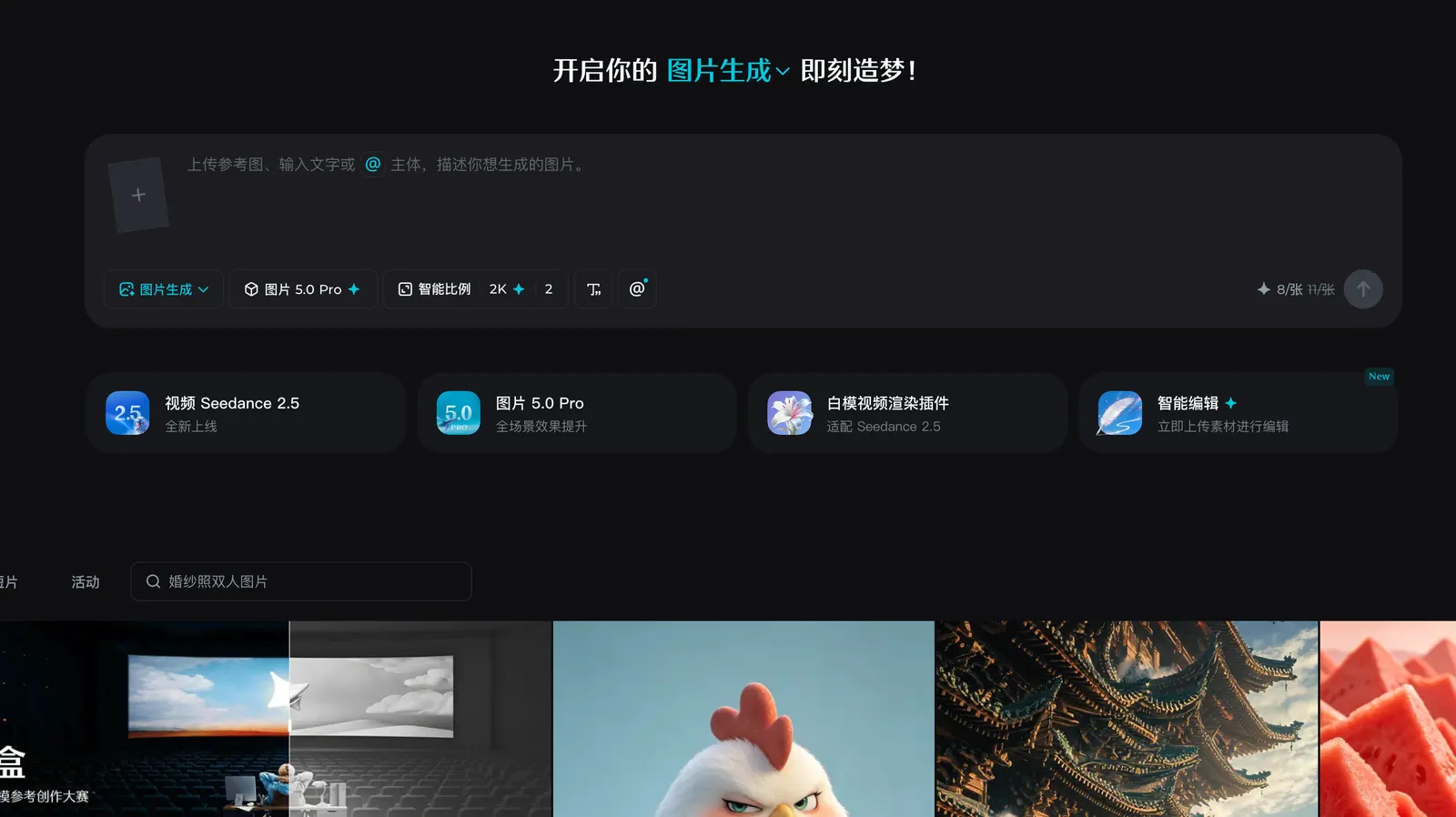
📦 What Is Dreamina AI?
Dreamina is designed for people who want to create visual content without learning complicated design or video-editing software. Instead of starting with a blank Photoshop or video-editing timeline, users can describe what they want, upload reference materials and let AI generate the first version.
The platform has gradually moved beyond simple text-to-image generation. Its current toolset covers AI image generation, image restyling, image remixing, image-to-video, text-to-video, AI avatars and other creative workflows. The official platform currently lists models and tools including Seedream, Seedance, Sora and Veo. :contentReference[oaicite:1]{index=1}
🌍 How Popular Is Dreamina Globally?
Dreamina is no longer limited to the Chinese AI market. The international Dreamina platform is available to users in multiple countries and has become particularly relevant to creators looking for AI-generated images and short videos.
Third-party traffic data estimated around 12.81 million Dreamina website visits in June 2026, ranking it second among AI video generator websites in that dataset. Another third-party AI ranking estimated 87.36 million monthly active users for the Chinese Jimeng AI app in June 2026. These figures come from external analytics rather than ByteDance's official user reports, so they should be treated as estimates rather than audited user numbers. :contentReference[oaicite:2]{index=2}
The international audience is also geographically diverse. Third-party traffic estimates show meaningful usage from Southeast Asia, Vietnam, Indonesia, Brazil and the United States, suggesting that Dreamina's appeal is extending beyond its original Chinese user base. :contentReference[oaicite:3]{index=3}
🎯 What Can Dreamina AI Do?
🎨 AI Image Generation
Describe a scene, character, product or design idea and Dreamina can generate an image from the prompt. It can be used for social media graphics, concept art, posters, product visuals, thumbnails and creative experiments.
🚀 AI Video Generation
Dreamina can generate video from text or images. Its video tools are designed for short-form content, advertising concepts, product demonstrations, storytelling and social media videos.
The current international platform highlights Seedance 2.5, which can create continuous clips of up to 30 seconds and supports multimodal references. Dreamina also provides image-to-video workflows where users can upload a photo and describe the desired movement or camera action. :contentReference[oaicite:4]{index=4}
✨ Image-to-Video
This is one of the most practical features for beginners. Upload an existing photograph, then describe how the subject should move. For example: “The camera slowly moves forward while the woman turns toward the camera and smiles.”
🧩 AI Image Editing
Dreamina can also be used to modify existing images, including background changes, object removal, image expansion, style transformation and variations. This makes it useful when the first generated image is close to the desired result but still needs adjustments.
👤 AI Avatar Creation
The platform includes AI avatar-related tools such as talking avatars, digital avatars and photo-to-avatar workflows. These features can be useful for marketing videos, educational content and social media creators. :contentReference[oaicite:5]{index=5}
⚡ Why Is Dreamina Interesting?
1. One platform for images and videos. You do not need to switch between several AI tools for every stage of production.
2. Reference images give you more control. Instead of relying entirely on text prompts, you can use images to guide composition, style, characters and visual direction.
3. It is relatively easy for beginners. You can start with a simple description and gradually learn more advanced prompting techniques.
4. It supports rapid experimentation. AI creation is rarely perfect on the first attempt. Dreamina makes it practical to generate several versions and select the strongest result.
5. It is useful for commercial content. Product images, advertising concepts, social media videos and promotional visuals can all be created within the same ecosystem.
🛠️ How to Use Dreamina
Step 1: Open the official Dreamina website and create an account.
Step 2: Choose the type of content you want to create, such as AI Image, Text to Video or Image to Video.
Step 3: Enter a prompt describing the subject, environment, visual style and desired action.
Step 4: Add a reference image when you need stronger control over the appearance or composition.
Step 5: Select the model, aspect ratio and other available settings, then generate the content.
Step 6: Do not immediately accept the first result. Compare several generations and refine the prompt based on what went wrong.
💡 Dreamina Prompt Tips
A common mistake is writing prompts that are too short. Instead of writing “a woman in Paris,” describe the subject, location, lighting, camera, composition and mood.
For example: “A young woman walking through a quiet Paris street at sunrise, cinematic photography, soft golden light, shallow depth of field, realistic skin texture, 35mm lens, medium shot.”
For video generation, describe movement rather than only the appearance. Mention camera movement, subject movement, speed and atmosphere. For example: “slow camera push-in, hair moving gently in the wind, the subject turns her head naturally.”
Another useful technique is to separate the prompt into five parts: subject + environment + action + camera + style. This makes it easier to identify what needs to be changed when the result is not right.
📥 How to Install Dreamina
For most users, no traditional installation is required. Dreamina can be used directly through its web platform.
For mobile users, Dreamina is also available through regional app stores. The international iPhone version is listed as a free app with in-app purchases and is published by ByteDance Pte. Ltd. :contentReference[oaicite:6]{index=6}
If you are using the Chinese version, the official Jimeng AI application is available through Chinese app distribution channels. The Chinese iOS listing currently supports iOS 15 or later. :contentReference[oaicite:7]{index=7}
💰 Is Dreamina Free?
Yes. Dreamina offers free daily credits, allowing users to try image and video generation without paying upfront. However, free usage is limited by available credits and generation rules. :contentReference[oaicite:8]{index=8}
Paid plans and credit purchases are also available. International App Store pricing currently lists a Basic Monthly Subscription at US$15 and a Basic Annual Subscription at US$144.99, although prices and available plans can vary by country, platform and promotion. :contentReference[oaicite:9]{index=9}
For the Chinese Jimeng AI service, the current iOS listing shows a monthly membership price of RMB 69 and an annual subscription of RMB 659. The official paid-service agreement states that membership tiers, credits and API pricing can change, so users should always check the purchase page before paying. :contentReference[oaicite:10]{index=10}
👥 Who Should Use Dreamina?
Content creators: Useful for thumbnails, social posts, short videos and creative experiments.
Marketers: Useful for quickly producing advertising concepts, product visuals and campaign variations.
E-commerce sellers: Useful for product presentation, lifestyle scenes and promotional images.
Designers: Useful for concept exploration, moodboards and rapid visual prototyping.
Video creators: Useful for turning still images and ideas into short video sequences.
Beginners: Suitable for users who want to experiment with generative AI without learning professional editing software first.
❓ Common Problems
Why is my generated image different from the prompt?
AI generation interprets the prompt rather than following it like traditional software. Add more information about composition, subject position, lighting and camera perspective.
Why does the same character look different between images?
Character consistency remains difficult for generative AI. Use reference images and keep important character descriptions consistent across prompts.
Why does AI video sometimes look unnatural?
Complex movements, hands, facial expressions and interactions between multiple objects can still produce errors. Start with simpler scenes and specify one main movement at a time.
Why did my credits disappear quickly?
Different models, resolutions and generation functions can consume different amounts of credits. Check the generation cost before producing large batches.
Why can't I access a certain feature?
Some features, models and subscription benefits may depend on country, account type, platform or rollout status.
📌 Final Verdict
Dreamina is best understood as more than a simple AI image generator. Its real advantage is the combination of image creation, video generation, reference-based creation and AI editing in one workflow. For someone who only needs occasional AI images, a free account may be enough. For creators producing videos, advertisements, product content or social media material regularly, the paid credits can make more sense.
The important point is not to judge Dreamina by one impressive sample image. Generate several versions, test different prompts and see whether its workflow actually saves you time. That is the better way to decide whether it belongs in your everyday AI toolkit.
🔗 Official website: Dreamina
Comments