

🏢 Who Makes Trint
Trint is a London-based transcription company founded in 2014 by Jeff Kofman, a working journalist. He spent years in TV news typing out interview tapes by hand, so the product was built for reporters from day one. Today the customer list reads like a newsroom roll call — the Associated Press and CNN — plus the likes of Airbnb and Nike, which tells you it's spread well beyond journalism into legal and corporate work.
📅 When It Launched
The company started in London in 2014 and, after a couple of years of building, opened the platform to the public in 2016. That's nearly a decade of operation, which makes Trint one of the older hands in a space that's now crowded with upload-and-transcribe tools.
🧩 Core Features
Everything orbits one job: turning audio into something you can publish.
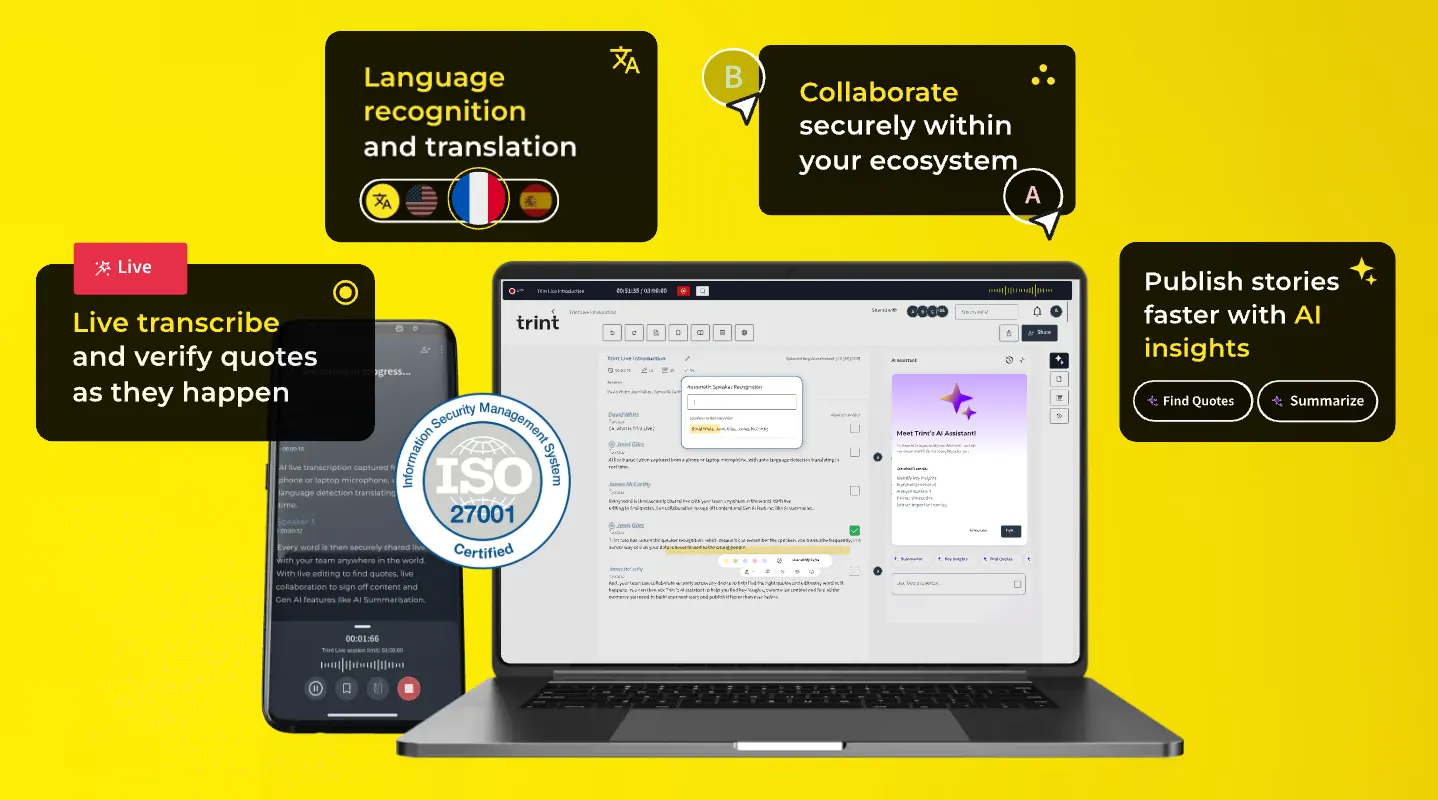
- Auto-transcription: 50+ languages, with timestamps on every line.
- Speaker ID: it splits out who said what and labels them.
- Translation: text translation across 54 languages.
- Story Builder: stitch multiple audio and video files into one article or script.
- Collaboration: roles, permissions, comments, and shared drives for teams.
- AI summaries: a quick digest of the content.
- Subtitle editor: build SRT files right in the app.
- Live transcription: real-time captions, mostly on higher tiers.
- Mobile: iOS and Android apps for upload and transcribe.
- Integrations: Zapier, Zoom, Dropbox, Box, Adobe Premiere Pro, plus an API on Enterprise.
- Export: TXT, DOCX, SRT, JSON.
✨ Standout Bits
Accuracy, collaboration, and a media-native workflow are the three things people keep praising. Drop an interview in, get back a transcript with speaker labels and timecodes in minutes, edit in place, then export an SRT for video or a DOCX for your editor. The UI is clean enough that a reporter with zero tech patience can pick it up.
🤖 The AI Underneath
It's a speech-to-text engine at the core, with automatic timestamps and speaker separation layered on. Translation in 54 languages and AI summaries sit on top. To set expectations: the AI toolset is slim. It's transcription plus summarization — not the full editing, dubbing, and voice-cloning suite you'd get from something like Descript.
🎯 What It's Actually For
- Newsrooms: turn interviews into copy fast enough to beat a deadline.
- Podcasts and video: subtitles, or a written version of a conversation.
- Multilingual publishing: translate an English interview for other markets.
- Legal: searchable text from depositions and hearings.
- Enterprise meetings: notes and archives from internal calls.
🛠️ How to Use It
Sign up, grab the 7-day trial (capped at 3 files), then upload audio or video. Wait for the transcript, proofread line by line, fix speaker labels, run a translation or summary if you need it, and export. For teams, drop files into a shared drive and let colleagues edit with comments and role-based permissions.
💡 Tips
- Audio quality is the ceiling on accuracy — use an external mic and kill background noise when you can.
- Correct speaker labels by hand after the fact, especially when people talk over each other.
- Use Story Builder to assemble several recordings into one piece instead of juggling documents.
- Search by keyword to jump straight to the line you need to fix.
- Watch your volume: Starter only gives you 7 files a month, and the jump to Advanced is real money.
📈 Real-World Use
The AP uses Trint to turn field interviews into publishable copy faster. CNN reporters run daily interview audio through it. Airbnb and Nike lean on it for internal meetings, marketing material, and user interviews. That spread — a wire service, a cable network, and two global brands — is a decent sign it holds up under both editorial volume and team collaboration.
📱 Platforms
The web app is the main event and has the most features. There are iOS and Android apps too, so you can upload from the field, and live transcription lets you get text while the interview is still happening.
🌐 Languages
Transcription covers 50+ languages and translation covers 54, so a multilingual team can spin several language versions out of one source file.
💰 Pricing
Subscription-only, and it's not cheap. No permanent free tier.
- Starter: about $52 per user per month (annual), 7 file uploads a month.
- Advanced: about $60 per user per month (annual), with "unlimited" transcription under a fuzzy fair-use cap, 54-language translation, AI summaries, mobile upload, and 1 hour of live transcription per seat per month.
- Enterprise: custom pricing for live transcription, API and CMS integration, SSO, and advanced security.
Europe has a pay-as-you-go option at roughly €16.20 an hour. Teams pay per seat, so the bill climbs fast as you add people.
👥 Who It's For
Reporters, editors, news organizations, podcast teams, legal professionals, and enterprises processing lots of interviews. If you're a solo user transcribing a voice memo once a week, the price is a lot to swallow; the value shows up in team collaboration and editorial pipelines.
👍 The Good
- Accurate — the company claims 99%, real-world tests land around 90% on clean audio.
- Strong collaboration with roles, permissions, comments, and shared drives.
- Built for media workflows; Story Builder and the subtitle editor are genuinely useful.
- Friendly UI, fast to learn.
⚠️ The Bad
- Expensive subscriptions, and per-seat pricing hurts teams.
- No free tier — just a 7-day trial capped at 3 files.
- Starter's 7 files a month runs out fast.
- "Unlimited" transcription has a vague fair-use limit that can bite heavy users.
- Can't record live audio straight from the web.
- Measured accuracy around 90% versus the claimed 99%.
- Speaker ID wobbles when several people talk at once.
- Thin AI feature set — summaries are the headline, not much else.
❓ FAQ
Is there a free plan?
No permanent free tier. There's a 7-day free trial limited to 3 files.
How accurate is it, really?
The company says 99%. In practice you'll see around 90%, depending on audio quality and accents.
Can it transcribe live?
Advanced and Enterprise include live transcription, but you can't record live audio from the web app directly.
Does it support Chinese?
Yes — transcription covers 50+ languages including Chinese, and translation covers 54.
How does it stack up against Otter.ai?
Otter is cheaper, has a free tier, and is quicker to start. Trint costs more but wins on collaboration and media workflows, so it suits newsrooms with teams.
🔄 Versus the Competition
Against Otter.ai, Trint's edge is collaboration and editorial workflow, its weakness is price and the missing free tier. Against Rev, which pairs AI with human transcription, Trint is cheaper than human work but less accurate than it. Against Descript, Trint stays focused on transcription while Descript is a full audio-video editor. If you're deciding: pick Otter for quick solo work, Rev for certified accuracy, Descript for editing-heavy podcast production, and Trint when a newsroom needs a shared, searchable transcript pipeline.
Comments