
📱 What Is Flowise?
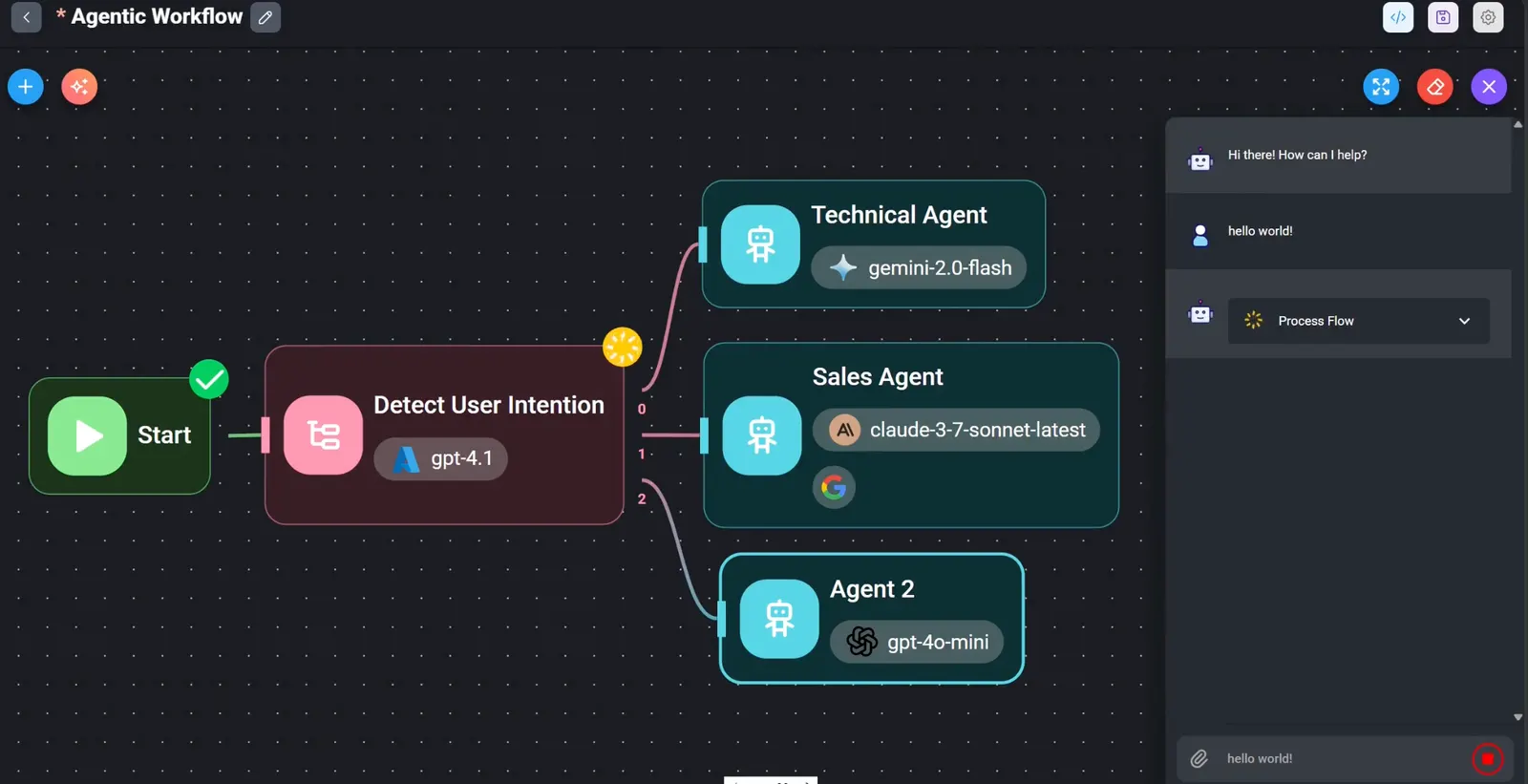
Flowise is an open-source, low-code/no-code visual builder for LLM applications and AI agents. It turns LangChain and LangGraph concepts into draggable nodes, so users can create chatbots, RAG knowledge bases, multi-agent workflows, and automation pipelines through a browser-based canvas instead of writing code from scratch.
Flowise was acquired by Workday in August 2025. As of mid-2026, its GitHub repository had roughly 50k–72k stars, with estimates varying by source. It is released under the MIT license and supports local, Docker, cloud, and enterprise deployment.
⚙️ Core Features
- Visual workflow builder: drag-and-drop LLM, prompt, memory, tool, vector store, and logic nodes on a canvas.
- Chatflow: build single-agent chatbots, RAG pipelines, and retrieval-augmented Q&A systems.
- Agentflow: orchestrate multi-agent systems with conditional branching, parallel execution, and tool calling.
- Assistant mode: create simpler AI assistants without complex orchestration.
- 100+ component nodes: covers models, document loaders, embeddings, vector databases, memory, tools, and API connectors.
- Wide model support: OpenAI, Claude, Gemini, DeepSeek, Ollama, Hugging Face, and other providers.
- RAG toolkit: PDF, DOC, CSV, web pages, SQL, and other data sources with chunking, embeddings, retrieval, and reranking.
- Human-in-the-loop: add review checkpoints before sensitive actions or final responses.
- REST API export: publish flows as API endpoints or embed them into websites and internal systems.
- Observability: execution tracing, Prometheus/OpenTelemetry monitoring, and integration with Langfuse and OpenLIT.
- MCP support: connects to external tools and data sources through the Model Context Protocol.
- Queue-based scaling: uses BullMQ and Redis for prediction, upsert, and scheduled queues, supporting horizontal worker scaling.
🌟 What Makes Flowise Stand Out
Flowise’s biggest advantage is making LangChain and LangGraph visually accessible. Instead of debugging long Python or JavaScript chains, users can see the entire agent graph, test each node, and adjust parameters in real time.
It is also deployment-flexible. You can run it locally with npm or Docker, deploy it on a private server, or scale it with PostgreSQL and Redis for production use. This makes it suitable for both quick prototypes and internal enterprise tools.
Compared with fully managed platforms, Flowise gives teams more control over data, models, and infrastructure. Compared with pure code frameworks, it reduces the learning curve for product managers, analysts, and developers who want to iterate quickly.
🎯 Best Use Cases
- RAG knowledge base: turn PDFs, docs, wikis, and databases into searchable AI assistants.
- Customer support bots: answer FAQs, triage tickets, and escalate to humans when needed.
- Internal copilots: help teams search documentation, summarize reports, or query internal systems.
- Multi-agent workflows: coordinate research, writing, review, and publishing steps across agents.
- Prototype validation: test AI product ideas before committing to custom engineering.
- Local/private AI: combine Flowise with Ollama or vLLM for offline or data-sensitive deployments.
🚀 How to Use It
- Install Flowise: run
npm install -g flowiseand thennpx flowise start, or use the official Docker image. - Open the UI: visit
http://localhost:3000and create an admin account. - Choose a flow type: select Chatflow for single-agent apps, Agentflow for multi-agent systems, or Assistant for simpler helpers.
- Add nodes: drag in a chat model, prompt template, memory, retriever, tools, or output node.
- Connect and configure: wire the nodes, set API keys, model names, retrieval settings, and system prompts.
- Test in the chat panel: ask questions, check retrieved documents, and adjust parameters.
- Publish as API: export the flow as a REST endpoint or embed it into a website or internal app.
- Hardening for production: use PostgreSQL, Redis queues, HTTPS, role-based access, and secret management.
💡 Tips for Better Results
- Start small: build a minimal RAG or chatbot first, then add tools and agents.
- Use variables: store intermediate results to avoid overly complex graphs.
- Test retrieval quality: adjust chunk size, overlap, embedding models, and rerankers.
- Keep prompts explicit: define role, output format, guardrails, and escalation rules.
- Enable observability: trace executions to debug slow steps, failed tool calls, or bad retrievals.
- Secure deployments: rotate API keys, restrict network access, and avoid exposing admin ports.
🔒 Security Notes
Flowise has disclosed several security issues in recent years. In 2025, a critical remote code execution vulnerability was identified, and in 2026 additional risks related to MCP node execution, authentication, and file handling were reported and patched.
If you run Flowise in production, keep it updated, avoid exposing the admin UI to the public internet, use strong credentials, restrict custom code nodes, and apply network-level access controls.
👍 Pros and 👎 Cons
Pros:
- Very fast way to prototype RAG, chatbots, and agent workflows.
- Strong LangChain and LangGraph integration without heavy coding.
- Wide model, vector database, and tool ecosystem.
- Supports local, Docker, cloud, and enterprise deployment.
- Exportable APIs and embeddable chat widgets.
- Active open-source community and frequent updates.
Cons:
- Complex flows can become hard to debug visually.
- Production deployments require extra security and scaling work.
- Some advanced collaboration and governance features are tied to paid or enterprise offerings.
- Not always the best fit for teams that already prefer code-first LangGraph or AutoGen workflows.
⚖️ How Flowise Compares to Similar Tools
- Flowise vs LangFlow: Both are visual LangChain builders. LangFlow has grown rapidly and is closely aligned with the LangChain ecosystem, while Flowise is known for its mature node library and API export capabilities.
- Flowise vs Dify: Dify offers a more product-oriented platform with built-in app management, plugins, and team features. Flowise is more developer-centric and graph-focused.
- Flowise vs LangGraph: LangGraph is a code-first state graph framework for production agents. Flowise visualizes similar concepts but is better for rapid prototyping and low-code teams.
- Flowise vs n8n: n8n is a general automation platform with growing AI nodes. Flowise is more specialized for LLM, RAG, and agent orchestration.
🏁 Bottom Line
Flowise is one of the most practical open-source tools for visually building LLM apps and AI agents. It excels at turning LangChain and LangGraph ideas into working prototypes, RAG systems, and internal copilots without heavy coding.
It is best for teams that want fast iteration, private deployment, and flexible model integration. For large-scale production systems, however, you should plan for security hardening, observability, database persistence, and possibly a transition to code-first frameworks when workflows become highly complex.
Comments