
🎨 What Is Lovart?
Lovart is an AI design agent built for people who need to turn ideas into finished visual content without moving between a long list of creative applications. Rather than functioning only as a text-to-image generator, Lovart combines generation, editing, visual organization, branding, and content production inside one workspace.The idea is simple: instead of telling an AI to create one picture and then manually handling everything else, you give Lovart a broader creative brief. It can help develop the visual direction, generate assets, revise them, and organize the work inside its Canvas environment. This makes it particularly interesting for marketing teams, e-commerce businesses, agencies, creators, and designers who regularly need multiple pieces of content for the same project.
✨ Main Features and Highlights
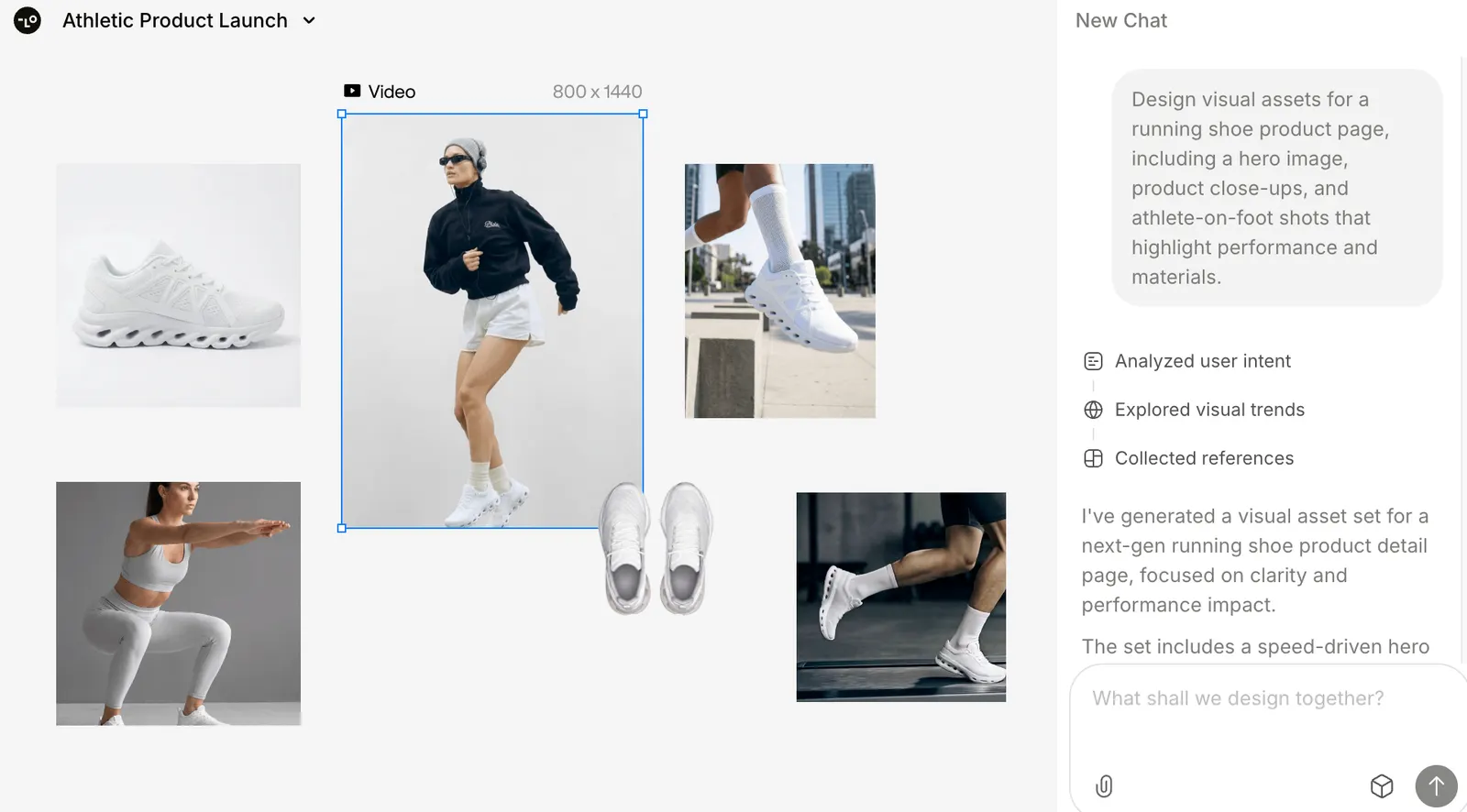
AI Design Agent: Lovart is designed to handle more than a single generation request. You can describe the project and let the agent help move the work from concept to visual execution.Canvas Workspace: The Canvas gives users a central place to generate, arrange, review, and modify creative assets. This is useful when a project contains multiple images or design variations.
Multi-model Generation: Lovart can work with multiple image and video generation models, allowing users to access different creative capabilities without constantly jumping between separate platforms.
Brand Kit: Brand colors, fonts, logos, and other visual rules can be organized so that different creative assets have a more consistent appearance.
Natural-language Editing: Instead of rebuilding a design from scratch, users can describe changes in ordinary language, such as moving an object, changing the background, adjusting colors, or modifying individual elements.
Multiple Export Options: Lovart supports practical formats such as PNG, SVG, PSD, PPTX, and MP4, making it more useful for real production workflows than a tool focused only on image generation.
🌎 How Lovart Fits Into the Global AI Market
Lovart is entering a market that already has many powerful image and video generators. Its difference is the workflow. The platform is aimed at people who need to produce a series of connected creative assets rather than a single impressive AI image.For a US marketing team, one product launch might require an advertising concept, social media graphics, product visuals, landing-page images, presentation materials, and short videos. Lovart is designed to bring these tasks into one creative workflow.
For e-commerce sellers, the value is similar. A single product can become the subject of multiple lifestyle scenes, promotional images, advertising variations, and short-form videos without rebuilding the entire creative process each time.
The important point is that Lovart should be evaluated as a production tool rather than a demo generator. A beautiful first image is not enough. The real test is whether the platform can consistently produce assets that require less manual work before publication.
🚀 How to Use Lovart for the First Time
Step 1 — Create an account: Open Lovart in your browser and create an account. Lovart is primarily a web-based service, so you do not need to install a traditional professional design application.Step 2 — Choose a real project: Instead of asking for a random image, start with something you actually need. A product advertisement, Instagram campaign, YouTube thumbnail, presentation cover, or promotional video is a much better first test.
Step 3 — Give Lovart enough context: Explain the target audience, platform, dimensions, product, visual style, colors, desired text, and overall purpose. If you have reference images or brand assets, provide them as part of the project.
Step 4 — Generate the first concept: Let Lovart create the initial design direction and review the result on the Canvas.
Step 5 — Give specific feedback: Avoid vague instructions such as "make it better." Tell the system exactly what needs to change. For example: "Make the product 20% larger, reduce the headline size, simplify the background, and leave more empty space around the product."
Step 6 — Refine instead of restarting: Use targeted editing when possible. If only the background or one object is wrong, there is no reason to regenerate the entire design.
Step 7 — Export the final asset: Once the design is ready, export it in the format required by your project.
🧠 Practical Tips for Better Results
The biggest mistake new users make is treating Lovart like a basic image generator. A short prompt such as "Create a luxury shoe advertisement" gives the system too little information about the actual business goal.A stronger brief would explain who the advertisement is for, where it will appear, what the product should look like, what emotion the design should create, and which visual elements are important.
For example: "Create a 9:16 social media advertisement for a premium running shoe targeting US men aged 25–40. Make the shoe the dominant element, use a clean urban morning environment, keep the composition premium and understated, and leave clear space at the top for a short headline."
Another useful habit is to establish the brand identity before creating a large number of assets. If the company has fixed colors, typography, logos, and visual guidelines, keep them consistent instead of describing the same rules from scratch in every prompt.
🎬 AI Video Creation
Lovart is not limited to static graphics. Its video workflow can be used to create short-form visual content from text, images, and other references. Users can describe scenes, camera movements, pacing, and creative direction using natural language.This makes the platform particularly relevant to advertising and social media production. A marketer can create several versions of a campaign instead of spending hours manually rebuilding each video concept.
For example, the same product campaign can be adapted into vertical social content, landscape video, promotional clips, and different creative hooks for testing.
💻 Does Lovart Need to Be Installed?
Lovart is primarily browser-based, so most users do not need to install a large desktop application or own a high-end GPU. The processing takes place online.This lowers the technical barrier considerably. Someone who has never used professional design software can start with a browser, describe what they want, and work from the resulting Canvas.
💰 Is Lovart Free? Pricing and Credits
Lovart offers free access as well as paid subscription options. The platform uses a credit-based system, and the amount of credits consumed can vary depending on the generation model, task, quality, image settings, and other factors.Current official information lists monthly credit allocations for different subscription levels, including Starter, Basic, Pro, and Ultimate plans. Because AI model costs and subscription structures change frequently, users should check the official pricing page immediately before purchasing rather than relying on an old price quoted in an article.
One important point for regular users is credit management. Subscription credits are generally tied to the billing period, while additional purchased credits can have a longer validity period. Users who generate large numbers of images or videos should monitor their credit consumption before committing to a higher plan.
Some plans also provide relaxed or queued generation options. These can reduce the use of fast-generation credits, but the trade-off is longer waiting time.
👥 Who Is Lovart Best For?
Marketing professionals: A good fit for people who regularly need advertising creatives, social posts, campaign graphics, and promotional videos.E-commerce sellers: Useful for product scenes, promotional images, advertising variations, and product videos.
Freelance designers: Helpful for speeding up repetitive production while keeping creative decisions under human control.
Content creators: Useful for thumbnails, social media graphics, visual concepts, and short-form video.
Small businesses: Particularly interesting for companies that need professional-looking marketing material without outsourcing every small design task.
Creative agencies: Potentially valuable when a team needs to produce multiple concepts and variations for different clients.
⚠️ Common Problems and Things to Watch
Credits may disappear quickly: Complex generations and higher-quality settings can consume more credits than expected. Do not assume every generation has the same cost.The result may look finished but still need editing: AI-generated designs can contain incorrect text, spacing, product details, or visual inconsistencies. Human review remains important for commercial work.
Brand consistency can drift: Use brand references and a consistent Brand Kit instead of rebuilding the visual identity with every new request.
Generation speed can vary: Queued or relaxed generation is designed to save fast-generation resources but may take longer to complete.
Commercial rights require attention: Commercial use should always be evaluated together with the applicable platform terms and the license conditions of any underlying models or third-party assets. Businesses should not assume that every generated element automatically has unrestricted commercial rights.
⚖️ Pros and Cons
Pros: Lovart combines several creative workflows in one environment, supports image and video generation, offers natural-language editing, provides brand-management features, and can reduce the need to switch between multiple AI platforms.Cons: The large number of features can make the platform feel complicated at first. The credit system requires attention, AI outputs still need human quality control, and users who only need an occasional image may find Lovart more powerful than necessary.
🎯 Final Verdict
Lovart's strongest selling point is not simply that it can generate attractive images. There are already plenty of tools capable of doing that. The more interesting idea is connecting creative briefing, generation, editing, brand consistency, variations, and export into one workflow.That makes Lovart much more compelling for people producing content continuously. If you only create one image every few weeks, a simpler AI image generator may be enough. If you manage advertising campaigns, e-commerce content, social media, branding, or frequent video production, Lovart becomes considerably more useful.
The best way to evaluate it is with a real project. Do not judge the platform only by its most impressive demo. Measure how much time it takes to go from a blank page to an asset that is genuinely ready to publish. That is where Lovart's practical value becomes clear.
Comments